A 16-Week CompTIA A+ Core 1 (220-1201) Study Plan That Fits a Real Schedule
In short
Plan on about 115 hours to pass the CompTIA A+ Core 1 (220-1201) exam. Over 16 weeks that's roughly 7 hours a week. Core 1 is the hardware-and-networking half of the A+ — the two heaviest domains, Troubleshooting (28%) and Hardware (25%), get the most time, and troubleshooting comes last because it needs everything else first.
How long you actually need
The 220-1201 exam is a maximum of 90 questions in 90 minutes, and you pass at 675 on a 100–900 scale — a fixed cutoff CompTIA sets for every candidate. About 115 hours is realistic for a beginner with minimal IT experience. Remember Core 1 is only half the certification: you also need to pass Core 2 (220-1202) to earn the A+.
The five domains are weighted unevenly, so your hours should follow them:
- Hardware and Network Troubleshooting — 28% · ~35 hours. The biggest slice. Diagnosing failing components, displays, and connectivity.
- Hardware — 25% · ~30 hours. Networking hardware devices, storage, power, and internal components across 10 objectives.
- Networking — 23% · ~25 hours. Ports and protocols, wireless technologies, and configuration.
- Mobile Devices — 13% · ~15 hours. Mobile hardware, connectivity, and mobile device management.
- Virtualization and Cloud Computing — 11% · ~10 hours. The smallest domain, two objectives.
Week by week
Sixteen weeks, ordered so you build knowledge before you diagnose with it. Finish a block when you can pass its topic quiz, then move on.
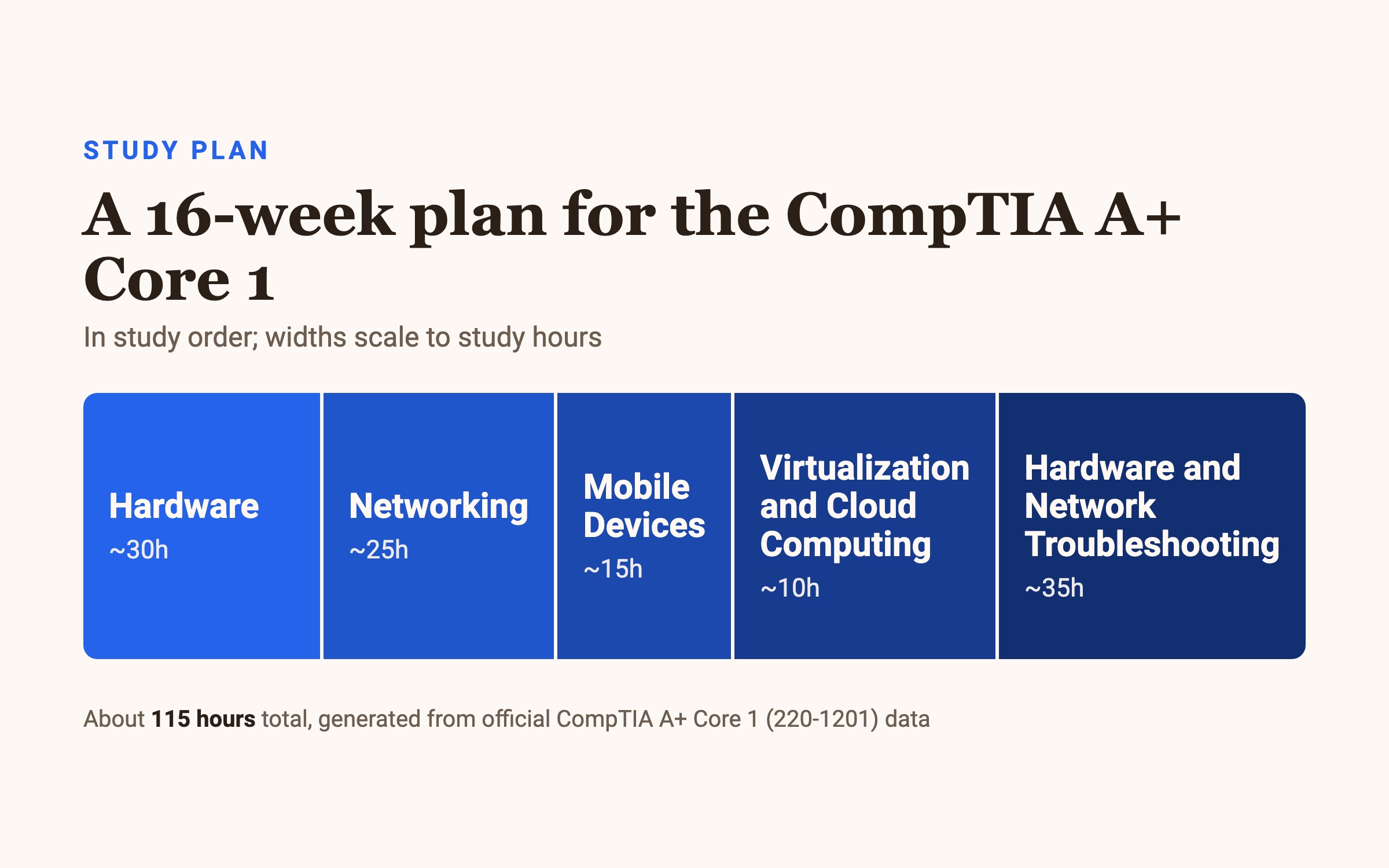
Weeks 1–4 — Hardware (30 hours).
Start with the physical foundation. Learn the internal components, storage types, power, and networking hardware devices →
handle real parts if you can, even an old desktop. Everything in the troubleshooting domain assumes you know what each component does and how it fails.
Weeks 5–8 — Networking (25 hours).
Now connect things. Memorize the common TCP/UDP ports and protocols →
study wireless standards and network configuration →
learn the common network appliances and services. Ports and protocols show up as fast recall questions, so flashcards earn their keep here.
Weeks 9–10 — Mobile Devices (15 hours). Two focused weeks on mobile hardware components, connectivity and accessories, and mobile device management. Smaller domain, but the objectives are specific — don't wing it.
Week 11 — Virtualization and Cloud Computing (10 hours). The smallest domain, one week. Cover cloud models, shared resources, and client-side virtualization. Two objectives, worth 11% — a quick but real return.
Weeks 12–15 — Hardware and Network Troubleshooting (35 hours). Four weeks on the biggest domain, saved for last because it draws on all the others. Learn a repeatable diagnostic approach:
Identify the symptom →
form a theory of probable cause →
test it →
apply the fix →
verify the system works.
Then drill it against failing displays, dead components, and network faults. Performance-based questions here ask you to diagnose, so practice on simulated problems rather than only reading.
Week 16 — Full review and timed practice. No new material. Sit full-length timed practice tests, trace every wrong answer back to its objective, and re-drill your weakest domain until you're finishing 90 questions comfortably inside 90 minutes.
If you have less time (or more)
Compressing to ~9 weeks: raise your weekly hours to 12–14 and lead with weight. Troubleshooting and Hardware together are 53% of the exam, so protect those hours first, then Networking, and move faster through Mobile Devices and the Cloud domain. Skipping the small domains entirely costs you — every one appears.
Stretching to 20+ weeks: if you're brand new to IT, add a slower first month on Hardware and Networking fundamentals before touching troubleshooting, and get hands-on with real or simulated parts throughout. The extra weeks buy you the muscle memory the exam's performance-based questions reward.
Whatever the timeline, keep the last week for review only and let your per-domain hours track the exam's percentages.
Common questions
How many questions are on the Core 1 exam? A maximum of 90, mixing multiple-choice with performance-based questions that test practical skills in a simulated environment.
What is the time limit? 90 minutes for the whole exam.
What is the passing score? 675 on a 100–900 scale — a fixed cutoff, the same for every candidate.
Do I need to pass two exams to get A+ certified? Yes. You must pass both Core 1 (220-1201) and Core 2 (220-1202) to earn the CompTIA A+.
How much does the exam cost? The registration fee is $265.
How long should I study? Around 115 hours for a beginner covering hardware, networking, and troubleshooting. Only Ever splits every domain into 15-minute topics, so you can build the hours in small, consistent sessions.
Want a quick read on where you stand? Try the free practice questions for A+ Core 1 — every answer explained, no paywall.