Azure Compute Options: VMs, Containers, and Functions
Not sure you’re ready?
Take the ~3-minute readiness diagnostic and see where you stand.
Imagine a factory where the fundamental raw material is not steel or silicon, but computational execution power itself. In a traditional, on-premises data center, harnessing this power requires purchasing, assembling, and maintaining heavy, specialized machinery—a massive capital expenditure incurred long before a single line of application code is ever processed. Cloud computing alters the fundamental physics of IT. Instead of buying the physical machinery, organizations rent the execution power on demand. In Microsoft Azure, this execution power is broadly categorized as "Compute."

The critical architectural decision for any cloud adoption strategy is no longer how to build the server, but which abstraction of compute best fits the specific operational physics of the workload. Choosing between a Virtual Machine, a Container, and Serverless computing is akin to deciding whether to rent an entire office building, lease a flexible co-working suite, or pay a micro-transaction only when a specific task is performed. The right choice dictates an organization’s deployment agility, maintenance burden, and operational costs.
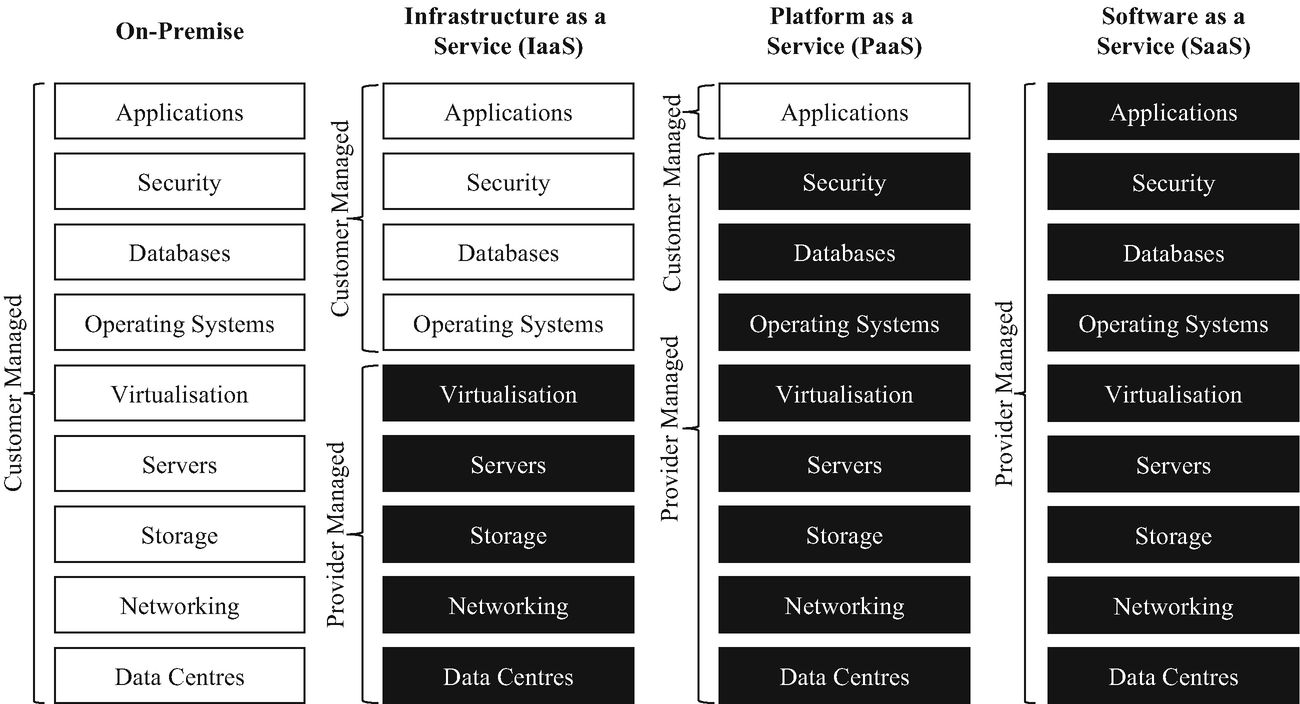
To understand cloud abstractions, we must start at the base layer: Azure Virtual Machines. This service provides infrastructure as a service (IaaS) in the form of a virtualized server. When you deploy an Azure Virtual Machine, Microsoft manages the physical hardware, the physical network, and the hypervisor in their global datacenters, but hands you the digital keys to the server itself.
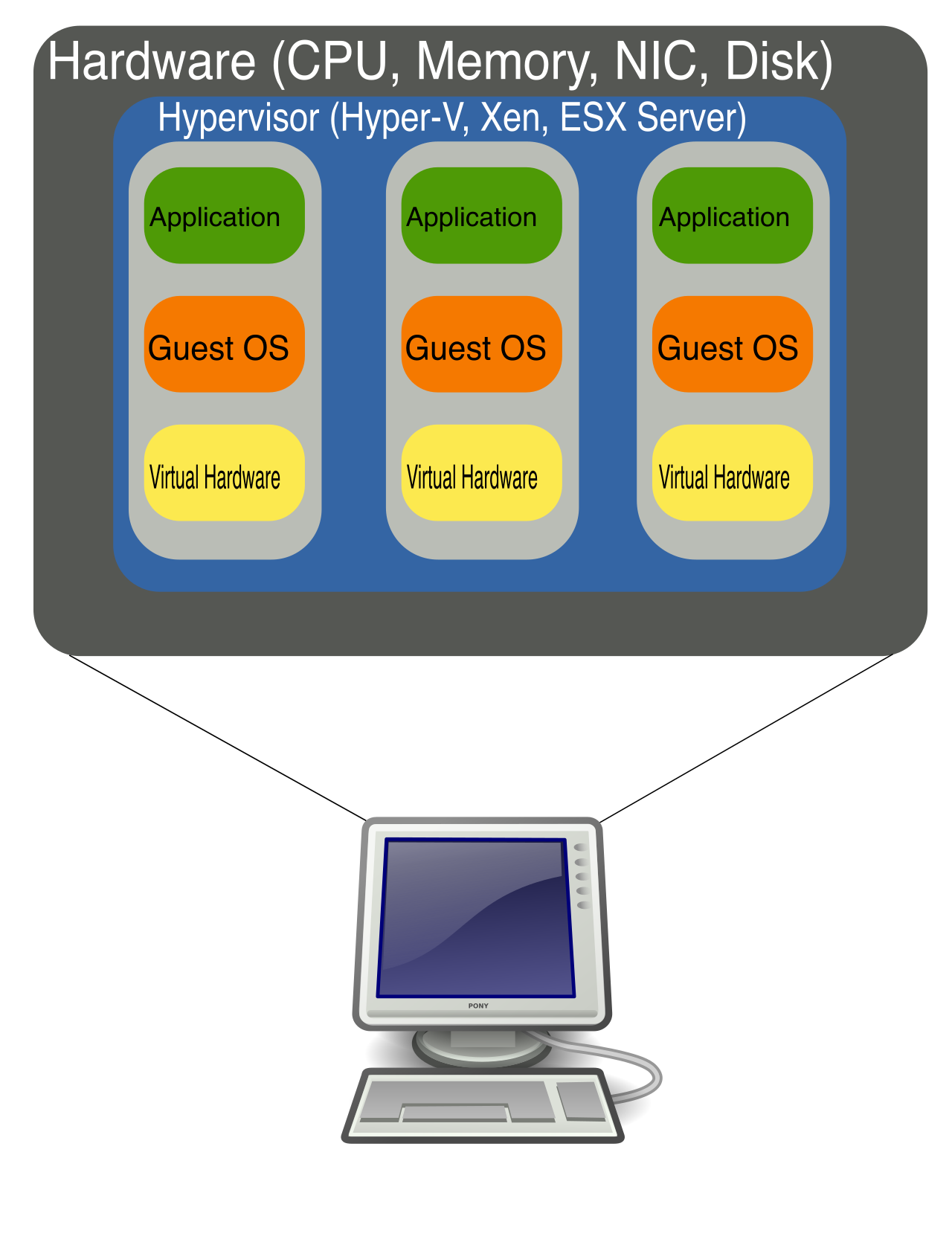
Why does this matter? Because Azure Virtual Machines grant complete control over the guest operating system and the installed software. If a legacy financial reporting application requires a highly specific, outdated version of Windows Server, or a custom dependency that conflicts with modern software, a Virtual Machine can accommodate it. You act as the system administrator, responsible for OS updates, antivirus software, and network configuration within that virtual space.
The Economics of Migration: Lift-and-Shift
For IT leaders and financial stakeholders planning a move to the cloud, rewriting decades-old legacy code is often prohibitively expensive and risky. Azure Virtual Machines are ideal for migrating existing workloads from on-premises datacenters to Azure.
This leads to a highly popular cloud adoption strategy known as lift-and-shift. A lift-and-shift migration strategy involves moving an application to an Azure Virtual Machine without modifying the application code. You are simply changing the physical location of the underlying server from your basement datacenter to Azure’s datacenter. This minimizes migration time and eliminates software redevelopment costs, providing an immediate path to cloud adoption.
Handling Demand: Azure Virtual Machine Scale Sets
A single Virtual Machine is static. If user traffic to a retail website suddenly quintuples during a holiday sale, a single VM will buckle under the load, resulting in lost revenue. To solve the problem of elasticity, Azure provides Azure Virtual Machine Scale Sets.
Azure Virtual Machine Scale Sets allow you to create and manage a group of identical, load-balanced virtual machines.
Instead of manually deploying ten servers and figuring out how to distribute network traffic among them, a Scale Set orchestrates this for you. Crucially for cost management, Azure Virtual Machine Scale Sets automatically add or remove virtual machine instances based on demand or a defined schedule. If traffic spikes at 9:00 AM, the Scale Set provisions new VMs automatically. When traffic subsides at 5:00 PM, it de-provisions them, ensuring the finance department only pays for heavy compute usage when the business actually needs it.
While Virtual Machines offer maximum control, they carry a heavy architectural tax: the operating system. If you run five Virtual Machines, you are paying the compute and memory costs to run five separate, heavy operating systems, even if the application code itself is tiny.
Computer science solved this inefficiency with Containers. Containers are a virtualization environment where multiple applications share a single host operating system. Rather than virtualizing the physical hardware (as VMs do), containers virtualize the operating system itself.
Because they share the host OS kernel, containers do not require a separate guest operating system for each container instance. This architectural elegance yields a massive operational advantage: containers boot significantly faster than virtual machines because containers do not boot a full operating system. While a VM might take minutes to boot, a container can spin up in milliseconds. They are highly portable, predictable, and efficient, making them the industry standard for modern software deployment.
Hosting Containers in Azure
Azure provides two primary avenues for running containerized workloads, scaling from simple standalone tasks to massive enterprise systems.
1. Azure Container Instances (ACI) For immediate, low-friction execution, Azure Container Instances is a platform as a service (PaaS) offering that runs containers in Azure without the need to provision virtual machines.
If a data science team needs to spin up a quick containerized script to process a dataset, they do not want to design a complex infrastructure topology. Azure Container Instances provides the fastest and simplest way to run an isolated container in Azure. You simply hand Azure your container image, and Azure runs it.
2. Azure Kubernetes Service (AKS) However, what happens when a global bank is running an application comprised of hundreds of micro-containers that need to communicate, scale dynamically, and heal themselves if they crash? ACI is too simple for this.
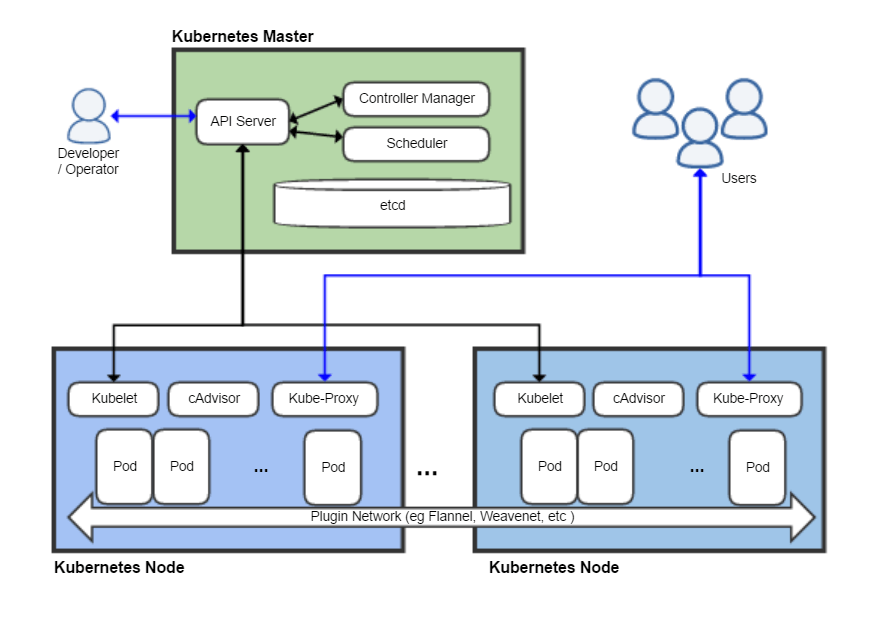
For complex topologies, you need an orchestrator. Azure Kubernetes Service is a managed container orchestration service based on the open-source Kubernetes system. Azure Kubernetes Service is used for deploying, scaling, and managing large volumes of containerized applications. It acts as the air traffic controller for your containers, ensuring that massive, distributed applications remain resilient and highly available.
What if we push the abstraction even further? Even with containers, developers still have to think about infrastructure scaling, memory allocation, and networking.
Azure Functions is a serverless compute service offered by Microsoft Azure. The term "serverless" is slightly deceptive—there are absolutely still servers involved. However, serverless computing abstracts the underlying infrastructure completely so developers can focus solely on writing application code. For a project manager, this is a revelation: engineering time is spent building business value (features), not plumbing (infrastructure).
Event-Driven Execution and Micro-Billing
Azure Functions do not run continuously. Instead, Azure Functions execute code automatically in response to specific events. These Azure Functions trigger events include HTTP requests, schedule timers, and messages arriving in a queue.
Consider an e-commerce platform. When a customer uploads a profile photo, a message is placed in a queue. That message triggers an Azure Function to wake up, resize the photo into a thumbnail, save it, and then immediately go back to sleep.
The financial implications of this model are profound. With Azure Virtual Machines, you pay for the server running 24/7, regardless of whether anyone is using it. With Azure Functions, customers only pay for the exact compute resources consumed while the function is actively executing. If the code takes 200 milliseconds to execute, you are billed for exactly 200 milliseconds. This shift from static capital expenditure to precise, usage-based operational expenditure allows businesses to build highly scalable systems for fractions of a cent per execution.
While Serverless is highly efficient for event-driven micro-tasks, and VMs are great for legacy software, what is the best option for a standard, modern web application?
Enter Azure App Service, an HTTP-based platform as a service (PaaS) for hosting web applications, REST APIs, and mobile back ends.
If an organization wants to launch a new customer portal, Azure App Service provides a fully managed hosting environment. Because it is a PaaS, Azure App Service handles infrastructure maintenance tasks such as security patching, load balancing, and automated deployments. The IT team is entirely freed from worrying about zero-day OS vulnerabilities or configuring web server routing.
App Service is exceptionally flexible for diverse engineering teams. Azure App Service supports multiple programming languages including .NET, Java, Ruby, Node.js, PHP, and Python. Furthermore, to handle fluctuating traffic—such as a marketing campaign driving sudden visits to the portal—Azure App Service allows hosted applications to automatically scale up (adding more CPU/RAM to the existing host) or scale out (adding more instances of the host) based on user demand.
Thus far, we have explored compute options for hosting applications. But compute resources can also be used to host environments for your human workforce.
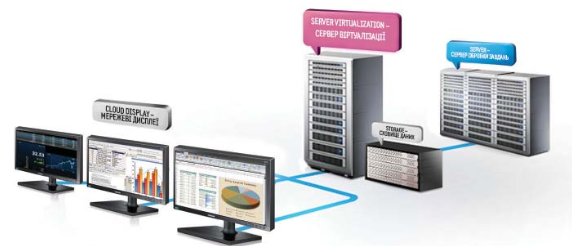
In an era of remote work and strict compliance requirements, sending physical laptops loaded with sensitive corporate data to employees across the globe is a security nightmare. Azure Virtual Desktop is a desktop and application virtualization service that runs natively on the Azure cloud.
Instead of running software on a local, physical laptop, Azure Virtual Desktop enables end users to securely access a full Windows desktop experience from any remote device. Whether an employee is using an iPad in a coffee shop, an old personal laptop, or a thin client in a branch office, the actual compute processing and data storage happen securely within Azure. If the employee's physical device is lost or stolen, no corporate data is compromised, because the data never left the Azure datacenter.
To synthesize these architectural options for your AZ-900 exam and your professional cloud strategy, rely on this decision matrix:
| Compute Service | Model | Ideal Use Case | Key Value Proposition |
|---|---|---|---|
| Azure Virtual Machines | IaaS | Lift-and-shift migrations; custom or legacy software. | Provides complete control over the guest OS and software environment. |
| Azure VM Scale Sets | IaaS | Highly variable IaaS workloads (e.g., e-commerce backends). | Automatically adds/removes identical VMs based on load or schedule. |
| Azure Container Instances | PaaS | Simple, standalone container tasks. | Fastest, simplest way to run an isolated container without VM provisioning. |
| Azure Kubernetes Service | PaaS | Microservice architectures; complex modern apps. | Orchestrates, scales, and manages large volumes of containerized apps. |
| Azure App Service | PaaS | Web apps, REST APIs, and mobile backends. | Handles infrastructure maintenance (patching, load balancing) natively. |
| Azure Functions | Serverless | Event-driven tasks (HTTP triggers, queues, timers). | Abstracts infrastructure completely; micro-billing only for execution time. |
| Azure Virtual Desktop | DaaS / PaaS | Secure remote workforces. | Delivers a secure, full Windows desktop experience to any remote device. |
Understanding Azure Compute is ultimately an exercise in understanding tradeoffs. By matching the specific requirements of a workload—whether it demands the raw control of an operating system, the blazing speed of a container, or the frictionless scalability of serverless—you align technological architecture directly with business value.