DNS, Wireless, and Social Engineering Attacks
Not sure you’re ready?
Take the ~3-minute readiness diagnostic and see where you stand.
A computer network is fundamentally an engine of blind trust. When a client requests an IP address, it trusts the response; when a wireless device sees a familiar network name, it trusts the airwaves; and when an employee receives an urgent email from their boss, they trust the sender’s name on the screen. The entire architecture of modern networking relies on these assumptions. As a network professional, your job is to understand exactly how adversaries exploit this trust. We are not merely memorizing terms; we are examining the physics of digital deception. We will dissect how attackers manipulate name resolution, weaponize wireless signals, and exploit the most vulnerable protocol on any network: human psychology.
Computers route traffic using IP addresses, but humans navigate using domain names. The Domain Name System (DNS) bridges this gap. If an attacker can control your network’s directory, they control your network's reality.
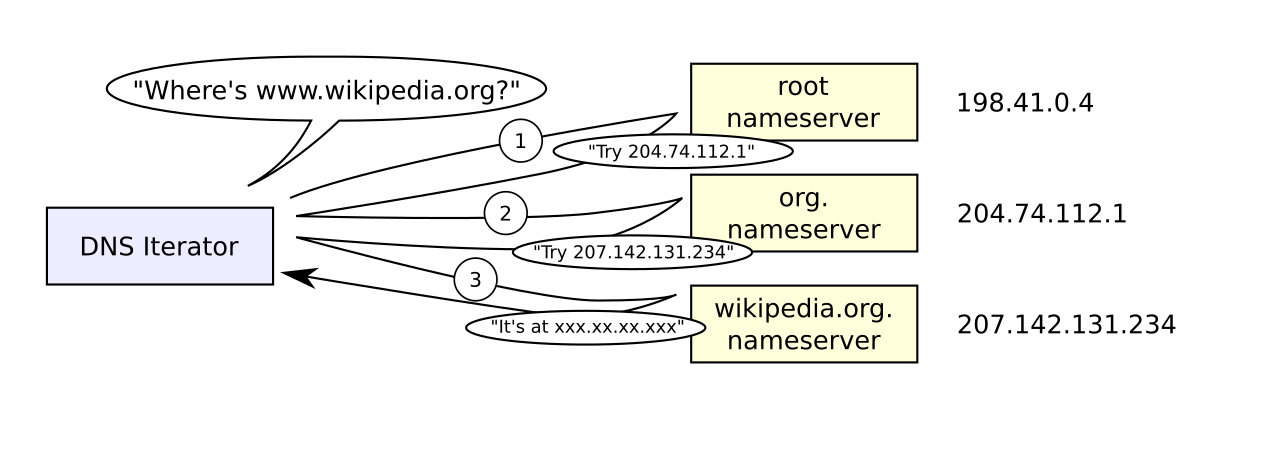
DNS spoofing is an attack where altered Domain Name System records are used to redirect network traffic to a malicious website. How does this happen in practice? Often, DNS spoofing can involve a local on-path attack where an attacker replies to a DNS request faster than the legitimate server. If the attacker’s forged response reaches your machine first, your computer accepts it and discards the legitimate reply that arrives milliseconds later.
However, attackers can scale this deception through a much more devastating technique. DNS cache poisoning occurs when an attacker inserts false address records into the cache of a DNS resolver. Instead of racing to fool a single client, the attacker fools the upstream server.
The Blast Radius of Poisoning: DNS poisoning affects all devices querying the compromised DNS server until the poisoned cache entries expire (based on the record's Time-To-Live, or TTL).
Because the underlying directory is corrupted, DNS poisoning can redirect a user to a fraudulent website even when the user types the correct URL into the browser. The user did everything right, but the infrastructure lied to them.
Diagnosing DNS Manipulation
As a network technician, you must recognize the immediate symptoms of a compromised naming system.
- Certificate Errors: A common symptom of DNS poisoning is users receiving security certificate warnings when visiting well-known secure websites. The attacker’s server is presenting a mismatched or invalid TLS certificate for the domain they are impersonating.
- Resolution Anomalies: DNS poisoning often results in the
nslookupcommand returning unauthorized or unexpected IP addresses for known domain names. Ifnslookup banking.comreturns an IP address hosted in an entirely different geographic region than expected, you are likely looking at a poisoned cache.
Once an attacker controls the routing or resolution of traffic, they can insert themselves directly into the communication stream. An on-path attack involves an attacker intercepting communication between two endpoints without either endpoint's knowledge. If you are reading older networking literature, you will note that on-path attacks were formerly known in the IT industry as Man-in-the-Middle (MitM) attacks.
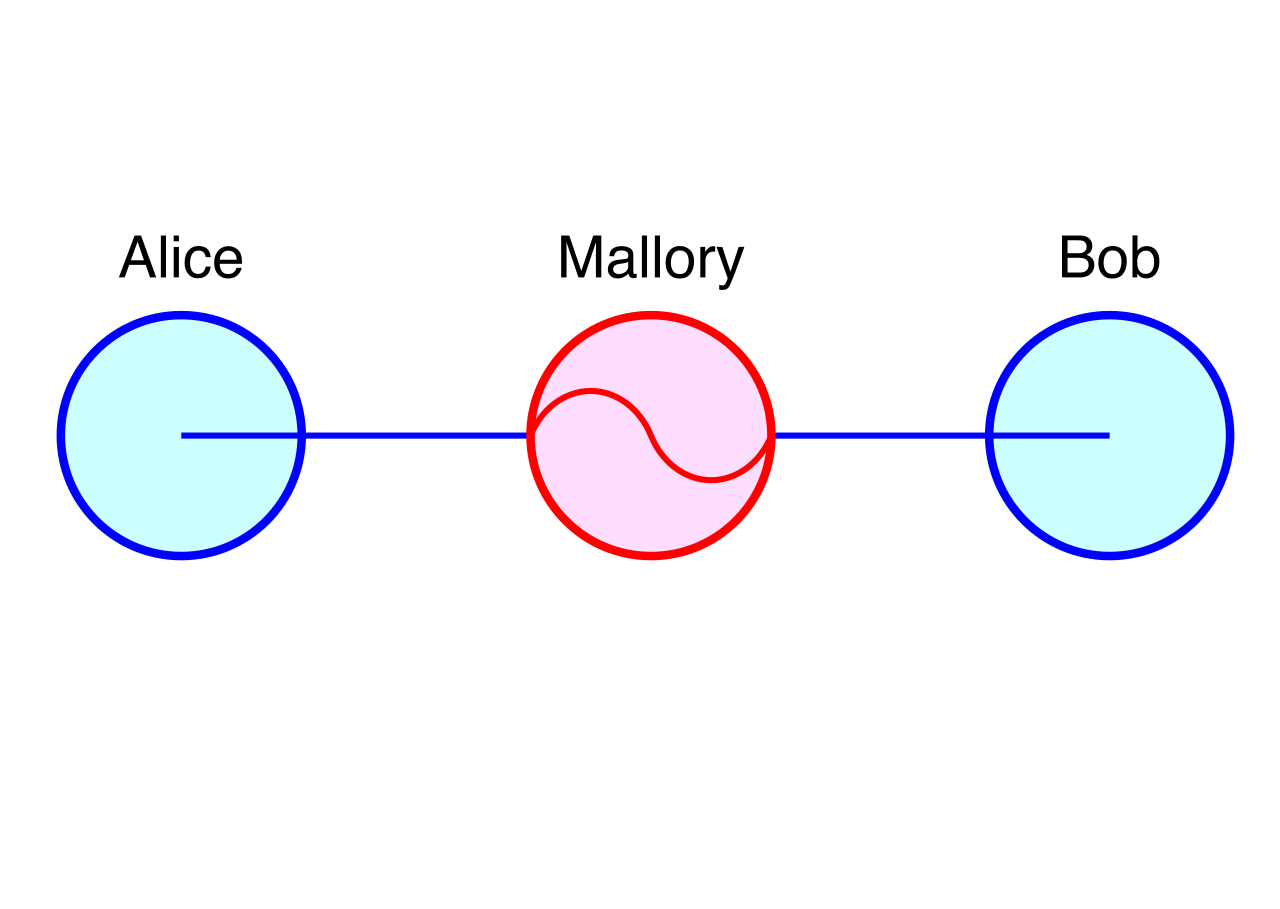
These attackers do not just passively eavesdrop; on-path attackers can actively alter the data packets flowing between a client and a server.
Mechanisms of Interception
How does an attacker physically or logically get "on the path"?
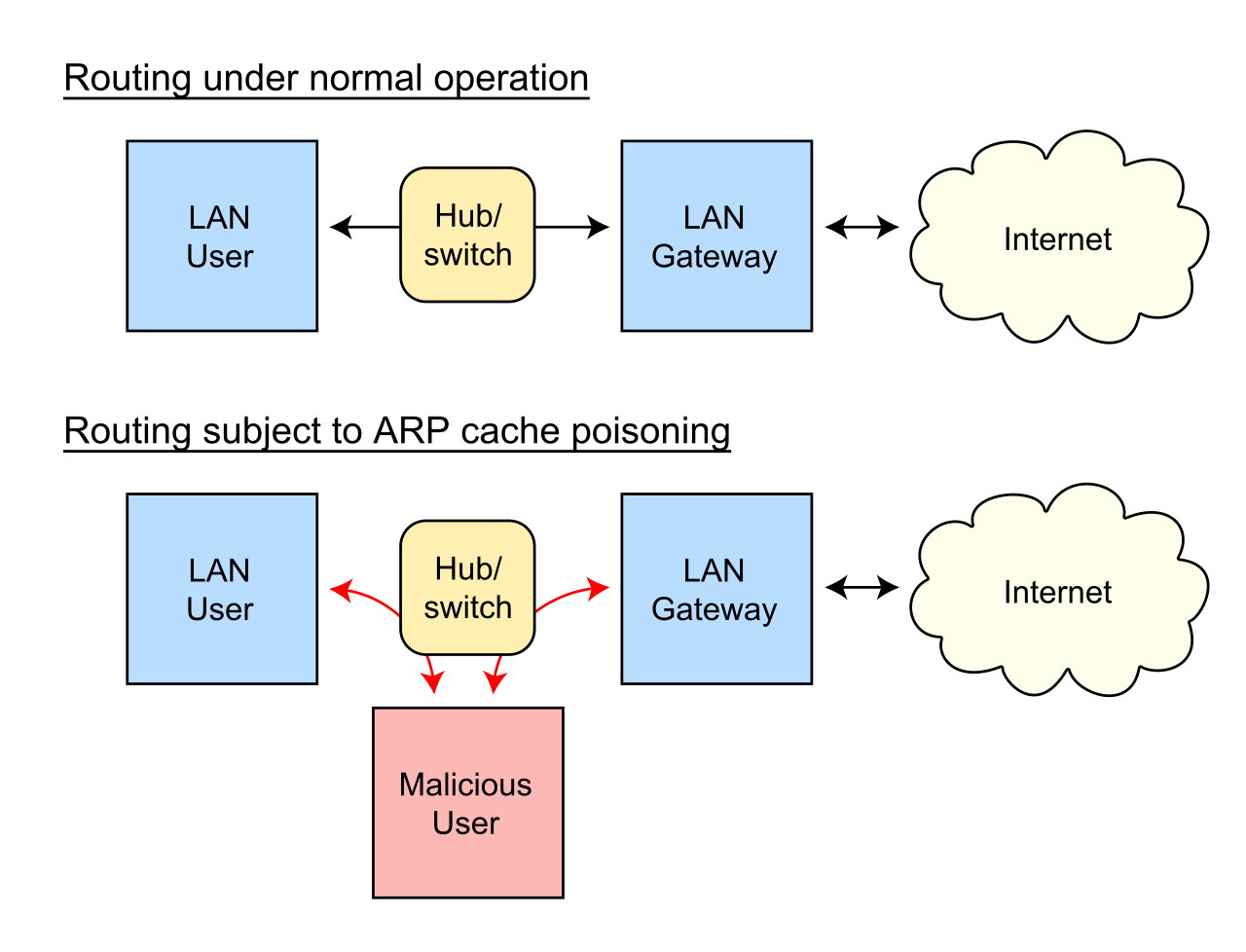
- ARP Poisoning: On a local area network, Address Resolution Protocol (ARP) poisoning is a common method used to execute an on-path attack. By broadcasting falsified ARP messages, the attacker associates their own MAC address with the IP address of the legitimate default gateway, forcing all local traffic to flow through their machine.
- Rogue Infrastructure: A rogue DHCP server is an unauthorized server that distributes incorrect IP configuration parameters to network clients. A rogue DHCP server can facilitate an on-path attack by setting its own IP address as the default gateway for client devices.
Breaking the Encryption
Intercepting traffic is useless if the data is unreadable. To defeat modern encryption, on-path attackers frequently use SSL stripping to downgrade secure HTTPS connections to unencrypted HTTP connections. The attacker maintains a secure HTTPS session with the destination web server, but forces the victim's client to communicate with the attacker via plaintext HTTP, capturing every password and session cookie in the clear.
Physical security controls—like badge readers, locked doors, and security guards—keep unauthorized devices from plugging into corporate switches. Wireless networks, however, bleed through physical walls, forcing us to secure the invisible radio frequency (RF) spectrum.
The Rogue Access Point
A rogue access point is an unauthorized wireless access point connected to a secure corporate network. Imagine an employee bringing a cheap consumer Wi-Fi router from home and plugging it into their office wall jack to get better signal for their smartphone. Even if done innocently, rogue access points allow attackers to bypass physical building security controls by providing remote wireless network access from the parking lot.
To combat this, Wireless Intrusion Detection Systems (WIDS) are commonly used to identify rogue access points on an enterprise network by scanning the airwaves for unauthorized MAC addresses broadcasting connected to the wired LAN.
The Evil Twin
While a rogue AP is about getting into the corporate network, an Evil Twin is about tricking users into connecting to the attacker.
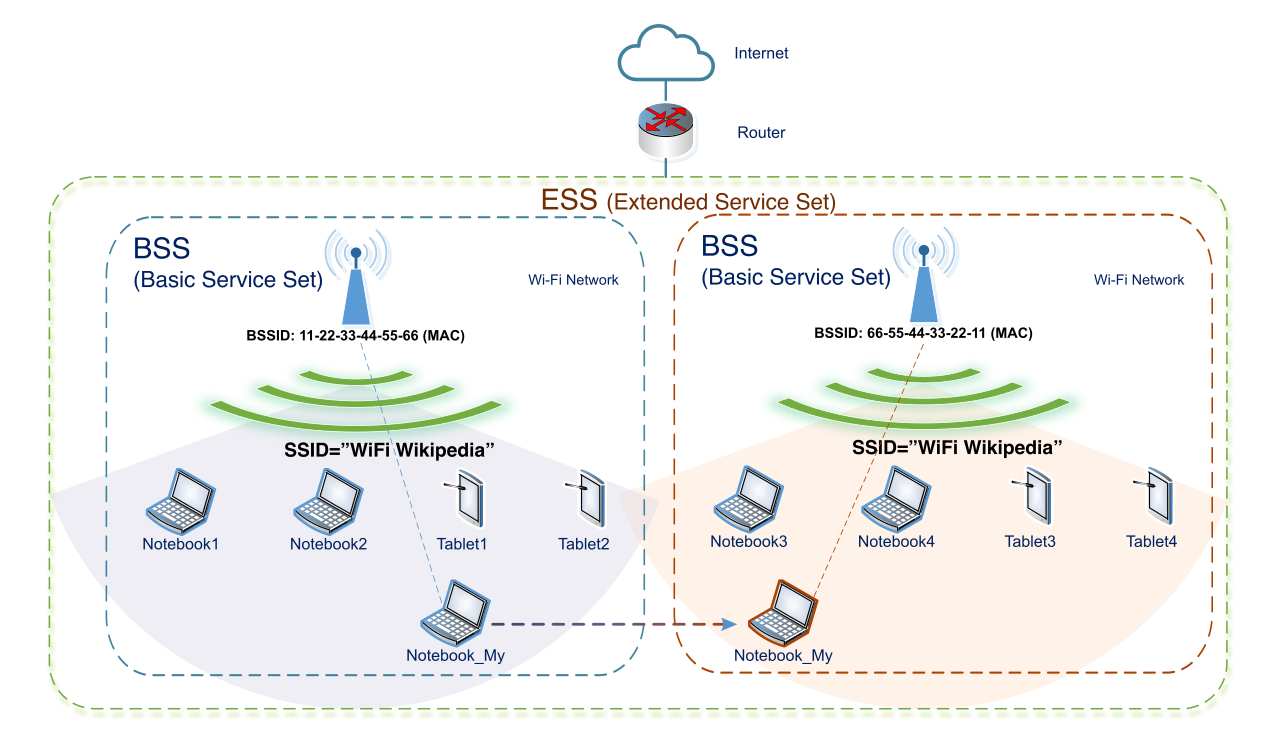
An evil twin is a malicious wireless access point configured to broadcast the same Service Set Identifier (SSID) as a legitimate access point. Evil twin access points are frequently deployed in public areas with free Wi-Fi (like coffee shops or airports) to secretly capture user login credentials and intercept traffic.
Why is this so effective? Evil twin attacks rely on wireless devices automatically connecting to the access point with the strongest radio signal for a known SSID. If an attacker sits near you with a high-gain antenna broadcasting "Starbucks_Guest", your laptop will silently abandon the legitimate router in the back room and associate with the attacker’s stronger signal.
When attackers cannot passively intercept data, they must inject code into your systems. A malware vector is the specific method or pathway used by malicious software to infect a target network system.
Understanding vectors and behaviors is critical for triage:
| Malware Type | Defining Characteristics |
|---|---|
| Ransomware via Email | Email attachments serve as a primary malware vector for distributing ransomware. Attackers rely on humans opening invoices or shipping documents containing malicious macros. |
| Trojan Horse | A Trojan horse is malicious software disguised as a legitimate application to trick a user into executing the program. It does not replicate on its own; it requires the user's active participation. |
| Network Worm | A network worm is a self-replicating type of malware designed to spread across computer networks without human interaction. Worms exploit software vulnerabilities to automatically jump from host to host. |
| Fileless Malware | Fileless malware operates entirely within the system RAM to evade traditional hard-drive-based antivirus software detection. By leveraging built-in OS tools like PowerShell, it leaves virtually no footprint on the physical disk. |
The most sophisticated firewalls in the world cannot stop an employee from willingly handing over the keys to the kingdom. Social engineering relies on human psychology to manipulate individuals into compromising security rather than using technical hacking methods.
Digital Deception
Phishing is a social engineering technique utilizing deceptive communications to trick users into revealing sensitive information. To create an illusion of authenticity, phishing attacks frequently employ forged email addresses to deceive victims about the sender's identity. Furthermore, they manipulate human emotion; phishing attacks often use urgent or threatening language to pressure victims into taking immediate action, bypassing their critical thinking.
As adversaries refine their tactics, phishing splinters into specialized disciplines:
- Spear Phishing: A highly targeted phishing attack customized for a specific individual or specific organization, utilizing deeply researched background information to appear credible.
- Whaling: A specialized form of spear phishing that specifically targets high-profile executives or senior management (the "whales"), often to authorize large fraudulent wire transfers.
- Vishing: A social engineering attack conducted over telephone networks or Voice over IP (VoIP) systems.
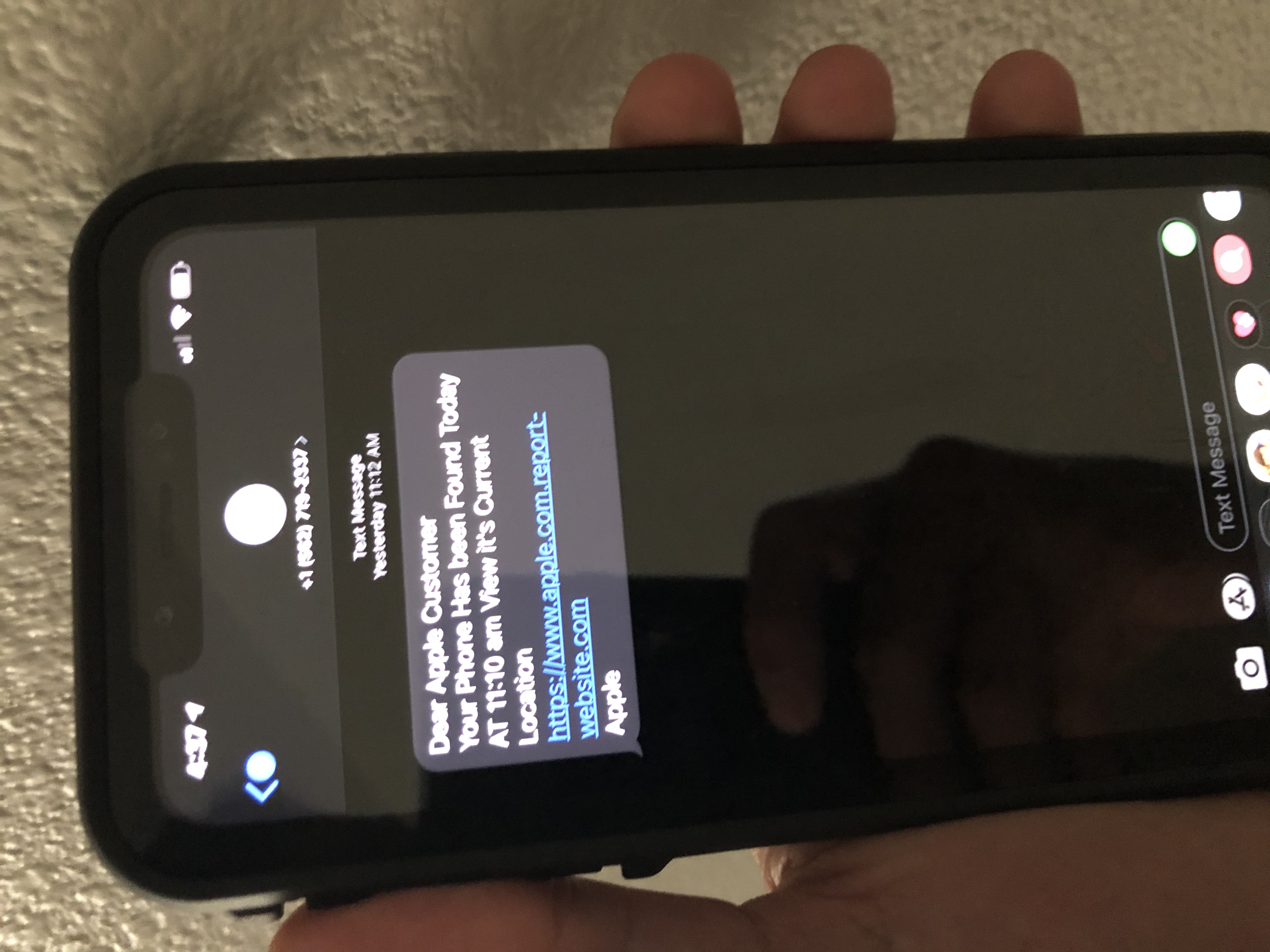
- Smishing: A social engineering attack that uses Short Message Service (SMS) text messages to deliver malicious links directly to a user's mobile device.
- Pretexting: A social engineering tactic where the attacker invents a fabricated scenario (e.g., pretending to be an IT support technician investigating a compromised account) to persuade a victim to release confidential information.
Physical Compromise
Social engineering extends beyond the digital realm and directly targets physical infrastructure.
Tailgating occurs when an unauthorized person closely follows an authorized employee into a restricted physical area before the door closes. To technically prevent this, Mantrap enclosures—small rooms with two interlocking doors where only one can be open at a time—are physical security controls specifically designed to prevent tailgating.

Closely related, but psychologically distinct, is piggybacking. Piggybacking is a physical security breach where an authorized person knowingly allows an unauthorized person to enter a restricted area (for instance, holding the door open out of politeness for someone carrying heavy boxes).
If attackers cannot get inside the building, they will look at what leaves it. Dumpster diving involves searching through an organization's physical trash to find improperly discarded sensitive information. What are they looking for? Dumpster diving attackers search discarded physical documents to find sensitive network diagrams and passwords, which give them the blueprints to execute cyberattacks. To defend against this, organizations mandate the use of cross-cut paper shredders to directly mitigate the risk of dumpster diving attacks by reducing documents to unreadable confetti.

Finally, the physical and digital vectors occasionally merge. USB drop attacks involve leaving malware-infected removable drives in public areas (like parking lots or lobbies) to trick employees into plugging the drives into corporate computers. The attack banks on human curiosity—an employee wanting to find the owner of a lost drive, or hoping to see what secrets it holds, unwittingly bypasses millions of dollars of perimeter security simply by plugging it in.