AWS Storage Services
Not sure you’re ready?
Take the ~3-minute readiness diagnostic and see where you stand.
Imagine constructing a corporate headquarters. You do not store the company’s financial archives, the raw concrete for future building expansions, and the employee vehicles in the exact same physical space. Each asset demands a distinct architectural environment dictated by how frequently it is accessed, how it is organized, and how it is modified. Data storage in cloud computing operates on the exact same principle. We do not place a rapidly changing operating system, a shared departmental directory, and a decade-old archival record into the same type of digital container. To build efficient, cost-effective infrastructure in Amazon Web Services (AWS), you must first understand the fundamental geometries of data storage.
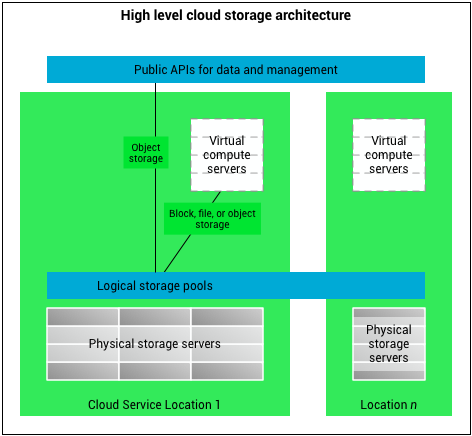
Before examining specific AWS services, we must define the three core paradigms of storage architecture. Every storage service in the cloud is an expression of one of these three models:
Block storage treats data as a sequence of fixed-size blocks. When you modify a file in a block storage system, only the specific blocks that were changed are updated, rather than rewriting the entire file. This allows for exceptionally fast, low-latency performance required by operating systems and databases.
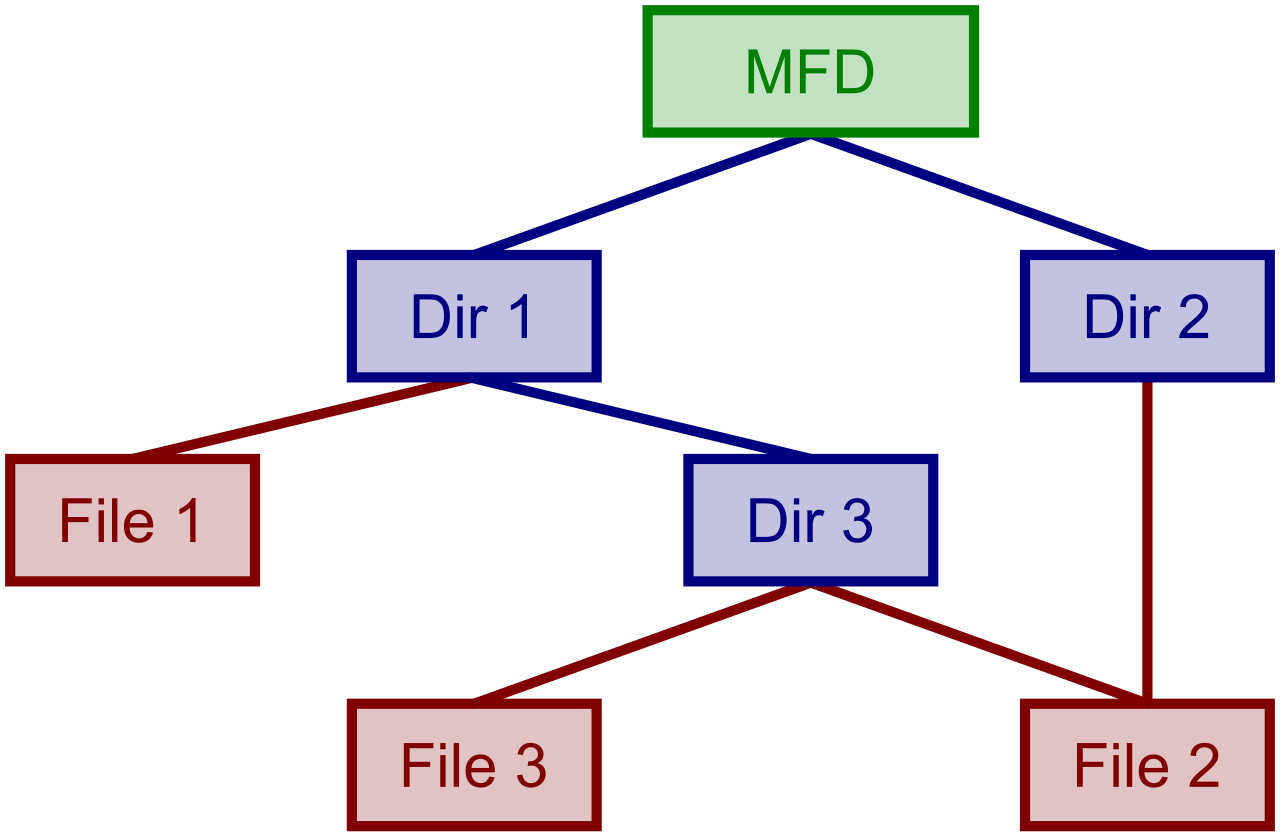
File storage stores data in a hierarchical structure of files and folders. This is the paradigm most familiar to end-users: data is nested in directories, allowing multiple users and instances to navigate a shared file tree simultaneously.
Object storage treats data as discrete units called objects rather than placing data in a traditional file hierarchy. Each object contains the data itself, a variable amount of metadata, and a globally unique identifier. You do not open an object to edit a single line of text; you replace the entire object.
By recognizing the distinction between these paradigms, you will instantly understand why AWS offers such a wide array of storage services—and exactly which one to choose for a given business problem.
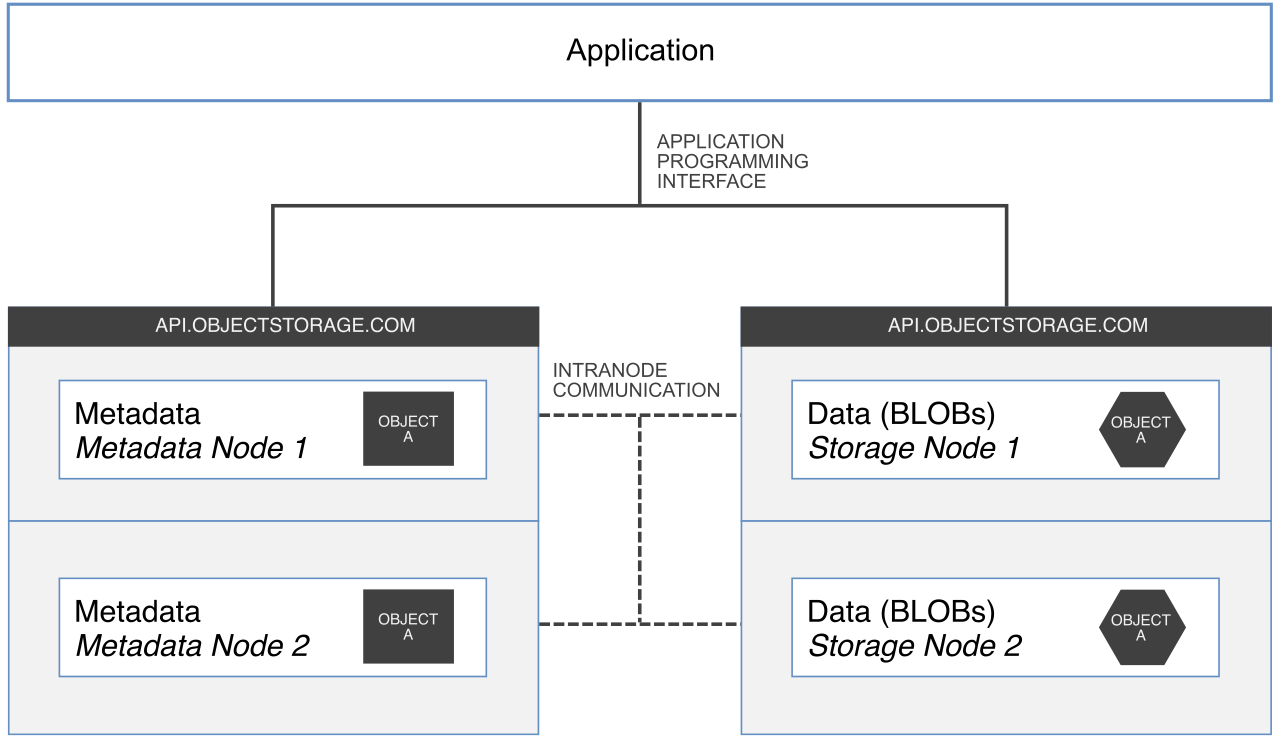
Amazon Simple Storage Service (Amazon S3) is an object storage service. It is the foundational storage layer of the AWS Cloud, designed to hold everything from website images to corporate data lakes.
In Amazon S3, you do not create drives or file directories. Instead, Amazon S3 stores data as objects within container resources called buckets. Because it relies on a flat namespace rather than a restrictive file hierarchy, Amazon S3 offers virtually unlimited cloud storage capacity. You can store an infinite number of objects, and single objects can range from a few bytes up to 5 terabytes in size.
The engineering marvel of S3 is its resilience. Amazon S3 is designed to provide 11 nines (99.999999999%) of data durability. This mathematically implies that if you store ten million objects in S3, you can expect to incur a loss of a single object once every 10,000 years.
The Economics of S3: Storage Classes
Not all objects demand the same level of access. An image on the front page of an active e-commerce site is retrieved thousands of times a second; a compliance record from five years ago might never be retrieved at all. AWS provides various storage classes to optimize cost based on access patterns.
| Storage Class | Use Case & Characteristics |
|---|---|
| Amazon S3 Standard | An object storage class designed for frequently accessed data. It delivers low latency and high throughput. |
| Amazon S3 Intelligent-Tiering | Automatically moves data to the most cost-effective access tier based on changing access patterns. This is ideal when data access patterns are unknown or unpredictable. For this service, Amazon S3 Intelligent-Tiering charges a small monthly monitoring and automation fee per object. |
| Amazon S3 Standard-IA | The "Infrequent Access" tier. It is designed for data that is accessed less frequently but requires rapid access when needed. Storage is cheaper than Standard, but you pay a retrieval fee when accessing the data. |
| Amazon S3 One Zone-IA | Unlike other classes that replicate data across minimum three Availability Zones, Amazon S3 One Zone-IA stores data in a single Availability Zone. It costs roughly 20% less than Standard-IA. However, data stored in Amazon S3 One Zone-IA can be lost in the event of an Availability Zone destruction. |
The S3 Glacier Family: Archival Storage
For data that must be retained long-term for compliance or historical purposes, S3 offers the Glacier storage classes. Moving data to Glacier drastically reduces storage costs, but the trade-off is retrieval time.
- Amazon S3 Glacier Instant Retrieval: Provides extremely low-cost storage for long-term archive data requiring immediate access.
- Amazon S3 Glacier Flexible Retrieval: Requires retrieval times ranging from minutes to hours, offering a balance between cost and access speed.
- Amazon S3 Glacier Deep Archive: This is the lowest-cost Amazon S3 storage class. However, Amazon S3 Glacier Deep Archive retrieval times can take 12 hours or more.
Automating Object Management: S3 Lifecycle Policies
Manually moving millions of objects between storage classes as they age would be operationally impossible. To solve this, Amazon S3 Lifecycle policies define automatic actions that Amazon S3 applies to a group of objects.
Lifecycle policies fall into two main categories:
- Amazon S3 Lifecycle transition actions automatically move objects to another storage class over time. (For example, moving an object from S3 Standard to S3 Glacier Flexible Retrieval after 90 days).
- Amazon S3 Lifecycle expiration actions automatically delete objects after a specified period of time. (For example, purging server logs permanently after 365 days).
When you launch an Amazon EC2 instance (a virtual server), that server requires a hard drive to boot an operating system and run high-performance applications. Because these operations require modifying tiny fractions of data at lightning speed, they rely on block storage.
Amazon Elastic Block Store (Amazon EBS)
Amazon Elastic Block Store (Amazon EBS) provides block-level storage volumes for use with Amazon EC2 instances. You can conceptualize an EBS volume as a highly reliable, network-attached virtual hard drive.
A critical characteristic of this service is its decoupling from the compute layer: Amazon EBS volumes can persist independently from the life of an attached Amazon EC2 instance. If you terminate the server, the EBS volume and its data can survive. However, because EBS is designed for microsecond latency, it cannot be physically located far from the server. Therefore, an Amazon EBS volume must reside in the same Availability Zone as the Amazon EC2 instance to which it is attached.

To protect the data on these volumes, AWS utilizes snapshots. Amazon EBS snapshots are point-in-time backups of Amazon EBS volumes. While EBS volumes themselves live in a specific Availability Zone, Amazon EBS snapshots are stored securely in Amazon S3, giving them 11 nines of durability and regional resilience.
Furthermore, Amazon EBS snapshots are incremental backups. This means incremental backups save only the blocks on an Amazon EBS volume that have changed since the previous snapshot. If you have a 100 GB volume and only 2 GB of data changes between Monday and Tuesday, Tuesday’s snapshot only stores and bills for that 2 GB of changed data.
Amazon EC2 Instance Store
Not all compute workloads require persistent network storage. Sometimes, you need raw, uncompromising speed for temporary data, such as caches or scratch buffers.
Amazon EC2 Instance Store provides temporary block-level storage for Amazon EC2 instances. Unlike EBS, which is accessed over the AWS network, Amazon EC2 Instance Store storage is located on disks that are physically attached to the underlying host computer.
This physical proximity delivers extraordinary input/output performance. But it comes with a definitive catch: data in an Amazon EC2 Instance Store is lost when the associated Amazon EC2 instance is stopped or terminated. It is ephemeral. If the hardware fails or the instance powers down, the data evaporates.
When multiple servers, applications, or users need simultaneous access to a shared directory structure, block storage and object storage are insufficient. You need file storage.
Amazon Elastic File System (Amazon EFS)
Amazon Elastic File System (Amazon EFS) provides a simple, scalable, fully managed elastic network file system.
The brilliance of EFS lies in its elasticity and shared nature. Amazon EFS automatically scales storage capacity up and down as files are added and removed, meaning you never have to provision drive size in advance. Crucially, Amazon EFS is designed to be shared across multiple Amazon EC2 instances simultaneously. Hundreds or thousands of servers can read and write to the same EFS file system at once.
EFS is built for Linux. Amazon EFS is natively compatible with Linux-based workloads, and to ensure high availability for these enterprise workloads, Amazon EFS stores data redundantly across multiple Availability Zones by default.
Amazon FSx
While EFS is the premier choice for shared Linux files, many organizations rely on specialized or proprietary file systems. Amazon FSx provides fully managed third-party file systems.
You must be familiar with two primary FSx offerings:
- Amazon FSx for Windows File Server: Provides a fully managed native Microsoft Windows file system. It natively supports the Server Message Block (SMB) protocol and integrates seamlessly with Microsoft Active Directory.
- Amazon FSx for Lustre: Derived from "Linux" and "cluster," Lustre is built for immense speed. Amazon FSx for Lustre provides a high-performance file system optimized for fast processing workloads like machine learning, high-performance computing (HPC), and video processing.
Many enterprises cannot move all their data to the cloud overnight. They operate data centers on-premises but want to leverage the unlimited scale and durability of AWS.
AWS Storage Gateway is a hybrid cloud storage service. It sits physically or virtually in your corporate data center and bridges your local infrastructure to AWS. By deploying it, AWS Storage Gateway provides on-premises applications with access to virtually unlimited cloud storage.
Storage Gateway comes in three distinct architectural types, solving three different hybrid challenges:
- AWS Storage Gateway File Gateway: Imagine a local server in your office that speaks standard file protocols (NFS/SMB), but the actual files are stored as objects in S3. The File Gateway provides an on-premises file interface into Amazon S3.
- AWS Storage Gateway Volume Gateway: This operates at the block level. The Volume Gateway presents cloud-backed block storage volumes to on-premises applications. Within this model, AWS Storage Gateway cached volumes store the complete dataset in Amazon S3, while they retain copies of frequently accessed data locally on-premises for low-latency access. Your servers think they are talking to a massive local hard drive, but the bulk of the weight is being carried by the cloud.
- AWS Storage Gateway Tape Gateway: Enterprises with legacy backup software often write to physical magnetic tapes. The Tape Gateway provides an on-premises virtual tape library backed by Amazon S3 and Amazon S3 Glacier. It allows a company to completely eliminate physical tape infrastructure while keeping their legacy backup software unchanged.

A sprawling enterprise architecture might possess thousands of EBS volumes, hundreds of EFS file systems, and dozens of Storage Gateways. Managing the backup schedules and retention rules for every individual resource manually invites catastrophic human error.
AWS Backup is a fully managed service that centralizes data protection across multiple AWS services. Instead of writing custom scripts for each service, AWS Backup automates backup scheduling and retention management.
To achieve this, AWS Backup allows administrators to create centralized backup policies called backup plans. You define a rule—such as "Backup all resources tagged Production every night at midnight and retain the backups for 35 days"—and AWS Backup coordinates with EBS, EFS, Storage Gateway, and other supported services to execute that mandate flawlessly.
By mastering the precise distinctions between object, block, and file storage, and understanding how hybrid and backup services orchestrate them, you transition from merely using the cloud to engineering it.