Cloud Security and Compliance Concepts
Not sure you’re ready?
Take the ~3-minute readiness diagnostic and see where you stand.
Imagine purchasing a specialized, high-security safety deposit box to hold a vital corporate asset. The bank manager can assure you verbally that their vault is impenetrable, but as a responsible fiduciary, you cannot simply take their word for it. You require architectural blueprints of the vault, an independent auditor’s certification of the locking mechanisms, a legally binding contract defining liability, and a continuous, tamper-proof video feed of every individual who approaches your box.

In the realm of cloud computing, moving corporate data to Amazon Web Services operates on the exact same principle of verifiable trust. For professionals across sales, finance, project management, and IT operations, cloud security is not merely a backend technical configuration—it is the foundation of business continuity and legal compliance. Organizations must simultaneously protect their data from unauthorized access, monitor operational health, track every digital interaction, and legally prove their compliance to external regulatory bodies.
Understanding how AWS achieves this is one of the most critical steps in mastering cloud literacy. Let us examine the specific tools AWS provides to secure your data and prove your compliance to the world.
Before a single byte of sensitive data moves to the cloud, organizations—especially those in regulated industries like healthcare or finance—must verify that AWS meets their legal and regulatory standards.
To solve this, AWS provides AWS Artifact, which is a self-service portal for on-demand access to AWS compliance reports.
Instead of emailing an AWS sales representative and waiting weeks for security documentation, your compliance officers can log into AWS Artifact and instantly download precisely what they need. This portal is divided into two primary functions: Reports and Agreements.
AWS Artifact Reports
You cannot audit an AWS data center yourself; AWS protects its physical locations with intense security. Instead, independent third-party organizations audit AWS. AWS Artifact provides access to security and compliance reports generated by these third-party auditors.

If your finance team needs to process credit card payments, they will need a Payment Card Industry (PCI) report. If your enterprise clients demand proof of your underlying infrastructure’s security controls, you will provide them with a Service Organization Control (SOC) report. Both of these critical documents—and hundreds of others—are housed inside AWS Artifact Reports.
AWS Artifact Agreements
Beyond just reading reports, organizations must establish formal legal contracts with AWS regarding data handling. AWS Artifact Agreements allows customers to review, accept, and manage legal agreements with AWS.
Real-World Scenario: If you are building software for a hospital in the United States, you are bound by HIPAA regulations. To legally store patient health records in the cloud, you must sign a specialized contract with your cloud provider. Business Associate Addendums (BAAs) for HIPAA compliance are signed and managed within AWS Artifact.
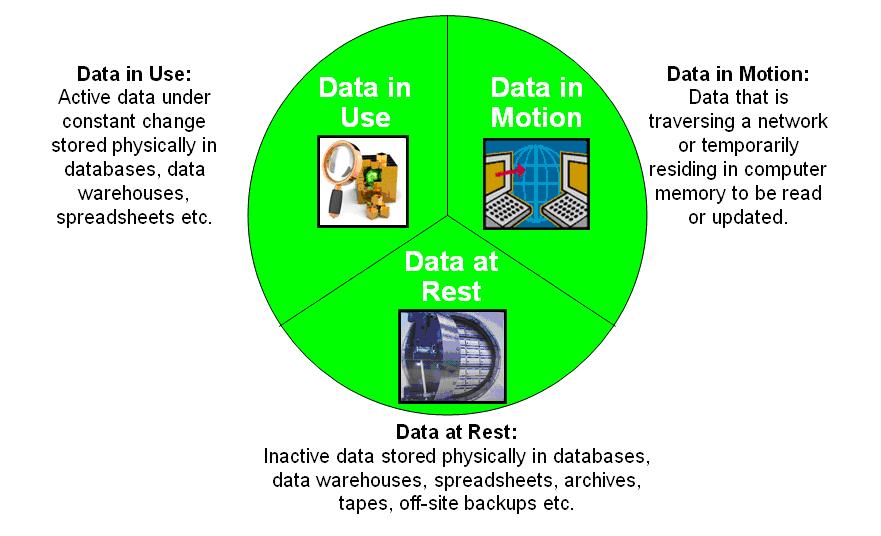
Once the legal frameworks are established, we must physically and digitally protect the data. In cloud security, we classify data protection into two states: data that is sitting still (at rest) and data that is moving (in transit).
Encryption at Rest
Data stored in a data center resides on physical hard drives. Encryption at rest protects data from unauthorized access while the data is stored on physical media.
If a malicious actor somehow bypassed physical security, breached an AWS facility, and stole a hard drive, the data would remain entirely secure. Why? Because encryption at rest converts plaintext data into an unreadable ciphertext format to protect against physical theft of storage media. Without the cryptographic key, the stolen drive contains only useless mathematical noise.
To manage the keys that lock and unlock this data, AWS uses a dedicated service. AWS Key Management Service (AWS KMS) is the primary AWS service used to create and manage cryptographic keys for encryption at rest. KMS acts as your digital forge, allowing you to create, rotate, and strictly control who has access to the cryptographic keys.
Because encryption is so vital, AWS makes it incredibly easy to apply to your core infrastructure. Both Amazon S3 (object storage) and Amazon EBS (virtual hard drives for servers) offer built-in options to automatically encrypt data at rest using AWS KMS keys with a single click.
Encryption in Transit
Data is rarely static. It constantly travels from your customers' web browsers over the internet into your AWS environment.
Encryption in transit protects data from interception while the data travels across a network. By creating a secure tunnel, encryption in transit ensures data confidentiality and integrity during transmission over the internet. Even if a hacker intercepts the data packets as they flow through global network cables, they cannot read or alter the contents.

To achieve this, AWS uses Transport Layer Security (TLS) to encrypt data in transit between AWS services and client endpoints. Managing the digital certificates required to establish these TLS connections can be tedious, so AWS provides a service specifically for this task: AWS Certificate Manager provisions and manages SSL/TLS certificates to support encryption in transit.
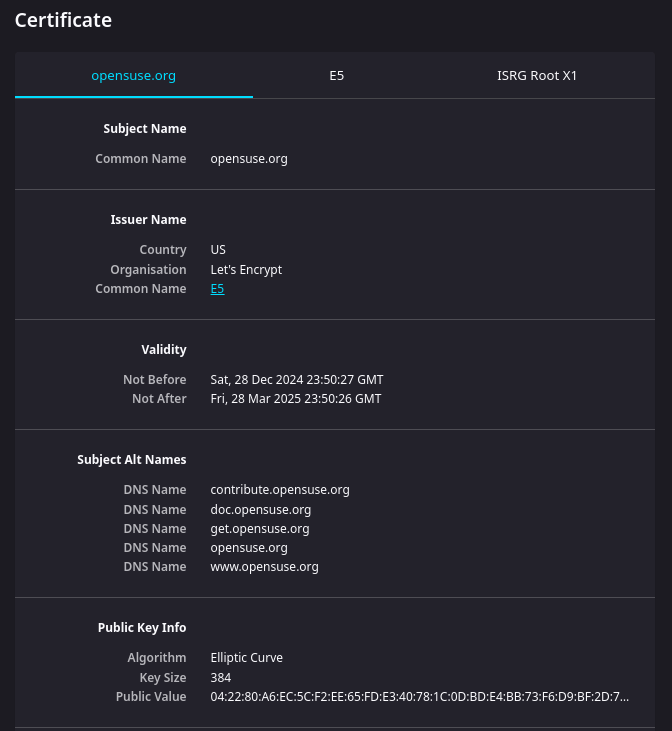
You can then attach these certificates to your public-facing entry points. For instance, Amazon CloudFront (a content delivery network) and Elastic Load Balancing (which distributes incoming web traffic) support HTTPS connections to enable encryption in transit for web applications.
To maintain a secure environment, you must have absolute visibility into three things: the performance of your systems, the API actions being taken by users, and the configuration state of your resources. AWS separates these duties across three distinct, heavily tested services.

Amazon CloudWatch: The Heartbeat Monitor
Think of CloudWatch as the vital signs monitor for your AWS environment. Amazon CloudWatch collects monitoring and operational data in the form of logs, metrics, and events.
Whether you are a project manager looking at server CPU usage or a developer tracking error rates, Amazon CloudWatch provides visibility into resource utilization, application performance, and operational health.
Importantly, CloudWatch doesn't just watch; it reacts. Amazon CloudWatch alarms automatically initiate specified actions based on predefined metric thresholds. If your application’s CPU utilization spikes above 80%, a CloudWatch alarm can automatically trigger the launch of additional servers to handle the load, preventing an outage.
AWS CloudTrail: The Omniscient Ledger
If CloudWatch answers "How is the system performing?", CloudTrail answers "Who did what, and when?"
Whenever someone creates a new server, deletes a database, or changes a security rule, they are making an API call to AWS. AWS CloudTrail records API calls made within an AWS account.
Because it acts as an unalterable digital ledger, AWS CloudTrail enables governance, compliance, operational auditing, and risk auditing of an AWS account.
The Anatomy of a CloudTrail Log: When an action occurs, the resulting AWS CloudTrail logs identify which user or service made an API call and the exact time the call was made. Furthermore, AWS CloudTrail captures the source IP address of the caller for every recorded API action.
It does not matter how the user interacted with AWS; AWS CloudTrail records actions taken via the AWS Management Console, AWS Command Line Interface (CLI), and AWS SDKs. If a disgruntled employee deletes a critical storage bucket, CloudTrail provides the undeniable forensic evidence of their identity, location, and exact timestamp.
AWS Config: The Historian and Inspector
While CloudTrail logs who made a change, AWS Config logs what exactly changed in the system's architecture.
AWS Config continuously monitors and records AWS resource configurations. It acts as an inventory manager, giving you a timeline of your environment. AWS Config provides a detailed historical record of resource configuration changes over time. If a server suddenly stops working on Tuesday, you can look at AWS Config to see exactly how its firewall rules were modified on Monday night.
Beyond just recording history, Config enforces your security standards. AWS Config rules evaluate whether resource configurations comply with organizational security policies. For example, you can set a rule stating that no storage bucket should ever be publicly readable. By doing so, AWS Config enables administrators to automate the evaluation of recorded configurations against desired configurations. If someone accidentally makes a bucket public, AWS Config instantly flags the resource as "non-compliant."
Comparing the Core Observers
| Service | Primary Question Answered | Core Function |
|---|---|---|
| Amazon CloudWatch | How is it performing? | Performance metrics, logs, application health, and automated alarms. |
| AWS CloudTrail | Who did what? | Records all API calls, user identities, timestamps, and source IP addresses. |
| AWS Config | What is its state? | Tracks historical resource configurations and evaluates compliance against internal rules. |
You have downloaded your legal documents via AWS Artifact, secured your data with KMS and TLS, and set up CloudWatch, CloudTrail, and Config to monitor your environment. Eventually, external auditors will arrive to assess your organization's compliance posture. Gathering logs and configurations to prove you meet standards like GDPR or HIPAA used to take weeks of manual labor.
To eliminate this friction, AWS introduced a specialized service. AWS Audit Manager continuously audits AWS usage to simplify risk and compliance assessment.
Instead of manually pulling CloudTrail logs and AWS Config history to hand to an auditor, AWS Audit Manager automates evidence collection to evaluate whether cloud resources comply with industry standards.
It knows exactly what auditors are looking for because AWS Audit Manager provides prebuilt frameworks for common compliance standards like HIPAA and GDPR. When it gathers data from across your AWS environment, AWS Audit Manager maps collected evidence directly to the specific controls of regulatory compliance frameworks.
By doing this, an organization can instantly generate a ready-to-review assessment report, transforming a grueling, multi-week IT audit into an automated process—potentially saving the company from $100,000 in compliance fines or lost enterprise contracts.
As an aspiring Cloud Practitioner, understanding these concepts bridges the gap between raw technology and business value. You secure the organization legally using AWS Artifact. You secure the data physically and across the network using Encryption at rest (KMS) and Encryption in transit (TLS/Certificate Manager). You gain total visibility into health, identity, and state using the triad of CloudWatch, CloudTrail, and Config. Finally, you seamlessly prove your adherence to global regulations by automating the reporting process with AWS Audit Manager.