Indicators of Malware Attacks
Not sure you’re ready?
Take the ~3-minute readiness diagnostic and see where you stand.
A skilled physician does not simply look at a patient and diagnose "illness." They observe highly specific indicators: a rigid abdomen suggests appendicitis, while a distinct clustering of vesicles indicates shingles. In the digital realm, a system administrator must develop an identical diagnostic precision. When a server's performance degrades or network traffic spikes, the underlying pathology could be one of a dozen distinct classes of malicious software. Understanding the mechanics of malware is not merely an academic exercise; it is the foundational requirement for triaging a compromised environment, halting lateral movement, and restoring operational integrity.
At its core, ransomware is a type of malware designed to deny access to a computer system or data until a fee is paid. In its earliest iterations, ransomware simply locked the graphical user interface, presenting a persistent screen that prevented the user from interacting with the underlying operating system. However, modern attackers quickly realized that interface locks could be bypassed by competent IT professionals. This evolution gave birth to the dominant threat we face today.
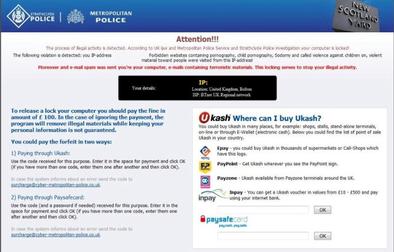
Crypto-malware is a specific form of ransomware that encrypts user files, fundamentally altering the underlying data mathematically so it cannot be read without a unique decryption key.
How do you, as an administrator, know a crypto-malware attack is underway before the attackers announce themselves? The indicators are distinct and measurable:
- Disk Telemetry: Because the malware must open, read, encrypt, and rewrite tens of thousands of files, unusually high disk read and write activity can indicate an active ransomware encryption process. If your SAN (Storage Area Network) or local endpoint monitoring suddenly alerts you to a massive, unexplained spike in input/output operations per second (IOPS), encryption may be occurring in real time.
- File System Anomalies: An indicator of crypto-malware is the sudden changing of file extensions across a filesystem. For example, familiar
.docxor.pdffiles might rapidly transform into.encrypted,.locked, or a random string of alphanumeric characters. - The Ransom Note: Ultimately, the attackers want to be paid. The presence of a text file demanding cryptocurrency payment is a primary indicator of a ransomware infection. These files are typically dropped into every directory where files have been encrypted, often named
README_FOR_DECRYPTION.txt.
Modern threat actors have escalated their tactics beyond mere encryption. Today, organizations face double extortion ransomware, which not only encrypts the local files but threatens to publish stolen data if the ransom is not paid. This transforms what was once purely an availability incident into a massive data breach and confidentiality crisis.
To defend a network, you must understand the "physics" of how malicious software moves. Two of the most common delivery mechanisms—Trojans and Worms—operate on entirely different physical principles.
The Trojan Horse
A Trojan horse is malware disguised as legitimate or desirable software. Much like the wooden horse of antiquity, it promises utility but delivers sabotage. The defining characteristic of this malware family is its reliance on the victim. Trojans rely on user interaction to execute and infect a system. A user must be tricked into downloading the "free PDF editor," clicking the malicious email attachment, or executing a macro.
Crucially, Trojans do not self-replicate across networks. If a Trojan infects Workstation A, it will not autonomously copy itself to Workstation B.
One of the most dangerous variants you will encounter is a Remote Access Trojan (RAT). A RAT provides an attacker with unauthorized remote control over a compromised system, effectively granting them a persistent backdoor. Because RATs require a communication channel back to the attacker's infrastructure, an observant administrator can spot them: unexplained open network ports often indicate the presence of a Remote Access Trojan. If you run a [netstat](https://en.wikipedia.org/wiki/netstat) command and see an unrecognized service listening on port 4444 or 31337, a RAT may be awaiting instructions.
The Computer Worm
If a Trojan is a trap, a worm is a biological contagion. A computer worm is a self-replicating malware program that spreads across networks.
Unlike Trojans, worms do not require human interaction to execute and spread. They achieve autonomy because worms exploit vulnerabilities in operating systems and network protocols to propagate. When the infamous WannaCry or Conficker outbreaks occurred, users did not need to click anything; the worms simply scanned the network, found unpatched protocols (like SMB), forced their way into the memory of vulnerable machines, and executed their payloads.

The indicators of a worm reflect its noisy, aggressive nature:
- Unexplained network congestion is a primary indicator of a worm infection. Because worms are constantly trying to find new victims, they generate massive amounts of outbound traffic.
- More specifically, rapid unauthorized scanning of internal IP addresses indicates potential worm activity. If an intrusion detection system (IDS) alerts you that a printer or an HR workstation is suddenly attempting to connect to port 445 on every other machine in the subnet, you are likely witnessing a worm's propagation cycle.
| Feature | Trojan Horse | Computer Worm |
|---|---|---|
| Disguise | Mimics legitimate software | Typically operates invisibly in the background |
| Propagation | Requires user interaction to spread | Self-replicating, autonomous |
| Network Indicator | Unexplained open listening ports (RATs) | Massive network congestion, internal IP scanning |
Not all malware seeks to destroy or hold data for ransom. Much of the malicious code in the wild is designed for quiet surveillance and monetization.
Spyware is malicious software designed to gather data about a user without user consent. Its primary objective is invisible observation; spyware tracks browsing habits and steals sensitive personal information, routing this data back to third-party brokers or threat actors.
In a corporate environment, users may unknowingly invite this surveillance. The unauthorized installation of new browser extensions is a common indicator of spyware. Furthermore, if a user complains that their homepage has mysteriously shifted to an unfamiliar search engine, take note: a modified default web browser homepage indicates a potential spyware or adware infection.
A closely related nuisance is adware. While sometimes legally grey rather than outright malicious, adware injects unwanted marketing into the user's workflow. Unusual pop-up advertisements often indicate the presence of adware on a system, particularly if these pop-ups appear when the web browser is not even open.
Keyloggers: The Credential Thieves
When spyware focuses specifically on input capture, we classify it as a keylogger. A keylogger is a surveillance tool used to record the keystrokes entered on a computer keyboard. Because almost all access control relies on passwords, a primary goal of a keylogger is the theft of user credentials and passwords.
As an administrator, you may not easily spot the keylogger itself, but you will see its downstream effects. Unexplained compromises of user accounts can indicate the presence of a keylogger. If an employee's account is accessed from a foreign IP address at 3:00 AM, and they have not fallen for a phishing attack, a keylogger may have harvested their credentials during their normal workday.
It is critical to remember that keyloggers can be implemented as either software applications or physical hardware devices.
- Software Keyloggers: Malicious programs running in the background, hooking into the operating system's input processing queue.
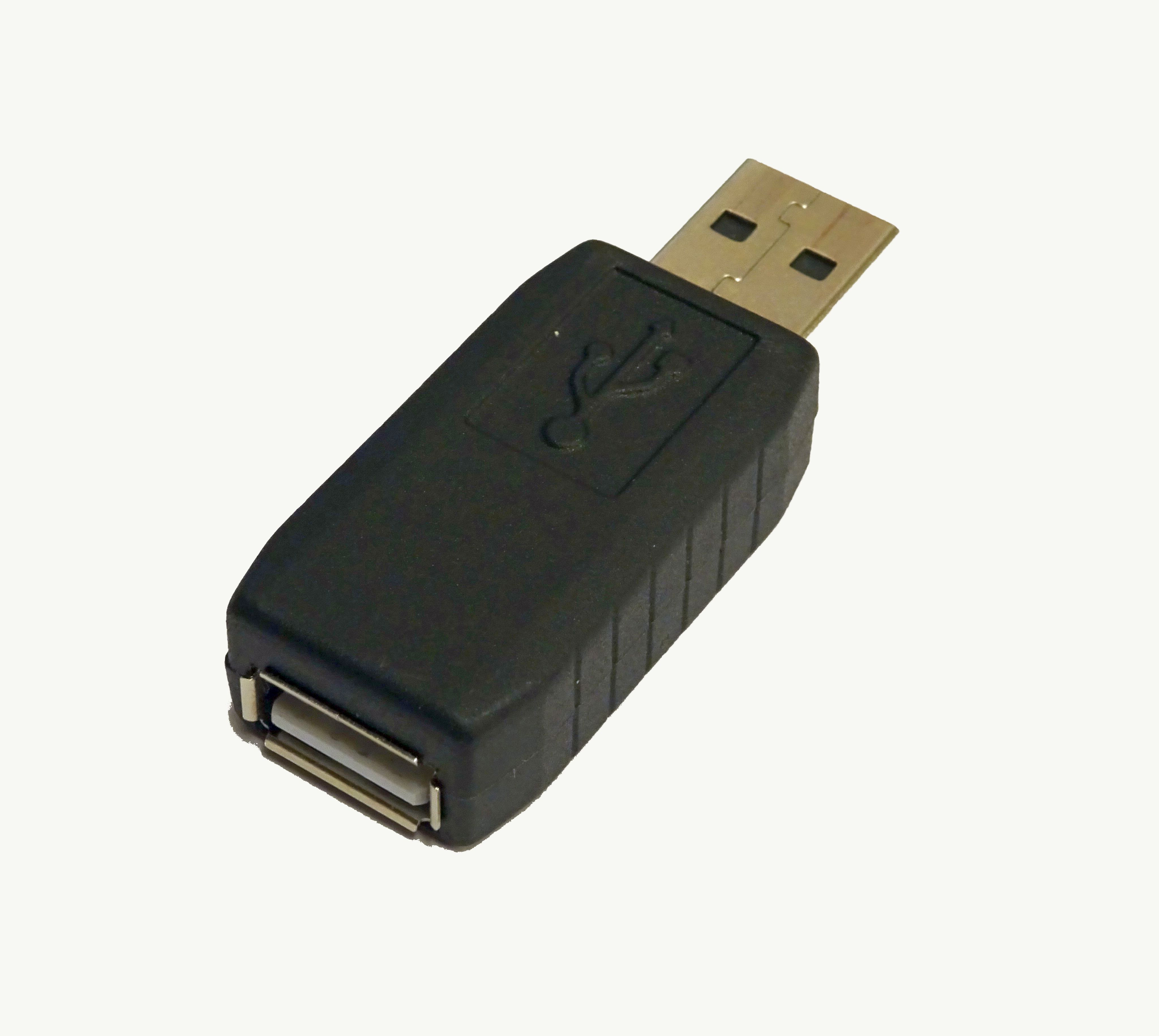
- Hardware Keyloggers: Tangible devices. Hardware keyloggers are typically installed as a physical interface between the keyboard and the computer port. They often look like small USB adapters or extension cables. Physical security inspections are the only way to detect them.
Imagine a piece of malware that generates no network traffic, uses no unusual CPU cycles, and leaves no ransom notes—until a highly specific moment.
A logic bomb is a piece of malicious code inserted into software to execute a malicious function under specific conditions.
Because of their highly targeted nature, logic bombs are frequently implemented by malicious insider threats—such as disgruntled system administrators or developers who possess the deep system access required to bury the code within legitimate scripts or applications.
The danger of this threat lies in its patience. Logic bombs often remain dormant and undetected until the triggering event occurs. The conditions that act as the detonator vary widely based on the attacker's intent:
- Time-based triggers: Logic bombs execute when specific conditions such as a particular date or time occur. For example, an attacker might program the bomb to wipe a database exactly three months after their expected resignation date.
- Event-based triggers: Logic bombs execute when specific conditions such as the deletion of a specific user account occur. In a classic retaliation scenario, an insider writes a script that continuously checks if their own administrative account exists in Active Directory. The moment Human Resources terminates the employee and IT deletes the account, the condition is met, and the logic bomb detonates, destroying critical infrastructure.
When troubleshooting a system, IT professionals rely on standard tools: Task Manager, File Explorer, and Antivirus scans. But what happens when the very tools you use to diagnose the system are lying to you?
Rootkits
A rootkit is a collection of computer software designed to enable access to a computer while masking malicious activities.
To achieve this invisibility, rootkits operate at the kernel level of an operating system to evade detection. The kernel is the central core of the OS; it manages memory, CPU, and hardware interactions. By compromising the kernel, the rootkit achieves the highest possible privilege on the machine.
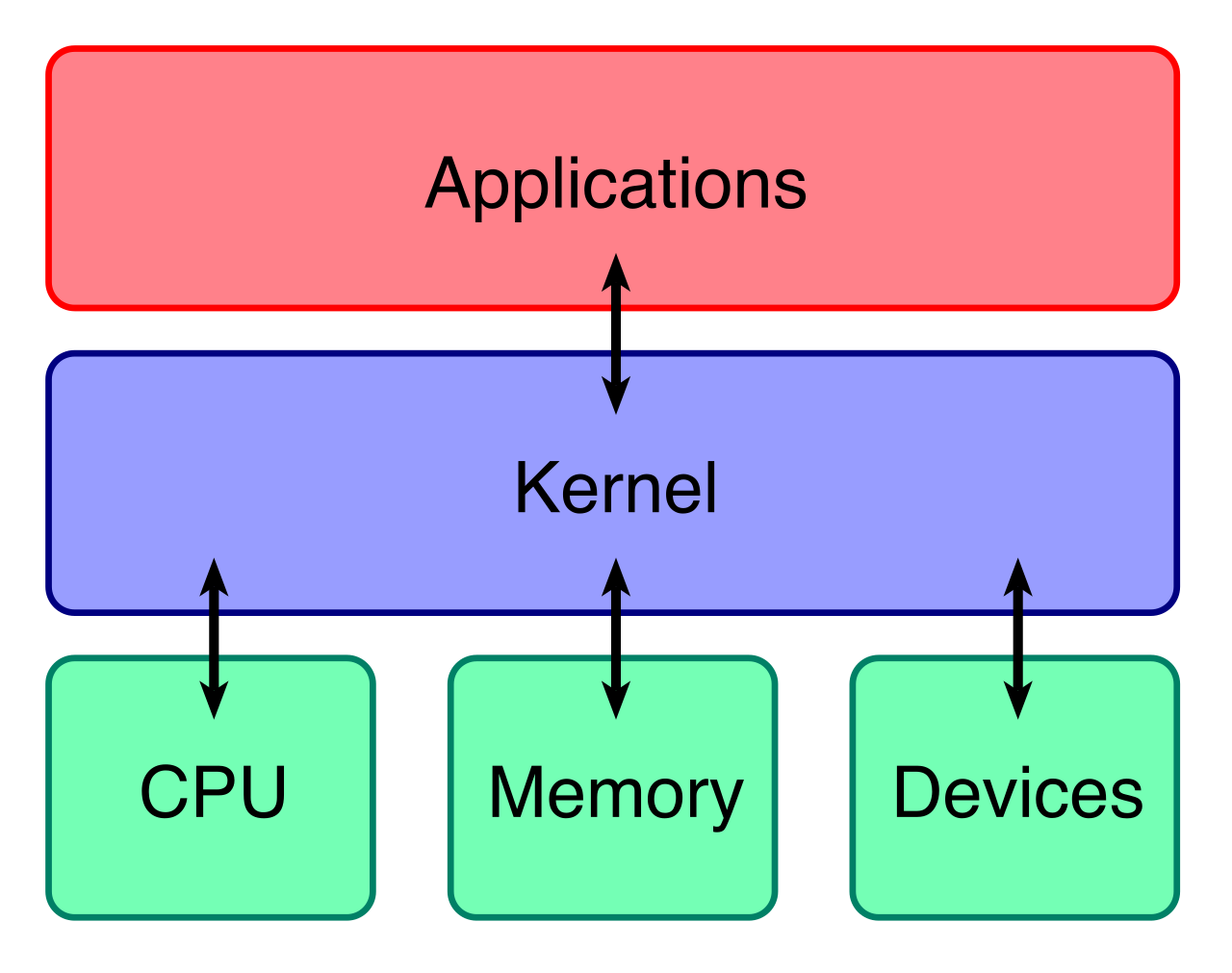
How does the deception work? Rootkits intercept and modify system application programming interface (API) calls. Suppose an administrator opens Task Manager. Task Manager sends an API request to the kernel: "List all currently running processes." The rootkit intercepts this request, reads the list of processes, deletes its own malicious processes from the list, and then hands the sanitized list back to Task Manager.
Because of this API interception:
- A rootkit can hide running processes from the operating system task manager.
- A rootkit can hide files and directories from the operating system file explorer.
This architectural dominance means that user-mode security software is fundamentally outmatched. Because the antivirus relies on the compromised kernel to read the hard drive, standard antivirus software often fails to detect kernel-level rootkits. Remediation almost always requires booting from trusted, external media or completely wiping the affected system.
Fileless Malware
While rootkits hide by manipulating the kernel, fileless malware hides by never touching the disk at all.
Fileless malware operates entirely within computer random access memory (RAM). Traditional antivirus software is heavily optimized to scan files as they are written to the hard drive. By residing only in volatile memory, fileless malware avoids writing malicious executable files to the system hard drive, rendering signature-based file scanning completely obsolete.
To execute its objectives without introducing foreign executable files, fileless malware frequently leverages legitimate administrative tools like PowerShell for execution. This technique is known as "Living off the Land." The attacker uses the tools you already installed and trusted against you.
The primary indicator of this invisible threat resides in memory analysis and script logging. Unusual PowerShell commands executing from memory indicate a potential fileless malware attack. If your logging infrastructure detects an enormous, Base64-encoded string being executed directly into memory via PowerShell—particularly if spawned from an unusual parent process like Microsoft Word—you are likely facing a fileless threat.
Individual compromised endpoints are dangerous, but malware often seeks scale. When thousands of infected machines are networked together, they form a botnet.
A botnet is a network of compromised computers controlled by a central command and control (C2) server.
The individual computers (the "bots" or "zombies") sit quietly, awaiting instructions from the threat actor who operates the C2 server. These instructions might command the bots to launch a coordinated Distributed Denial of Service (DDoS) attack, send millions of spam emails, or collectively mine cryptocurrency.
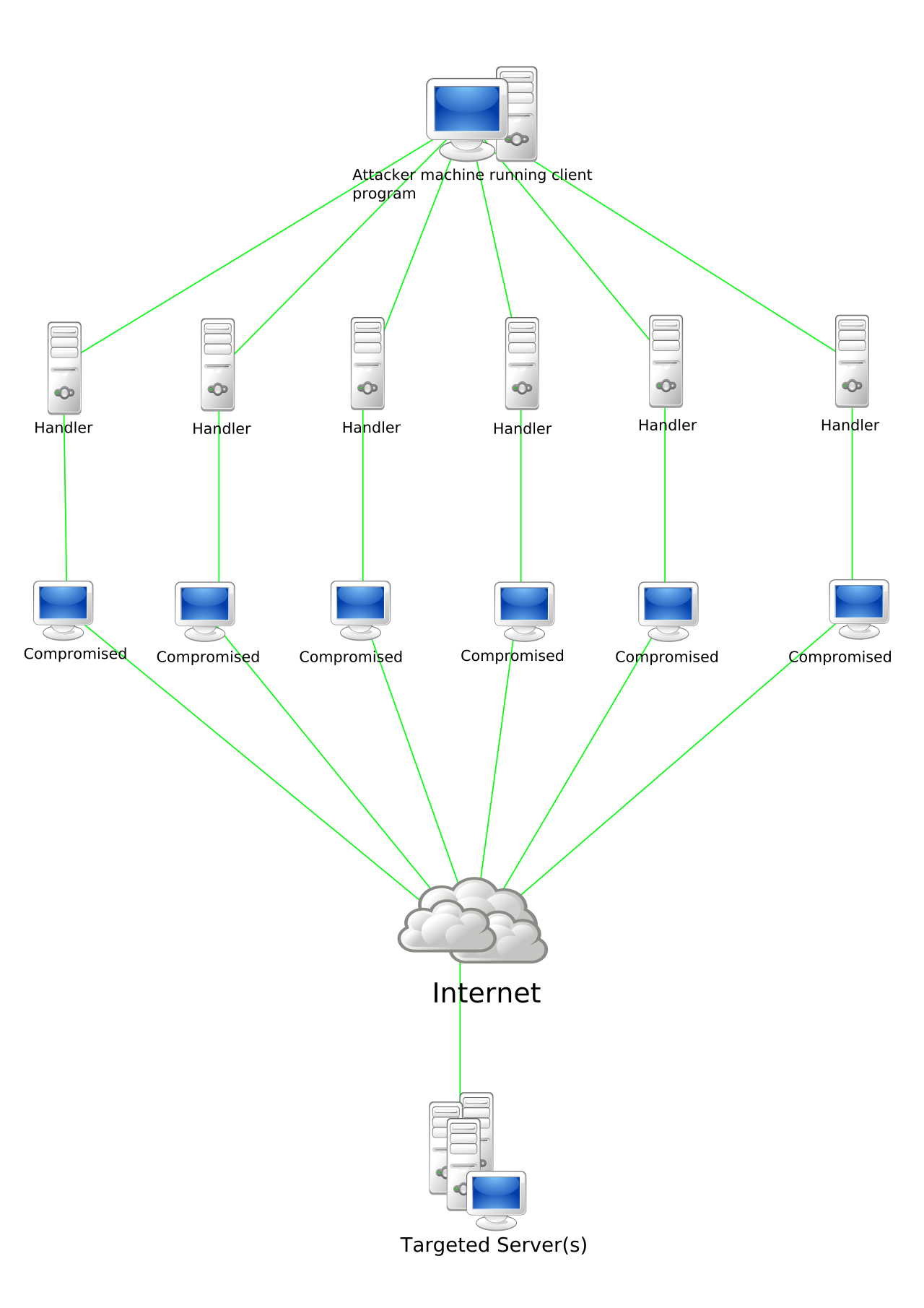
Because a botnet relies on coordination, its greatest weakness is its communication channel. An astute security analyst will monitor outbound traffic patterns. Synchronized outbound network traffic from multiple internal endpoints indicates a potential botnet infection. If you observe thirty different workstations across different departments all attempting to establish an HTTPS connection to the same obscure foreign IP address at exactly 2:00 AM, those machines are almost certainly checking in with their Command and Control server for their next set of malicious instructions.