Infrastructure Vulnerabilities
Not sure you’re ready?
Take the ~3-minute readiness diagnostic and see where you stand.
A bridge may have newly paved asphalt, but if the steel girders beneath are quietly rusting, the entire structure will inevitably collapse under load. Digital infrastructure operates on the exact same physical and logical principles. We spend vast amounts of time polishing the application layer—securing user interfaces and tuning web firewalls—while the foundational hardware, virtualization layers, and third-party dependencies are often neglected. If an attacker compromises the underlying host, the security of the applications running on top of it drops to zero. To defend a network, you must intimately understand the vulnerabilities baked into the devices, hypervisors, and cloud environments that form the bedrock of modern computing.

When you unbox a new piece of infrastructure—a router, a server, or an IoT device—it is inherently vulnerable. Default system configurations often prioritize usability over security by keeping unnecessary network services enabled, ensuring the device "just works" when plugged in. Similarly, default hardware configurations frequently leave easily guessable administrative credentials active upon installation.
To counteract this out-of-the-box fragility, systems administrators must engage in hardening. Hardening reduces infrastructure vulnerabilities by disabling unnecessary network services. True hardening involves applying secure configuration baselines to infrastructure devices and absolutely requires changing default administrative passwords on newly deployed infrastructure devices before they ever touch a production network.
But what happens as that hardware ages? Time is the enemy of security. Hardware and software pass through distinct lifecycle phases that dictate their risk profile:
- End of Life (EOL): This indicates that a manufacturer no longer produces or sells a specific hardware or software product. The product is retired from the catalog, though support may temporarily continue.
- End of Support (EOS): This means the manufacturer no longer provides technical support for a specific product. Unpatched security vulnerabilities accumulate in End of Support systems because the vendor does not release fixes for new threats.
- End of Service Life (EOSL): The terminal stage. End of Service Life (EOSL) systems no longer receive security patches from the original manufacturer.
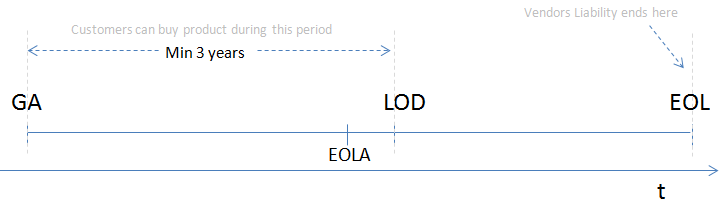
When you discover an EOSL system in your environment, your immediate instinct should be to replace it. However, reality is rarely that simple. You will frequently encounter legacy systems, which are outdated computing technologies that remain in operation because they perform essential business functions.
Why do organizations keep them? First, upgrading legacy systems is often difficult due to strict software dependencies on outdated application frameworks. If a critical manufacturing control program only runs on Windows Server 2003, upgrading the OS breaks the factory. Second, the high financial cost of replacing specialized hardware often forces organizations to continue using legacy systems.

Because you cannot patch these systems, you must isolate them. Network segmentation reduces the risk of legacy system compromise by isolating vulnerable devices from the rest of the network, ensuring that if they are breached, the attacker cannot pivot to modern systems.
Beneath the Operating System: Firmware Vulnerabilities
Below the operating system lies the firmware. Firmware vulnerabilities exist in the low-level code that controls the basic functions of hardware devices. Because this code sits below the OS, malware residing in firmware is nearly invisible to traditional antivirus software.

Updating hardware firmware requires specific vendor patches to resolve low-level security flaws. However, if the device has aged out, end of life firmware cannot receive security updates to address newly discovered hardware vulnerabilities. This leaves the hardware permanently exposed to attackers who understand its lowest-level instruction sets.
Worse still are zero-day vulnerabilities—software flaws that are completely unknown to the original software vendor. Because the vendor is unaware of the flaw, zero-day vulnerabilities currently lack any available official security patch from the developer. Defending against zero-days requires robust defense-in-depth, as no patch can save you from a flaw nobody knows exists.
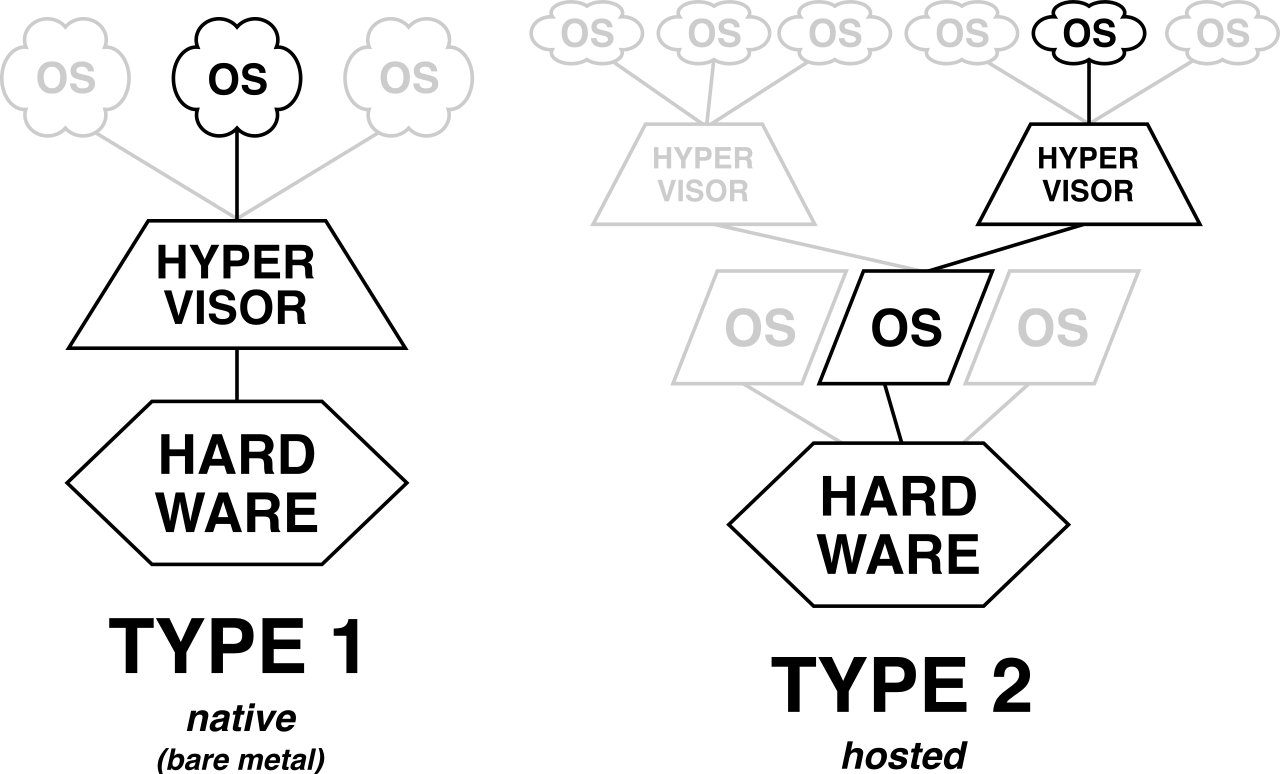
To maximize hardware efficiency, we use virtualization. A hypervisor is the software responsible for creating and running virtual machines on physical hardware. Think of the hypervisor as an apartment building manager, and the Virtual Machines (VMs) as the individual apartments.
In a properly functioning environment, the tenants cannot access each other's apartments. However, inadequate isolation between virtual machines can lead to unauthorized access to resources across a virtualized environment.
The nightmare scenario for any systems administrator is a Virtual Machine (VM) escape. A VM escape occurs when an attacker breaks out of an isolated guest operating system to interact directly with the host hypervisor. A successful VM escape allows an attacker to potentially compromise all other virtual machines running on the same physical host. If the hypervisor falls, the entire infrastructure falls. Therefore, regularly patching the hypervisor software is the primary mitigation against Virtual Machine escape vulnerabilities.
Virtualization also introduces unique data retention risks. Data remnants in virtualization occur when a deleted virtual machine's storage space is reallocated without being securely wiped. If a new VM spins up and claims that physical disk space, a clever attacker could scrape the unallocated space to recover passwords or cryptographic keys left behind by the previous tenant.
The cloud is simply virtualization deployed at an industrial scale. The convenience of the cloud masks its immense complexity, and misconfigurations are rampant.
Consider storage. Cloud storage misconfigurations are a leading cause of data breaches due to unintentional public exposure of sensitive data. An administrator toggles a single setting incorrectly on an AWS S3 bucket, and suddenly a database of proprietary customer information is indexed by public search engines.
APIs and Access Control
Cloud environments run on Application Programming Interfaces (APIs), which allow different software components to communicate and share data in cloud environments. APIs are the connective tissue of modern infrastructure.
- Authentication Failures: Insecure cloud APIs without proper authentication expose backend cloud infrastructure to unauthorized access. If an API accepts commands without verifying who is sending them, it acts as an unlocked backdoor.
- Rate Limiting Failures: Cloud APIs lacking rate limiting are highly vulnerable to automated brute-force attacks and resource exhaustion. An attacker can hammer the API with millions of requests a second, either cracking a password or crashing the service.
Behind the APIs lies the logic of permissions. Identity and Access Management (IAM) misconfigurations in cloud environments often result from assigning overly permissive roles to users. But humans aren't the only entities needing permissions. Assigning overly broad IAM permissions to automated cloud applications creates significant security vulnerabilities. If an automated script that only needs to read a database is given "Full Admin" privileges, a compromise of that script grants the attacker total control over the environment.
The Financial Attack Vector and Multi-Tenancy
The cloud is designed to scale infinitely based on demand. While great for handling a sudden surge in legitimate traffic, cloud elasticity can be exploited in a Denial of Wallet attack by triggering automatic resource scaling that incurs massive financial costs. An attacker sends bogus traffic, your auto-scaler spins up fifty new expensive servers to handle it, and you are left with a $100,000 monthly bill.

Finally, remember that the public cloud is a shared environment. Multi-tenancy in public clouds introduces the risk of cross-tenant attacks if strict logical isolation fails. Just as with localized VM escape, a flaw in AWS, Azure, or GCP could theoretically allow an attacker operating their own cloud instance to peek into yours.
You can build a fortress, but if you buy your locks from a compromised locksmith, your walls are useless. A supply chain attack compromises a primary target by exploiting vulnerabilities in the target's third-party vendors.
Because large enterprises have massive security budgets, attackers often go after the smaller companies that service them. A supply chain attack can leverage vulnerabilities in an organization's managed service providers. Managed Service Providers (MSPs) are frequent targets of supply chain attacks because their access to multiple client networks provides a high-value pivot point. Why hack fifty individual companies when you can hack the single IT firm that holds the administrative keys to all fifty?
Poisoning the Well: Software and Hardware
Supply chain attacks occur in both the digital and physical realms:
- Software Supply Chain: These attacks involve injecting malicious code into trusted open-source libraries. Developers unknowingly pull this corrupted code into their applications. Consequently, software supply chain attacks can compromise the distribution of legitimate software updates. The infamous SolarWinds breach was exactly this—a trusted update mechanism turned into a malware distribution network.
- Hardware Supply Chain: Hardware supply chain vulnerabilities include the insertion of malicious microchips into devices before final delivery. Alternatively, hardware supply chain attacks can involve installing compromised firmware onto devices during the manufacturing process. By the time the server arrives at your loading dock in shrink-wrap, it is already compromised.
Supply Chain Defenses
How do we trust what we buy? First, we demand transparency. A Software Bill of Materials (SBOM) documents all open-source and third-party components within a specific application. An SBOM helps security teams identify hidden supply chain vulnerabilities within application dependencies. If a new vulnerability is announced in a obscure logging library, you check your SBOM to see if your software relies on it.
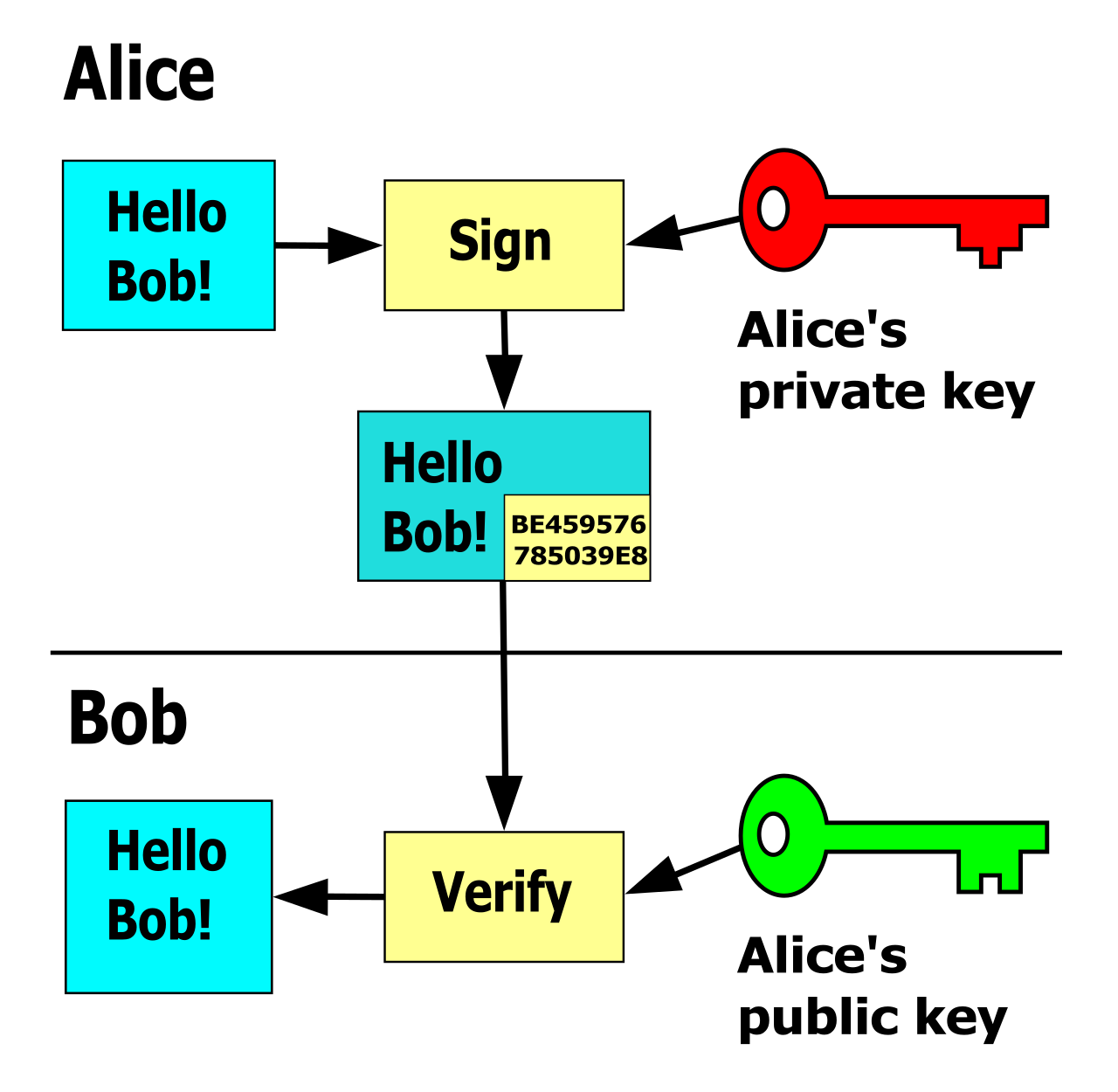
To ensure files haven't been tampered with, we rely on cryptography. Cryptographic code signing helps mitigate software supply chain attacks by verifying the authenticity of software updates. Furthermore, cryptographic code signing guarantees the integrity of an application file to ensure the file was not altered in transit. If the digital signature doesn't match the developer's public key, the system refuses to install the update.
Finally, organizations utilize Vendor Risk Management programs. These programs assess the cybersecurity posture of third-party suppliers to mitigate supply chain risks before contracts are even signed.
You cannot protect what you cannot see. Shadow IT involves employees using unapproved cloud services without the knowledge of the IT department. A marketing team frustrated by corporate bureaucracy might independently purchase a cloud file-sharing service to collaborate with external vendors. Shadow IT also includes the deployment of unauthorized hardware devices on the corporate network, like a developer plugging a personal, unpatched Wi-Fi router into a sensitive subnet.

Shadow IT introduces infrastructure vulnerabilities by completely bypassing organizational security controls. Because these systems are unvetted, they do not undergo hardening, they lack proper IAM controls, and they are not tracked for EOL/EOS status. Ultimately, Shadow IT creates blind spots in network visibility for security monitoring teams, rendering millions of dollars of security architecture blind to the rogue infrastructure operating right beneath it.