Linux Client/Desktop Operating System
Not sure you’re ready?
Take the ~3-minute readiness diagnostic and see where you stand.
Imagine walking into an immense, highly automated factory. There are no maps painted on the walls, and there are no tour guides to hold your hand. Instead, there is a central command language. If you understand the rules of this language, you can direct every machine, inspect every blueprint, and control every assembly line with absolute precision. This is the Linux operating system. In the world of enterprise IT, Linux is the bedrock. From the servers hosting cloud infrastructure to the endpoint terminals in secure environments, Linux demands that an IT professional interact with the machine exactly as it is—without the obscuring layer of a graphical user interface.

When a critical web server fails at 3:00 AM, or when a developer's environment suddenly denies them access to their own code, you cannot rely on clicking through menus. You must know how to interrogate the system, read its configuration, and manipulate its files using pure text. By understanding the underlying architecture and mastering the command-line interface, you transition from a passive user of technology into an active engineer of it.
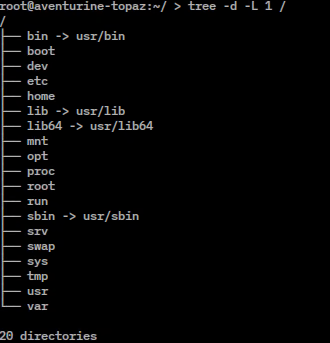
To support a Linux environment, you must first understand how it structures reality. Unlike Windows, which abstracts physical drives into letters (C:, D:), Linux unifies everything into a single, logical structure.
The Filesystem Hierarchy: The Linux filesystem hierarchy organizes all files and directories under a single root directory represented by a forward slash (
/). Every drive, folder, file, and hardware device is mounted somewhere beneath this singular point of origin.
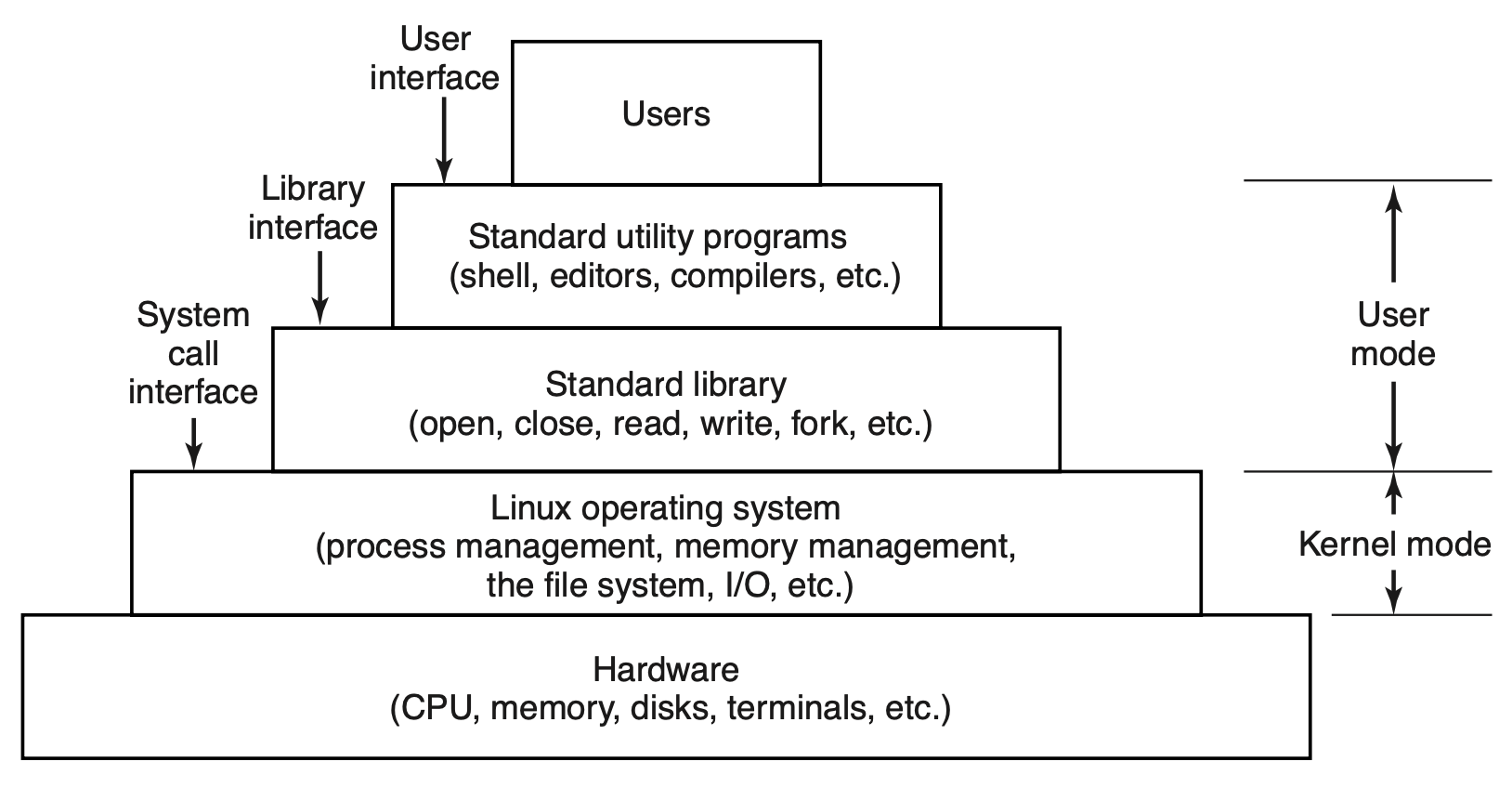
Beneath this hierarchy, the machine operates through a series of foundational components:
- The Linux Kernel: At the absolute bottom, the Linux kernel is the core interface between the computer hardware and the operating system processes. It manages the CPU, memory, and peripheral devices. You rarely interact with the kernel directly; instead, you interact with the shell, which passes your commands to the kernel.
- Systemd: When you power on a Linux machine, chaos must become order. Systemd is an initialization system and service manager for Linux operating systems that runs as the first process upon boot. It has a Process ID (PID) of 1, and it acts as the parent of all other processes, bringing up the network, mounting drives, and starting background services (daemons).
- Configuration Files: In Linux, you do not use a registry to manage system settings. Instead, Linux configuration files are generally plain text files formatted as key-value pairs or simple directives. Because they are plain text, you can read and modify them with any basic editor.
- The
/etcDirectory: You will find the vast majority of these settings in one specific place. The/etcdirectory in Linux typically stores system-wide configuration files. Whether you are configuring network interfaces, user passwords, or software behavior,/etcis your primary destination.
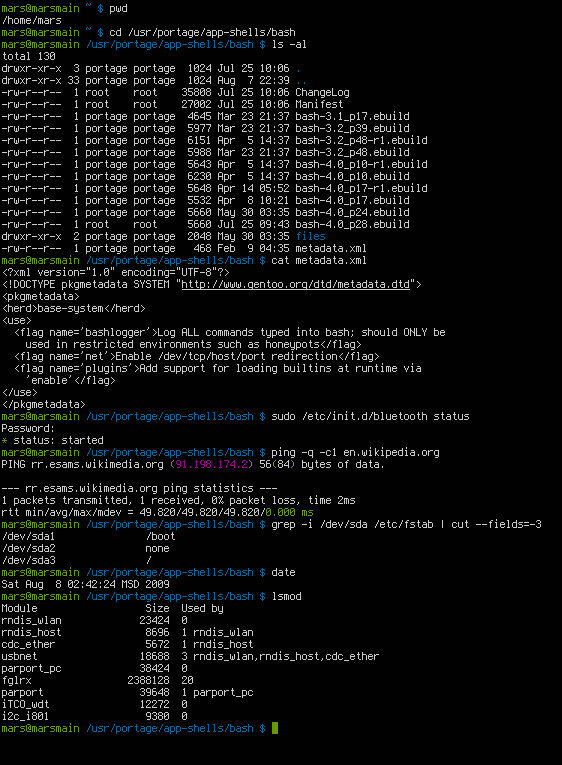
When you open a terminal session, you are dropped into a directory, but you are effectively blind. You must use commands to orient yourself and explore.
To find out exactly where you are standing, use [pwd](https://en.wikipedia.org/wiki/pwd) (print working directory). The pwd command prints the absolute path of the current working directory in a Linux terminal, starting from the root (/).
To see what surrounds you, use [ls](https://en.wikipedia.org/wiki/ls). At its most basic, the ls command lists the files and directories contained within a specified directory. However, IT professionals rarely run ls by itself. We need details.
- Appending the
-lflag to thelscommand displays detailed information about files including permissions, ownership, size, and modification dates. - Appending the
-aflag to thelscommand reveals hidden files that begin with a dot in a Linux directory (such as.bashrcor.ssh). You will frequently combine these asls -lato see absolutely everything in a directory.
To move through the filesystem hierarchy, the [cd](https://en.wikipedia.org/wiki/cd_%28command%29) command changes the current working directory in a Linux command-line environment. Typing cd /etc teleports you to the configuration directory, while typing cd .. moves you exactly one level up.
Once you can navigate, you must learn to manipulate. These are the tools you use to manage data day-to-day.
| Command | Function in the Linux Filesystem |
|---|---|
[cp](https://en.wikipedia.org/wiki/cp_%28Unix%29) | The cp command copies files or directories from one location to another. If you are modifying a critical configuration file, you should always back it up first: cp sshd_config sshd_config.backup. |
[mv](https://en.wikipedia.org/wiki/mv_%28Unix%29) | The mv command moves or renames files and directories in a Linux filesystem. Because Linux does not have a dedicated "rename" command, moving a file to the same directory with a new name achieves the rename. |
[rm](https://en.wikipedia.org/wiki/rm_%28Unix%29) | The rm command removes or deletes files and directories from the Linux filesystem. Warning: Linux has no recycle bin by default. Once a file is removed via terminal, it is gone. |
rm -r | Directories cannot be deleted with a simple rm if they contain data. The rm -r command recursively deletes a directory and all contents within that directory. |
If you know a file exists but cannot remember where it lives, the [find](https://en.wikipedia.org/wiki/find_%28Unix%29) command searches for files and directories within a directory hierarchy based on criteria like name, size, or modification date. For example, find / -name "syslog" asks the system to start at the root and locate any file named syslog.
When dealing with logs or software distributions, you will frequently encounter archives. The [tar](https://en.wikipedia.org/wiki/tar_%28computing%29) (tape archive) command creates, extracts, or maintains archive files containing multiple files and directories. It allows you to bundle dozens of files into a single .tar file, often compressed as a .tar.gz.
If configuration files are plain text, we need tools to read them.
The simplest tool is [cat](https://en.wikipedia.org/wiki/cat_%28Unix%29) (concatenate). The cat command reads file contents and outputs the entire text to the standard output display. This is perfect for short files, but if you cat a file with 10,000 lines, it will instantly scroll past your screen.
When you need to find specific needles in a massive text haystack, you use [grep](https://en.wikipedia.org/wiki/grep). The grep command searches text files for lines matching a specified regular expression or string. If a user cannot log in, an IT technician might run grep "failed" /var/log/auth.log to filter out everything except the failed login attempts.
When you must modify these files, you rely on text editors:
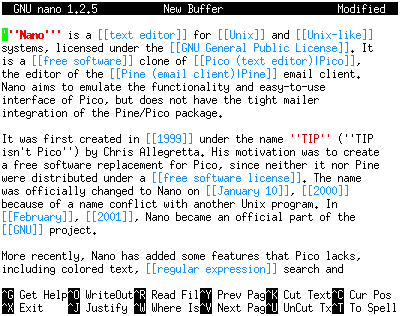
[nano](https://en.wikipedia.org/wiki/GNU_nano): Nano is a simple, command-line text editor commonly included in Linux distributions for modifying configuration files. It is intuitive, with shortcuts listed directly at the bottom of the screen.
[vi](https://en.wikipedia.org/wiki/vi): Vi is a powerful, modal command-line text editor present by default on nearly all Unix and Linux systems. Whilenanois easier for beginners,viis universal. It operates in modes—you must pressito insert text andEscto stop inserting before saving. Masteringviensures you can edit files on literally any Unix system on the planet.
Linux is a multi-user environment. A single server might host web services, database services, and dozens of human developers simultaneously. To prevent chaos, Linux enforces a rigid permissions model.
The Root User: The superuser account in Linux is named
rootand possesses unrestricted access to all commands and files. The root user can delete the entire operating system while it is running. Because of this terrifying power, everyday administration is done using standard accounts, temporarily escalating privileges only when absolutely necessary.
To escalate privileges, we use two primary commands:
[su](https://en.wikipedia.org/wiki/su_%28Unix%29)(substitute user): Thesucommand allows a user to run a shell as a different user, typically switching to the root user account entirely.[sudo](https://en.wikipedia.org/wiki/sudo)(superuser do): Thesudocommand executes a single command with the administrative privileges of the root user. This is the preferred method for IT support because it logs the action, creating an audit trail of exactly who requested the privilege.
Every file and directory is bound by ownership and permissions.
- Ownership: The
[chown](https://en.wikipedia.org/wiki/chown)command changes the user ownership and group ownership of a file or directory in Linux. - Permissions: The
[chmod](https://en.wikipedia.org/wiki/chmod)command alters the read, write, and execute permissions of a file or directory in Linux.
Linux does not use abstract words for these permissions; it uses an elegant mathematical model. Linux file permissions use an octal numbering system where 4 represents read, 2 represents write, and 1 represents execute.
Because of this specific numbering, any combination results in a unique sum. If you want a script to be readable and writable, but not executable, you add 4 + 2 to get 6. Therefore, a Linux file permission value of 7 grants read, write, and execute access to a file (4 + 2 + 1). We apply these numbers in a three-digit sequence—the first digit for the user, the second for the group, and the third for the rest of the world. For example, chmod 755 file.sh gives the owner total control (7), while the group and everyone else can only read and execute (5).
You do not generally browse the web to download executables in Linux. Instead, Linux relies on centralized software repositories. Package managers in Linux automate the process of installing, upgrading, configuring, and removing software. They also handle dependencies, ensuring that if a program requires specific libraries to run, those libraries are downloaded automatically.
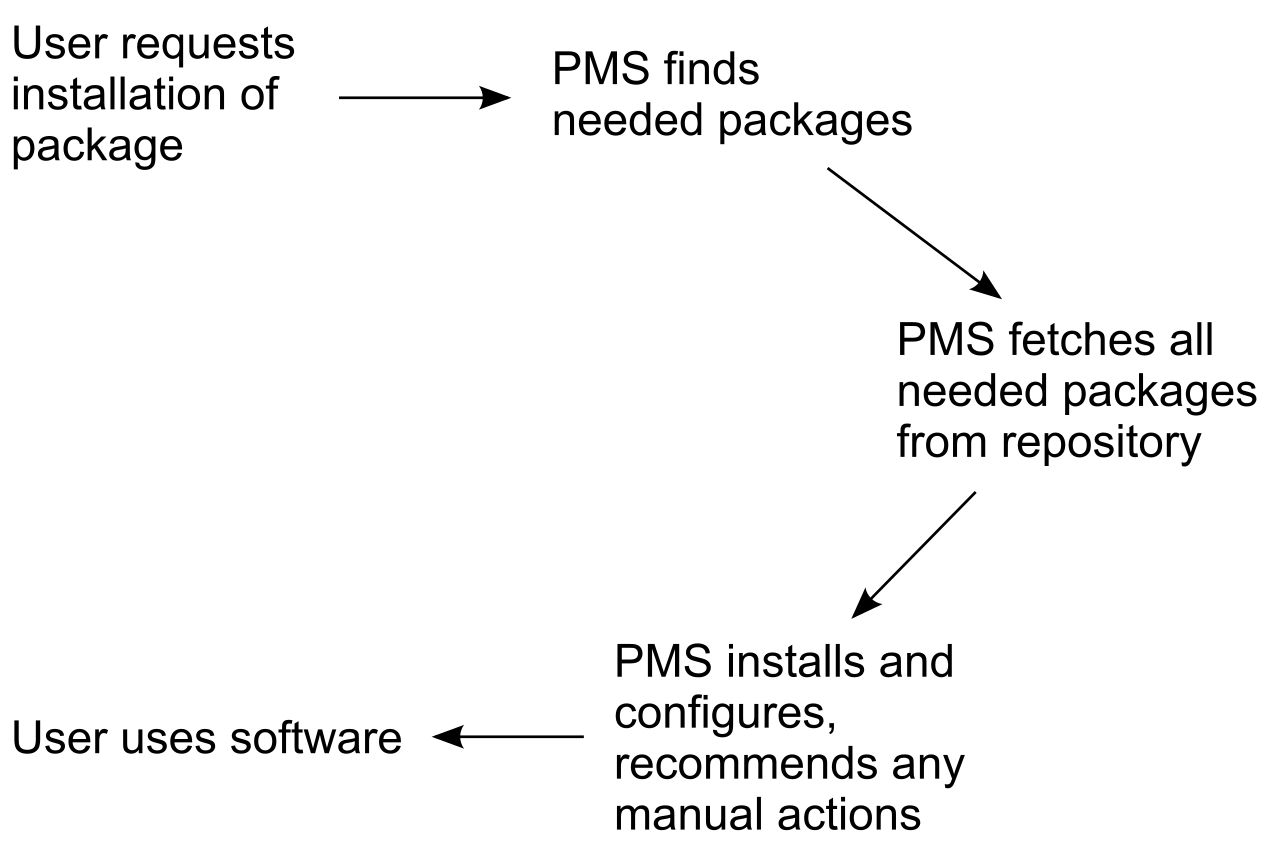
The Linux ecosystem is largely split into two major distribution families, each with its own package management philosophy: Debian-based systems and Red Hat-based systems.
Debian and Ubuntu-Based Systems
Debian, Ubuntu, and Linux Mint are among the most common desktop and server distributions.
[apt](https://en.wikipedia.org/wiki/APT_%28software%29): Theaptcommand is the primary package management tool for modern Debian and Ubuntu-based Linux distributions. It is fast, clean, and user-friendly.apt-get: You will frequently see documentation referencingapt-get. Theapt-getcommand is an older, widely used front-end package management tool for Debian-based systems.aptwas created to combine the best features ofapt-getinto a more simplified command.- Update vs. Upgrade: A vital distinction exists here. The
apt updatecommand refreshes the local list of available packages from the software repositories. It does not install new software; it merely updates the system's catalog of what is available. To actually apply the new software, you must run theapt upgradecommand, which installs the newest versions of all packages currently installed on an Ubuntu or Debian system.
Red Hat, Fedora, and CentOS Systems
In enterprise data centers, the Red Hat family is incredibly prevalent.
[rpm](https://en.wikipedia.org/wiki/RPM_Package_Manager): At the lowest level, therpmcommand installs, queries, and manages individual Red Hat Package Manager software files directly. However, it does not resolve dependencies automatically.[yum](https://en.wikipedia.org/wiki/YUM_%28software%29): To solve dependency issues,yumwas created. Theyumcommand is a legacy package manager for Red Hat-based systems that has been largely replaced by modern alternatives.[dnf](https://en.wikipedia.org/wiki/DNF_%28software%29): Today, thednfcommand is the default package manager for modern Red Hat Enterprise Linux, Fedora, and CentOS systems. It operates similarly toapt, effectively acting as the modernized, faster replacement foryum.
As an IT technician, you are a diagnostic engineer. When a system slows to a crawl or loses connectivity to the internet, you must ask the operating system directly what is happening.
System Processes and Resources
[top](https://en.wikipedia.org/wiki/top_%28software%29): If the system is lagging, thetopcommand provides a dynamic, real-time view of running system processes and resource usage in Linux. It acts like a live scoreboard, updating every few seconds to show which process is consuming the most CPU or memory.
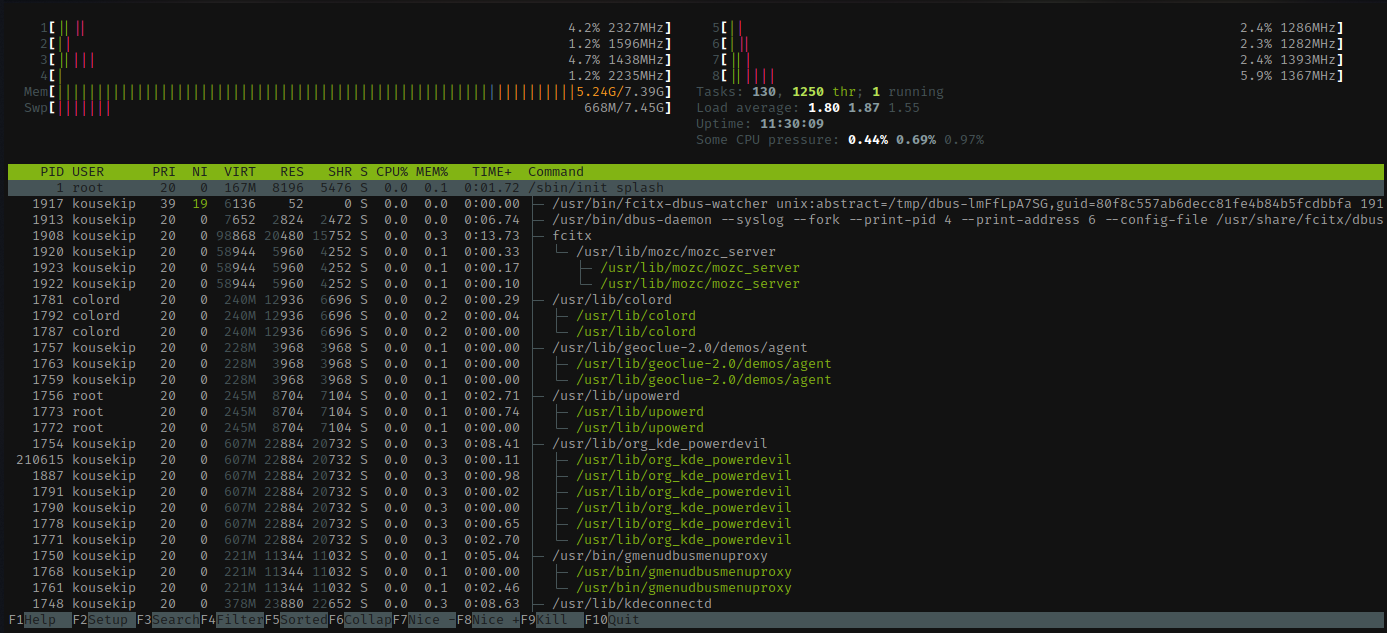
[ps](https://en.wikipedia.org/wiki/ps_%28Unix%29): Sometimes you don't want a live, jumping screen. Thepscommand displays a static snapshot of the currently running processes on a Linux system. Runningps auxwill show you every single process running at that exact millisecond.
Disk Storage
Storage capacity issues are the root cause of countless application failures.
[df](https://en.wikipedia.org/wiki/df_%28Unix%29): Thedf(disk free) command displays the amount of available and used disk space on mounted Linux filesystems.df -h: By default,dfreports sizes in 1-Kilobyte blocks, which is difficult for human brains to parse quickly. Appending the-hflag to thedfcommand formats disk space output in human-readable units like megabytes and gigabytes.
Network Troubleshooting
Finally, a computer that cannot communicate is merely an expensive space heater. Modern Linux utilizes a powerful suite of network commands.
[ip](https://en.wikipedia.org/wiki/iproute2): Theipcommand displays and configures network interfaces, routing, and network tunnels in Linux. It is the modern replacement for the deprecated[ifconfig](https://en.wikipedia.org/wiki/ifconfig)command.ip addr: Specifically, theip addrcommand shows the IP addresses assigned to all network interfaces on a Linux system, allowing you to instantly verify if a machine has successfully pulled an address from the DHCP server.[dig](https://en.wikipedia.org/wiki/dig_%28command%29): If your IP is correct but you cannot reach websites by name, you likely have a Domain Name System (DNS) issue. Thedigcommand performs DNS lookups and queries name servers for information about host addresses. It shows you exactly how a domain name is resolving.[curl](https://en.wikipedia.org/wiki/cURL): To verify that a specific web service is active and responding, thecurlcommand transfers data to or from a server using protocols like HTTP, HTTPS, or FTP directly from the command line. If you runcurl https://www.example.comand receive HTML code back, you have definitively proven that the network path to the web server is open, the DNS is resolving, and the server is actively serving web pages.
By mastering these commands, you cease to be at the mercy of graphical interfaces. You gain the ability to step directly onto the factory floor of the Linux operating system, armed with the exact vocabulary required to inspect, diagnose, and command the machine.