Time Protocols and Network Access
Not sure you’re ready?
Take the ~3-minute readiness diagnostic and see where you stand.
In any distributed computing system, time is the sole arbiter of truth, and cryptography is the sole guarantor of geography. Imagine attempting to diagnose a massive security breach where your database server claims an attacker exfiltrated data a full three minutes before your edge firewall recorded the initial intrusion. Without an absolute, universally synchronized metronome across all devices, digital forensics becomes mathematically impossible, cryptographic certificates expire prematurely, and authentication protocols immediately collapse. Similarly, as traditional network perimeters dissolve, we can no longer rely on the physical walls of a building to protect our data; we must construct invisible, encrypted bridges across the chaotic public internet to safely transmit information. Understanding how to engineer precise network time and implement secure virtual private network (VPN) access architectures is not merely an administrative chore—it is the foundational basis for establishing reality and trust in modern infrastructure.
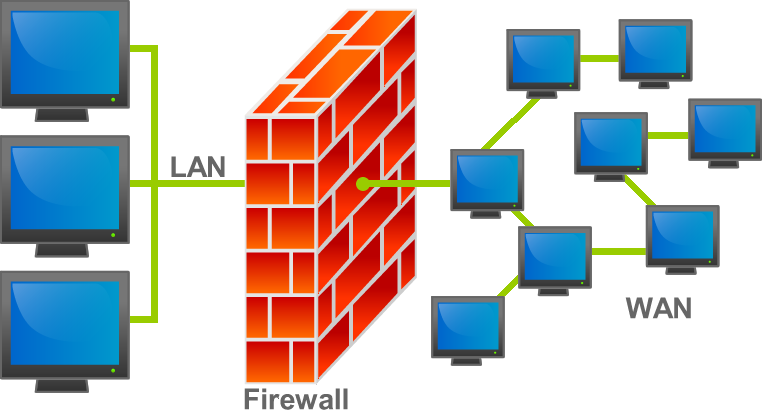
Every router, switch, server, and workstation possesses an internal hardware clock. However, these inexpensive quartz oscillators naturally drift. A server might lose a fraction of a second every day, which accumulates into minutes over a year. To force the entire network to march to the exact same beat, we rely on specialized time synchronization protocols.

Network Time Protocol (NTP)
For decades, the standard mechanism for coordinating clocks has been the Network Time Protocol (NTP). Operating globally over UDP port 123, the Network Time Protocol (NTP) uses UDP to synchronize device clocks across a packet-switched network. We use UDP rather than TCP because time synchronization relies on speed and predictability; the overhead of TCP's three-way handshake and error correction would introduce unacceptable, variable delays into the timing measurements.
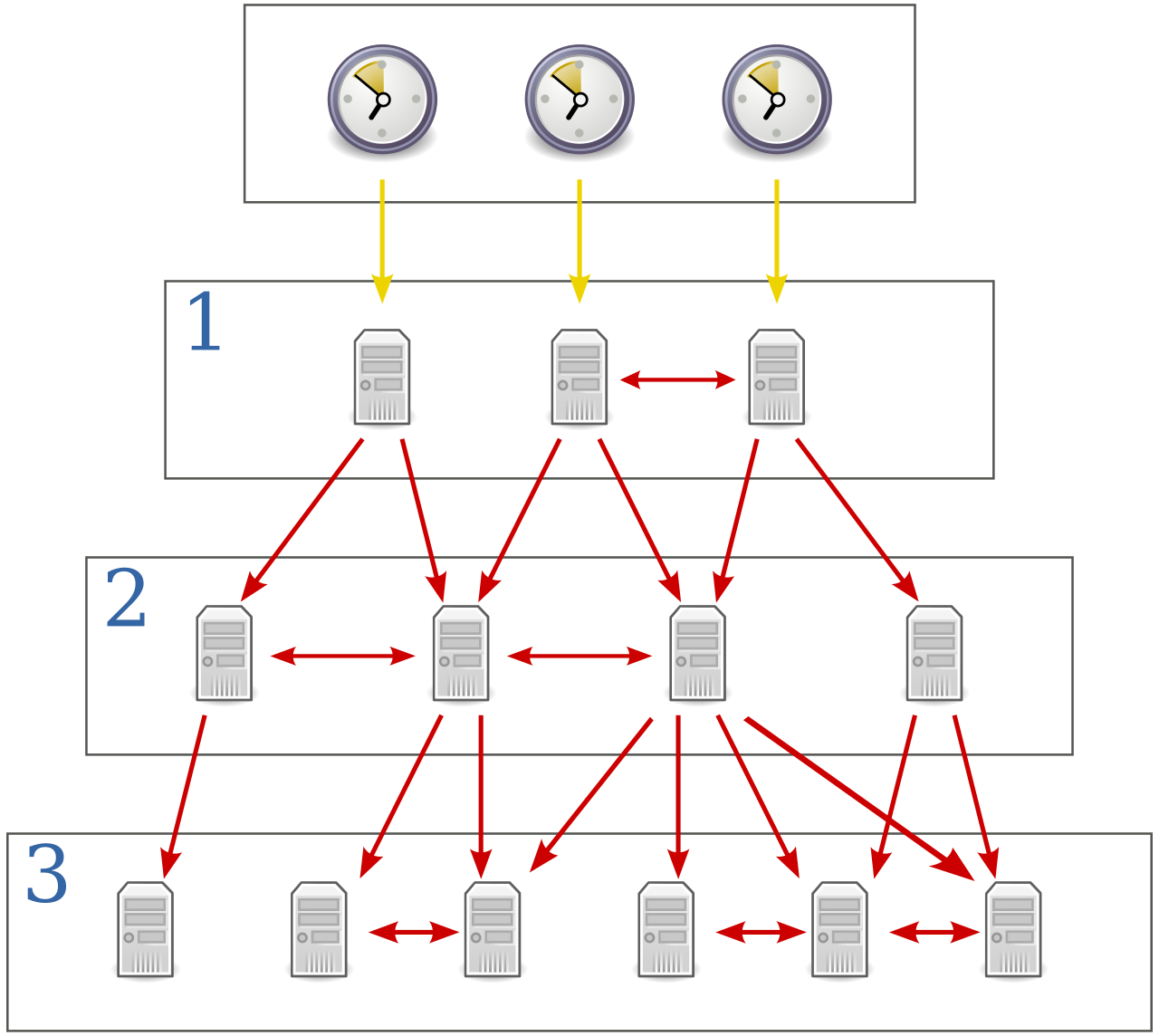
To ensure accuracy, the Network Time Protocol (NTP) operates using a hierarchical architecture consisting of multiple stratum levels to indicate the distance from a reference clock. You can visualize this like a pyramid of trust:
- Stratum 0: At the absolute peak of the hierarchy, Stratum 0 devices are high-precision timekeeping devices like atomic clocks or GPS receivers. These devices do not inherently speak network protocols; they physically generate the perfect pulse of time.
- Stratum 1: These are the primary network time servers. Stratum 1 servers in an NTP hierarchy are directly connected to Stratum 0 time sources, usually via a serial cable or direct radio link. They act as the bridge between raw atomic time and the IP network.
- Stratum 2 and beyond: Stratum 2 servers pull their time from Stratum 1 servers over the network, Stratum 3 pulls from Stratum 2, and so on. The higher the stratum number, the further the device is from the pure Stratum 0 source, and the more network jitter has affected the measurement.
Note: The Network Time Protocol (NTP) typically achieves millisecond accuracy over wide area networks (WANs). For standard enterprise logging, user authentication, and system operations, being accurate to a thousandth of a second is more than sufficient.
Precision Time Protocol (PTP)
But what happens when a thousandth of a second is an eternity? If you are managing a high-frequency algorithmic trading network, a cellular 5G tower handoff system, or an industrial robotics assembly line, millisecond accuracy is far too sloppy. You need absolute precision.
This is where the Precision Time Protocol (PTP) comes into play. The Precision Time Protocol (PTP) is defined by the IEEE 1588 standard and was engineered from the ground up for environments requiring extraordinary synchronization. While NTP gives you milliseconds, the Precision Time Protocol (PTP) provides microsecond or nanosecond timing accuracy.
How does PTP achieve a leap in accuracy thousands of times better than NTP? The secret lies in where the timestamp is applied. In standard NTP, the operating system's software processes the time packet, meaning CPU interrupts and software buffers introduce tiny, unpredictable delays (jitter). The Precision Time Protocol (PTP) achieves higher accuracy than NTP through hardware timestamping at the physical network layer. Instead of waiting for the software kernel to process the packet, specialized network interface cards (NICs) physically stamp the packet with a time precisely at the exact moment the first bit of data hits the copper or fiber optic wire.
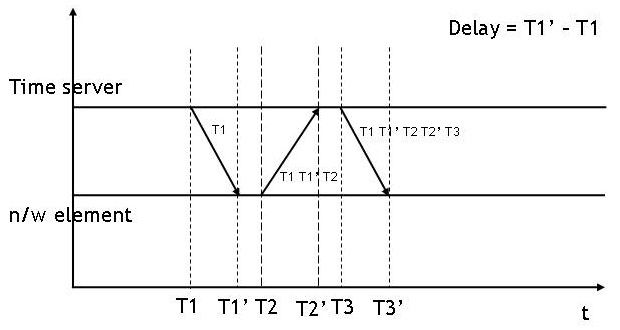
To coordinate this flawless timing, Precision Time Protocol (PTP) networks utilize a Grandmaster clock as the primary synchronization source for all other network devices. Devices continuously exchange delay-request and delay-response messages with the Grandmaster, calculating and adjusting for the exact propagation delay of the physical cables connecting them.
Securing Time: Network Time Security (NTS)
Time is not just a metric; it is a critical security parameter. Transport Layer Security (TLS) certificates, Kerberos authentication tickets, and multi-factor authentication tokens all rely on strict time windows. If a malicious actor can spoof your network's time, they can force your servers to accept long-expired cryptographic certificates or replay old authentication tokens.
Historically, standard NTP was highly vulnerable to these attacks because its packets were transmitted in cleartext without robust verification. To solve this, network engineers developed Network Time Security (NTS).
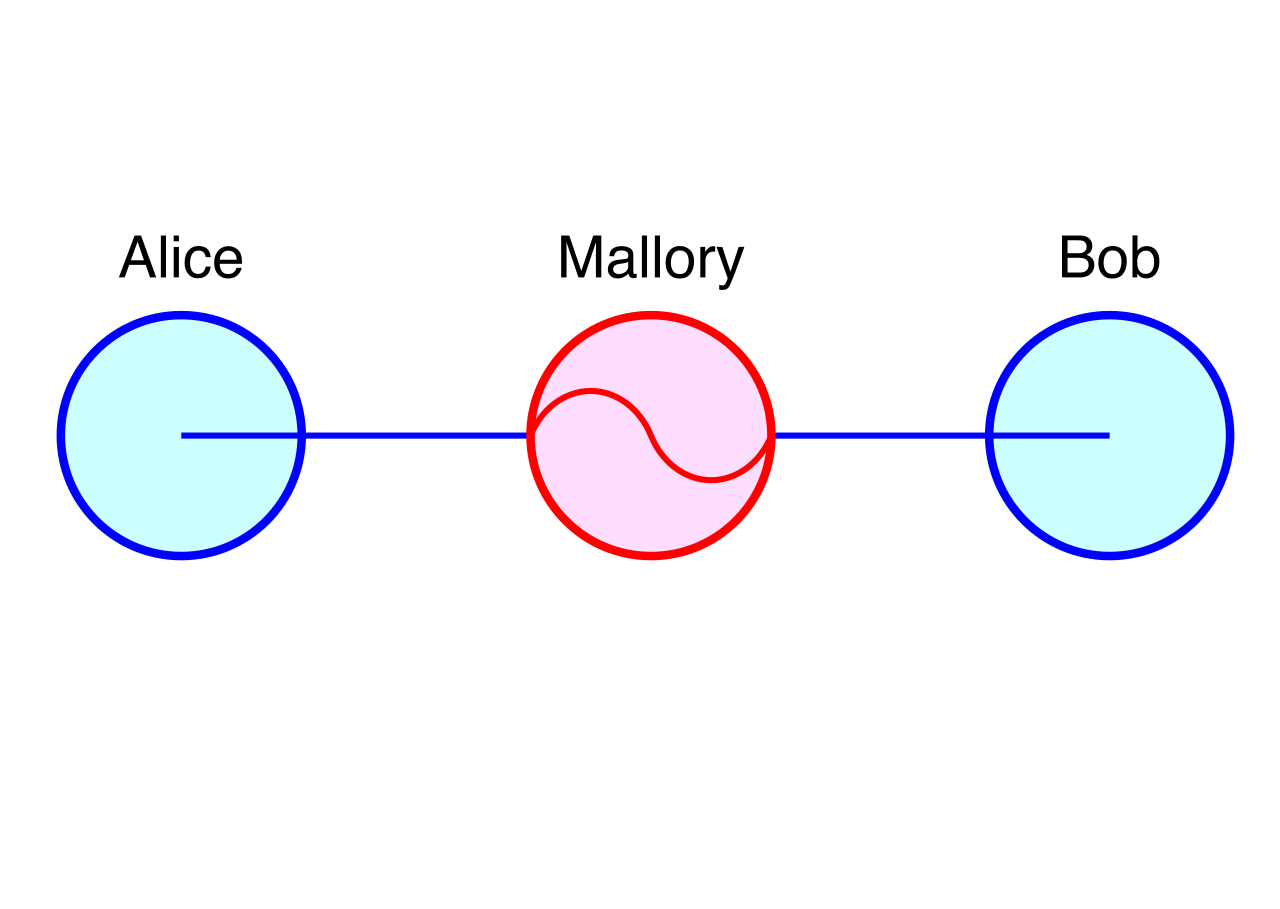
Network Time Security (NTS) is a cryptographic security extension for the Network Time Protocol (NTP). It fundamentally changes the threat landscape because Network Time Security (NTS) prevents time-spoofing and man-in-the-middle attacks by providing cryptographic authentication for time synchronization packets.
The mechanics of NTS occur in two distinct phases:
- Key Exchange: When a client first wants to synchronize securely, Network Time Security (NTS) utilizes Transport Layer Security (TLS) for the initial key exchange between the time client and the time server.
- Authenticated NTP: Once the secure TLS channel has exchanged the cryptographic keys, the TLS session drops. The devices then resume sending standard UDP time packets, but those packets now contain cryptographic extension fields. The server hashes the packet using the shared keys, allowing the client to mathematically prove that the time packet genuinely originated from the trusted server and was not altered in transit.
Once the network shares a synchronized, mathematically secured perception of time, we must secure the physical space between our networks. We live in a world of remote workforces, branch offices, and cloud infrastructure. We cannot stretch private Ethernet cables across the globe. Instead, we use Virtual Private Networks (VPNs) to build encrypted, logical tunnels across the public internet.
The architecture you choose depends entirely on what you are trying to connect.
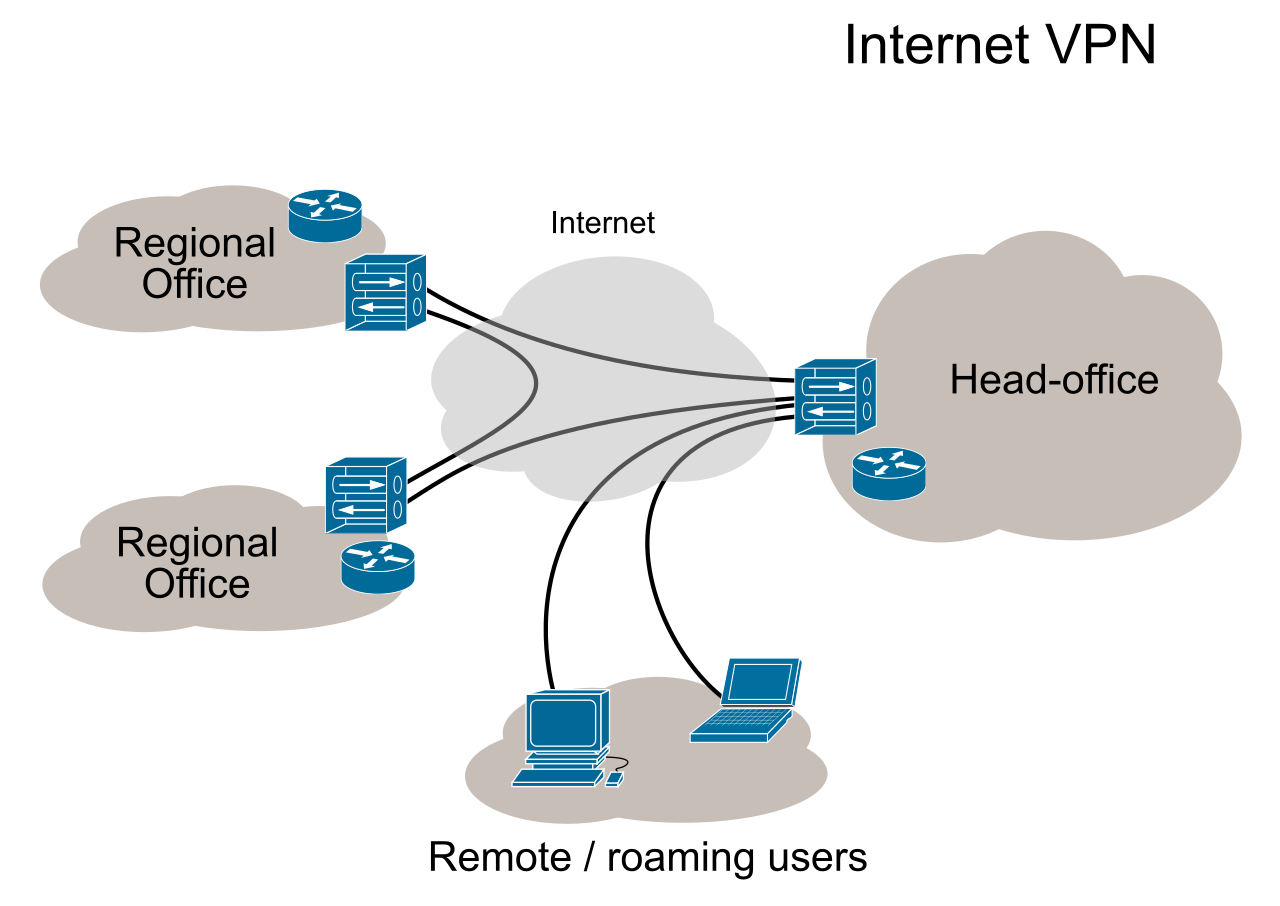
Bridging Islands: Site-to-Site VPNs
When an organization has a headquarters in New York and a branch office in London, those two locations need to share servers, printers, and active directories seamlessly.
A site-to-site Virtual Private Network (VPN) creates a persistent, secure connection between two separate geographic networks over the public internet. Think of this as a permanent, heavy-duty bridge spanning a river. The bridge is always open, and traffic flows back and forth continuously.
To facilitate this massive flow of data, site-to-site VPNs rely on dedicated VPN gateways or edge routers at each physical location to automatically encrypt and decrypt cross-site traffic. Because the heavy cryptographic lifting is done by the routers at the edge of the network, the internal devices are completely oblivious to the public internet. Consequently, in a site-to-site VPN architecture, individual user workstations communicate seamlessly with the remote site without requiring VPN client software installed on the workstations. An employee in New York simply pings a server in London, and the edge router transparently intercepts, encrypts, and routes the packet.
At the protocol level, Internet Protocol Security (IPsec) is the most common protocol suite used to establish and secure site-to-site VPN connections. IPsec is a framework of open standards that provides data confidentiality, integrity, and origin authentication at the network layer (Layer 3), making it the undisputed gold standard for tying geographic sites together.
Connecting the Wanderer: Client-to-Site VPNs
A site-to-site VPN is useless for an individual sales executive working from a coffee shop or an airport terminal. For these transient users, we utilize a remote access model.
A client-to-site VPN securely connects a single remote user device to a central corporate network. Instead of joining two entire networks, it tethers one nomadic machine securely back to base.
Because the user is operating from random, untrusted networks, the corporate edge router cannot automatically intercept their traffic. Therefore, client-to-site VPN connections require the remote device to run dedicated VPN client software or utilize native operating system VPN capabilities.
When the user initiates the connection and proves their identity, a critical network transaction occurs: client-to-site VPN gateways dynamically assign a virtual IP address from the corporate network pool to the remote user's device upon successful authentication. Even though the user's laptop is physically connected to an airport Wi-Fi network with an IP like 172.16.50.10, the corporate VPN gateway hands them a virtual, internal corporate IP like 10.0.5.150. To the internal corporate servers, the laptop appears as though it is plugged directly into a wall jack inside the headquarters.
While IPsec can be used for these connections, client-to-site VPNs frequently utilize Secure Sockets Layer (SSL) or Transport Layer Security (TLS) to encrypt the remote connection. Because TLS operates at the application layer and is natively understood by web browsers and operating systems, it generally navigates through strict hotel or coffee shop firewalls much more easily than IPsec.
Establishing a client-to-site VPN creates a fascinating routing dilemma for the network administrator. Once the remote laptop is connected to the corporate gateway, what happens when the employee opens a web browser and goes to YouTube or attempts to download a massive file from a public website?
You must decide exactly which data enters the encrypted tunnel.
Full-Tunnel VPN Configuration
A full-tunnel VPN configuration routes all internet-bound and corporate network traffic from the remote client device through the encrypted VPN tunnel.
If the user tries to access the corporate internal payroll server, the request goes through the tunnel. If the user tries to access Netflix, the request goes through the tunnel, lands at the corporate headquarters, goes out the corporate internet connection to Netflix, and streams back through the tunnel to the user.
| The Full-Tunnel Advantage | The Full-Tunnel Penalty |
|---|---|
| Complete Visibility: Full-tunnel VPN configurations allow network administrators to enforce corporate web filtering and security policies on remote user devices for all internet activity. You can block malicious websites exactly as if the user were sitting in the office. | Bottlenecks: Full-tunnel VPN configurations increase the bandwidth load on the corporate internet connection because the corporate gateway processes all remote client internet traffic. If 500 remote employees stream high-definition video over a full tunnel, your corporate internet line will quickly buckle under the strain. |
Split-Tunnel VPN Configuration
To solve the bandwidth crisis created by the full-tunnel model, administrators can alter the routing tables pushed to the VPN client.
A split-tunnel VPN configuration routes only specific corporate network traffic through the encrypted VPN tunnel.
In this model, the VPN client software examines the destination IP address of every packet the laptop attempts to send. If the packet is destined for an internal corporate subnet (e.g., 10.0.x.x), it is encrypted and sent down the VPN tunnel. However, in a split-tunnel VPN configuration, general internet traffic bypasses the VPN tunnel and routes directly through the remote client's local internet connection.
The operational benefits are immediate: split-tunnel VPN configurations conserve corporate network bandwidth by offloading regular internet traffic to the remote user's local Internet Service Provider (ISP). You are no longer paying to encrypt and route your employees' streaming audio, casual web browsing, or personal cloud backups.
But this efficiency demands a steep security trade-off. Split-tunnel VPNs present a higher security risk than full-tunnel VPNs because the remote client device connects directly to the unmonitored public internet while simultaneously accessing the internal network. If the user visits a compromised website via their local internet connection and inadvertently downloads malware, that malware now resides on a machine that has an active, authenticated, and encrypted backdoor straight into your most sensitive corporate subnets. You have essentially bypassed your own million-dollar edge firewalls.
The Architectural Choice: As a network professional, your job is to weigh these variables. Do you require the flawless synchronization of PTP, or is the ubiquitous simplicity of NTP sufficient? Do you lock down your remote workers with the iron grip of a full-tunnel VPN, or do you accept the inherent risks of a split-tunnel to save your network from bandwidth collapse? Network engineering is the continuous, calculated balancing of capability, security, and physics.