DHCP and DNS Services
Not sure you’re ready?
Take the ~3-minute readiness diagnostic and see where you stand.
Imagine constructing a sprawling metropolis where every building constantly changes its geographical location, and the millions of residents speak completely different dialects. Without a centralized registry to translate complex navigational coordinates into recognizable names, and without an automated system to assign addresses to the shifting buildings, the city would collapse into isolated, unreachable islands. In enterprise networking, The Dynamic Host Configuration Protocol (DHCP) and the Domain Name System (DNS) serve exactly this function. They are the invisible, essential gears of modern infrastructure that allow billions of endpoints—from massive database clusters to the smartphone in your pocket—to interoperate seamlessly without human intervention.
If you manage a network of 500 computers, manually typing an IP address, subnet mask, default gateway, and DNS server into every single machine is not just tedious; it is an invitation for catastrophic human error. The Dynamic Host Configuration Protocol (DHCP) automatically assigns IP addresses and network configuration parameters to client devices.
But how does a device with no IP address communicate with a server to ask for one?
The DORA Process
When a device first connects to the network, the DHCPv4 assignment process follows four steps known as the DORA process. Because the client does not yet have an IP address or know the location of the DHCP server, DHCP discovery messages are sent as broadcast traffic. The client essentially walks into a crowded room and shouts to everyone, "I need an address!"
The four steps of the DHCPv4 DORA process are Discover, Offer, Request, and Acknowledge:
- Discover: The client broadcasts its plea for an IP configuration.
- Offer: A listening DHCP server responds with a proposed IP address.
- Request: The client officially requests to lease the offered address.
- Acknowledge (ACK): The DHCP server confirms the lease and locks it in.
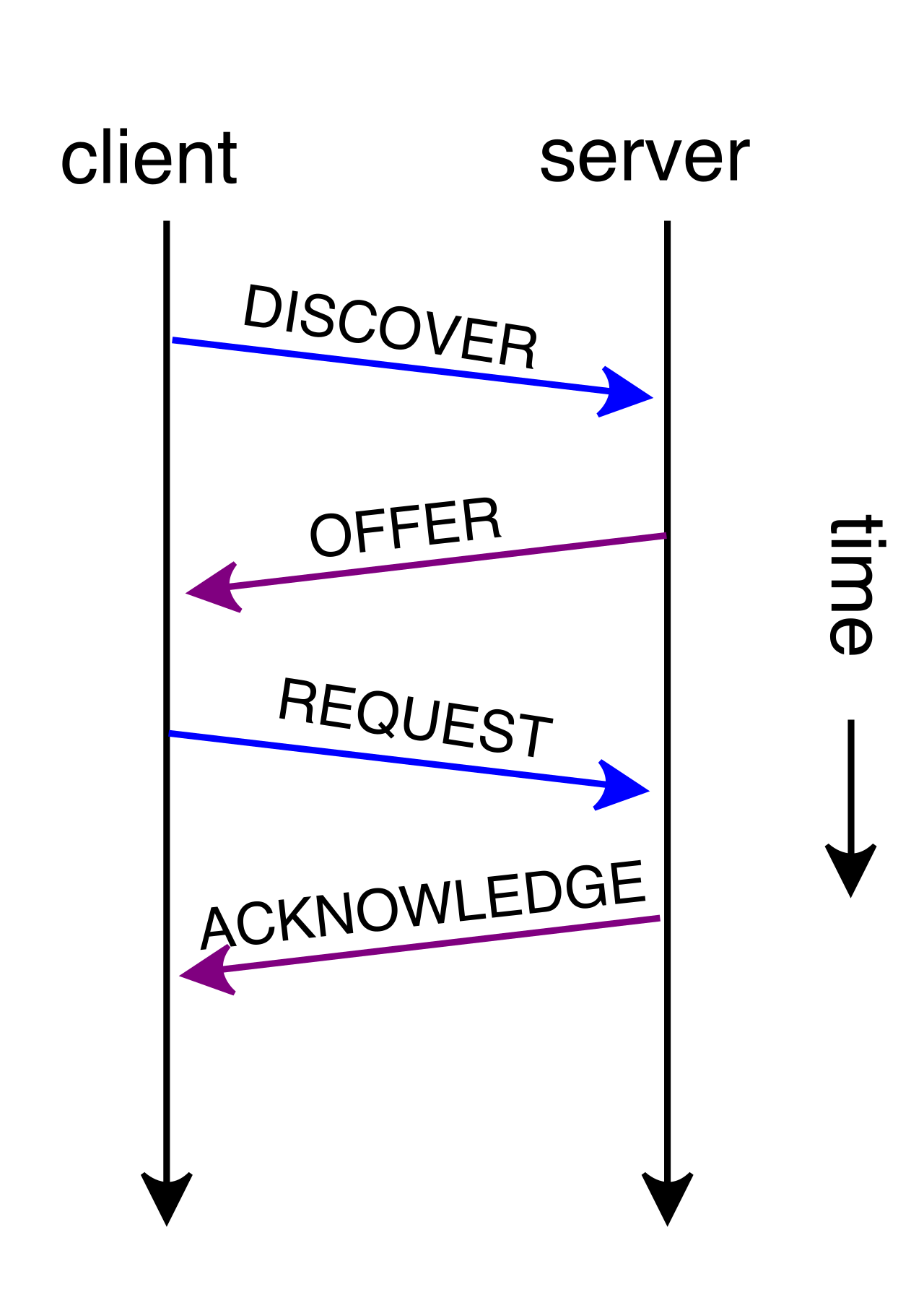
Why this matters for your daily work: When an entire floor of users suddenly loses network connectivity and their machines self-assign 169.254.x.x (APIPA) addresses, you know exactly where the process broke down: the initial Discover broadcast never received an Offer.
Scopes, Exclusions, and Leases
To hand out addresses, the DHCP server relies on boundaries you define. A DHCP scope defines a continuous range of IP addresses that a DHCP server is authorized to lease to clients.
However, you often have static infrastructure—like switches, printers, or legacy servers—living inside that subnet. You cannot risk the DHCP server handing a user the same IP address that your core router is using. To solve this, you configure a DHCP exclusion, which removes specific IP addresses from a DHCP scope to prevent the DHCP server from assigning those addresses to clients.
When a client receives an IP, they do not own it forever. A DHCP lease time determines the specific duration a client device is permitted to use a dynamically assigned IP address. What happens when time starts running out? The device doesn't wait until the last second. A DHCP client typically attempts to renew a DHCP lease when 50 percent of the lease time has expired. If the lease is 8 days, the client silently whispers a unicast renewal request to the server on day 4.
Reservations: The Best of Both Worlds
Sometimes you have a device, like a network-attached scanner, that needs to receive its IP configuration dynamically via DHCP, but you want to ensure it gets the same IP address every single time so users can reliably map to it.
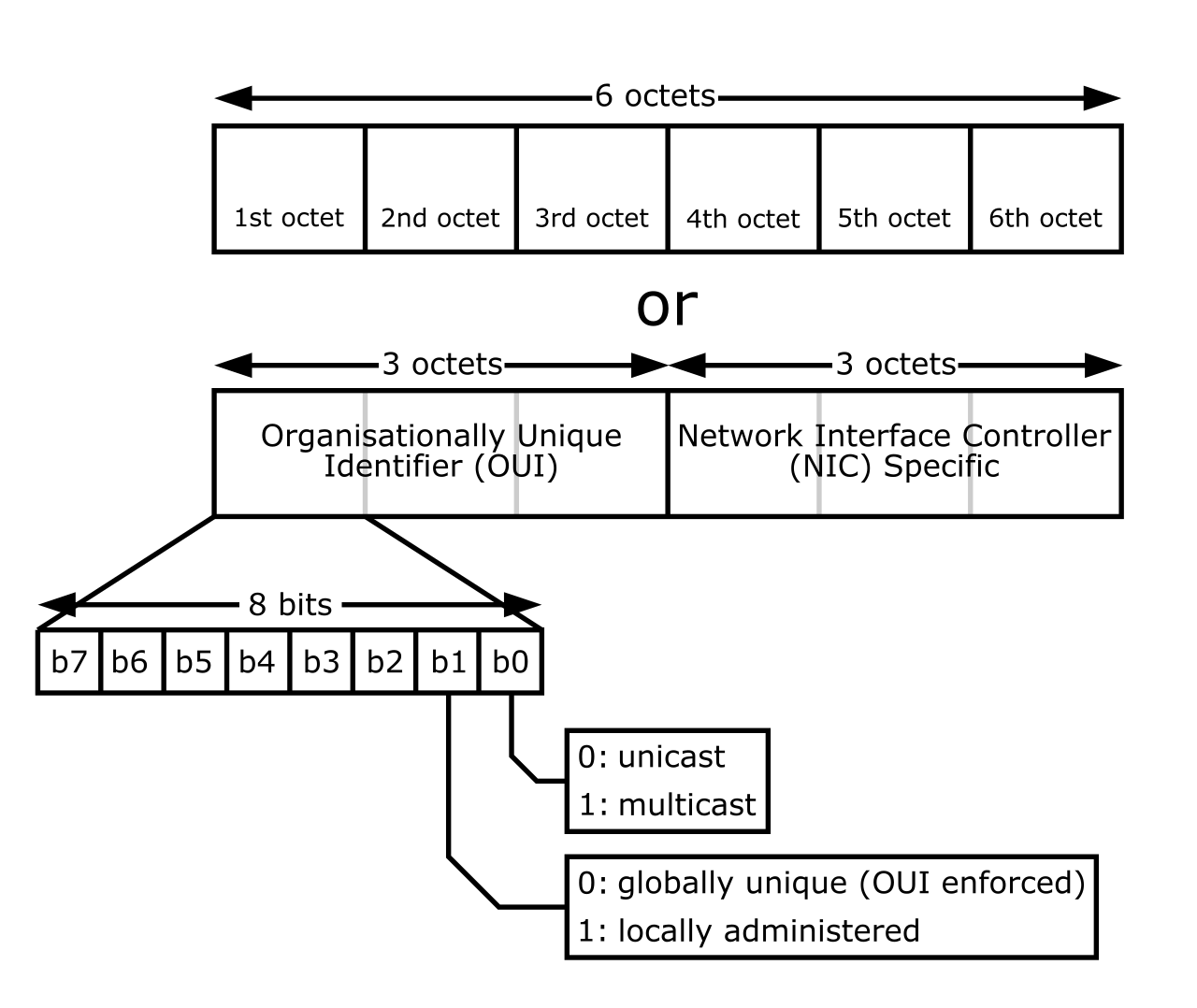
A DHCP reservation guarantees that a specific client device always receives the exact same IP address from the DHCP server. How does the server recognize the device? A DHCP reservation relies on matching the Media Access Control (MAC) address of the client device to a preconfigured IP address.
Crossing Network Boundaries: Relays and Helpers
Here is a fundamental rule of networking: Routers drop broadcast traffic by default. They are designed to contain noisy broadcasts to a single local area network (LAN).
But recall that DHCP Discover messages are broadcasts. If you have 50 different subnets (VLANs) in your corporate office, do you need to purchase and maintain 50 separate DHCP servers? No.
You use a feature on your router called an IP helper address, which configures a router interface to forward broadcast DHCP requests as unicast packets to a remote DHCP server. When the router hears the broadcast, it bundles it up into a targeted unicast packet and ferries it directly to your centralized DHCP server. A DHCP relay agent performs the exact same function as an IP helper address by forwarding DHCP requests across different subnets. (Note: "IP helper" is largely Cisco terminology, whereas "Relay Agent" is the vendor-neutral protocol term, but they are functionally identical).
IPv6 completely redesigns how we think about address assignment. Because the IPv6 address space is astronomically vast, devices don't necessarily need a centralized server to carefully manage and lease out individual addresses.
IPv6 Stateless Address Autoconfiguration (SLAAC) allows a device to assign itself a unique IPv6 address without requiring a DHCPv6 server. It is a brilliant mechanism of self-sufficiency.
Here is how it works:
- SLAAC relies on Router Advertisement (RA) messages sent by local routers using the Neighbor Discovery Protocol (NDP) to determine the network prefix. The router periodically shouts out, "Welcome to this network! The first 64 bits of the address scheme here are 2001:db8:acad:1::/64!"
- An IPv6 host using SLAAC combines the router-advertised network prefix with a locally generated interface identifier. The device takes the router's 64-bit prefix, and mathematically creates its own 64-bit ending (the interface ID) to form a complete 128-bit IPv6 address.
- How does it guarantee the second half is unique? Often, SLAAC can use the Extended Unique Identifier (EUI-64) method to generate an IPv6 interface identifier directly from the device MAC address. Since MAC addresses are globally unique hardware addresses, embedding them into the IPv6 address effectively guarantees a unique IP on the network without any central DHCP database.

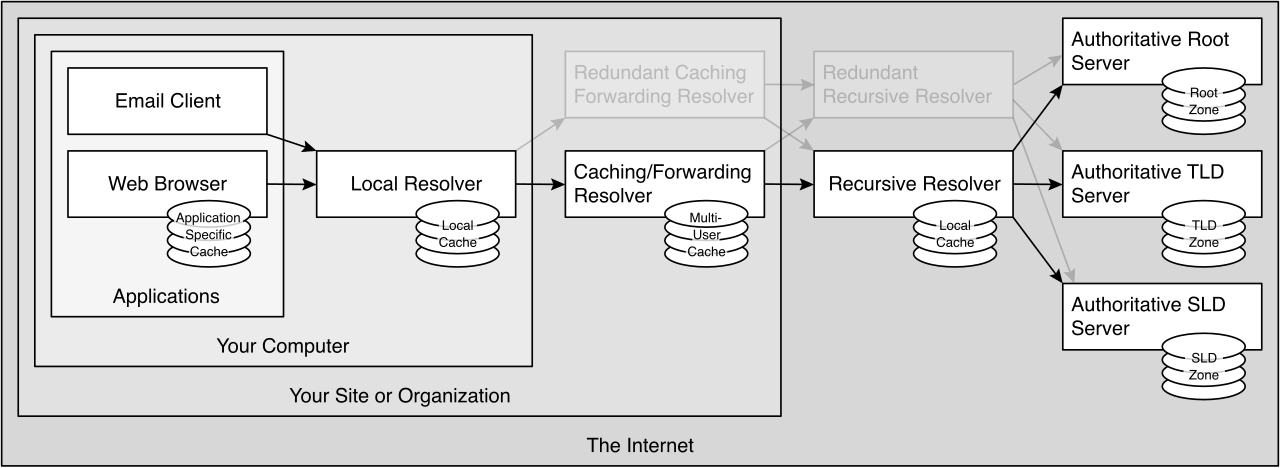
Now that devices have IP addresses, they can route traffic to one another. But humans are terrible at memorizing random strings of numbers. The Domain Name System (DNS) translates human-readable domain names into IP addresses, acting as the internet's master directory.
DNS Zones
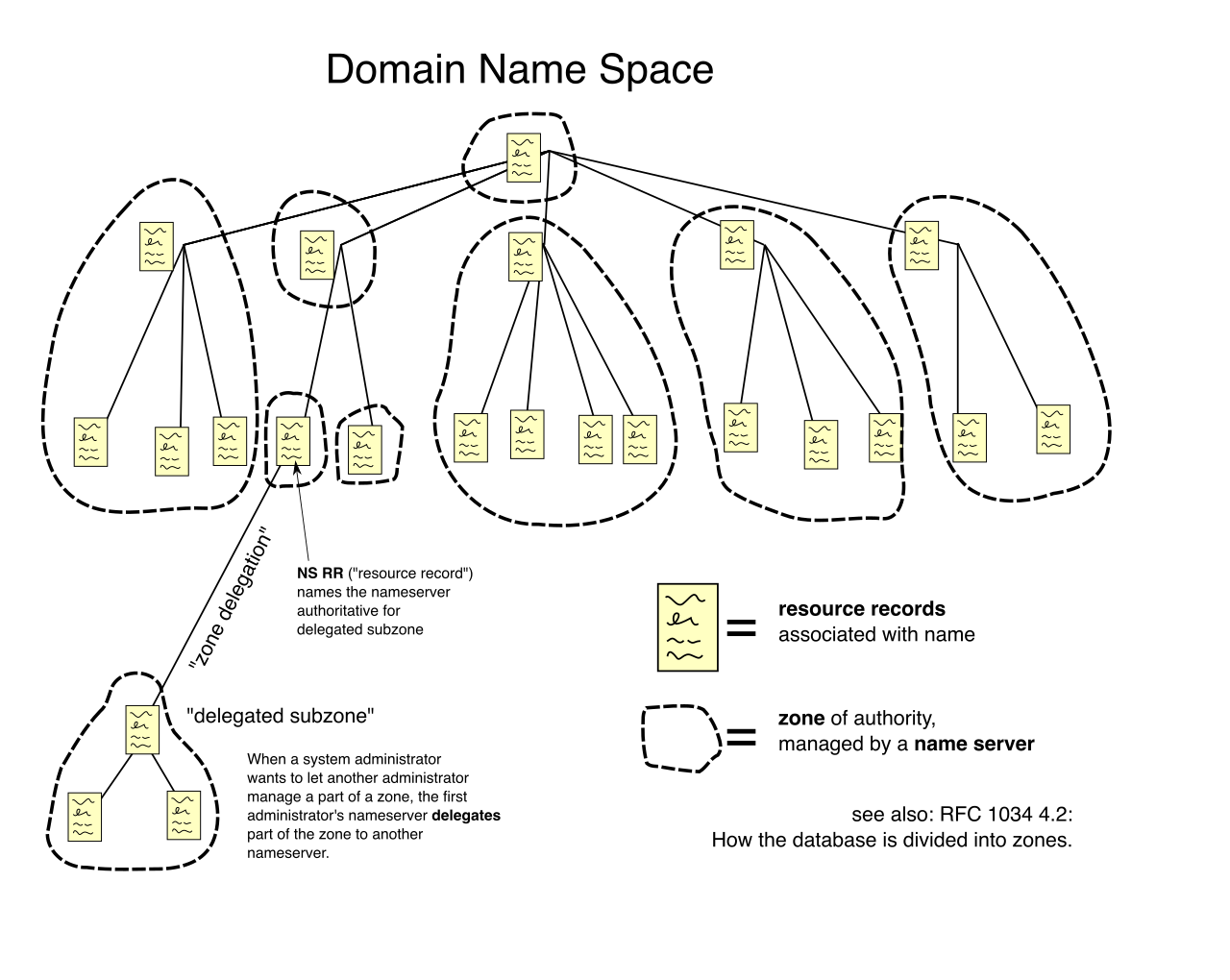
The DNS namespace is a massive, globally distributed tree structure. No single server holds all the internet's records. Instead, it is broken down into zones. A DNS zone is a distinct administrative portion of the global DNS namespace delegated to a specific manager.
We generally divide these into two operational directions:
- A DNS forward lookup zone resolves domain names to IP addresses. (e.g., "What is the IP of mail.company.com?")
- A DNS reverse lookup zone resolves IP addresses to domain names. (e.g., "Who owns 192.0.2.44?")
Crucial DNS Record Types
Inside a zone, data is categorized into distinct record types. As a network professional, you must instantly recognize the following core records:
| Record Type | Purpose | Description |
|---|---|---|
| A | IPv4 Mapping | A DNS A record maps a fully qualified domain name to an IPv4 address. |
| AAAA | IPv6 Mapping | A DNS AAAA record maps a fully qualified domain name to an IPv6 address. |
| CNAME | Alias | A DNS CNAME record creates an alias that points a domain name to another domain name. (e.g., routing www.company.com to company.com without creating duplicate IP records). |
| MX | Mail Exchange | A DNS MX record specifies the mail exchange server responsible for accepting incoming email for a particular domain. |
| PTR | Pointer | A DNS PTR record maps an IP address back to a hostname and is exclusively used in reverse lookup zones. |
| TXT | Text / Policy | A DNS TXT record stores human-readable text or machine-readable configuration data such as email security policies. (Critically used today for SPF, DKIM, and DMARC to prevent email spoofing). |
Caching and TTL
Because looking up a DNS record from the global root servers takes valuable time, your local machine and your corporate DNS server cache these answers. But how long should they remember an answer before checking if it changed?
A DNS Time To Live (TTL) value determines how long a DNS resolver caches a DNS record before requesting an updated record from the authoritative server. If you are migrating a website to a new server, you must dramatically lower the TTL days in advance, so when you finally change the A record, clients around the world will look for the new IP instead of relying on their stale, cached memory.
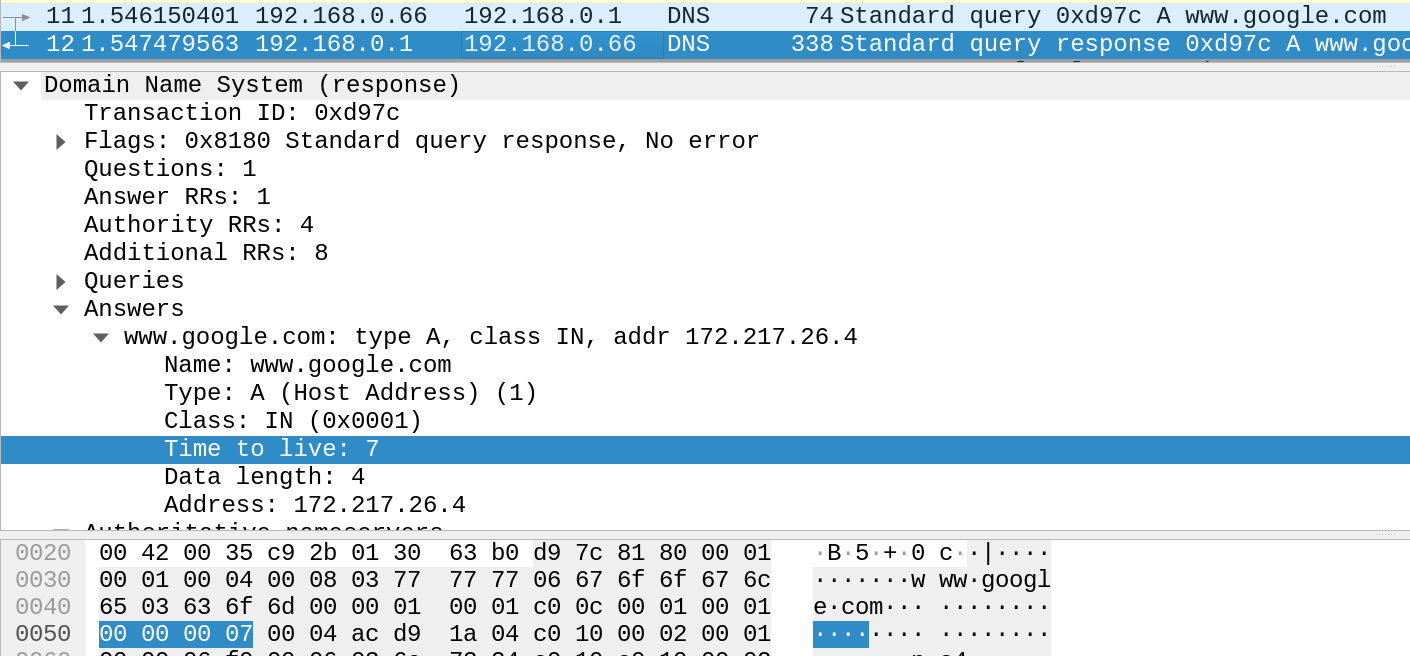
Standard DNS operates over UDP port 53 in plain text. This is a massive security vulnerability. If DNS is unencrypted and unverified, an attacker sitting between you and the DNS server can perform a man-in-the-middle attack, forging a response to direct your browser to a malicious clone of your bank's website. We solve this problem via integrity and encryption.
Verifying Authenticity: DNSSEC
If you receive a letter in the mail, how do you know the sender actually wrote it, and that the mail carrier didn't alter the contents? You look for a cryptographic wax seal.
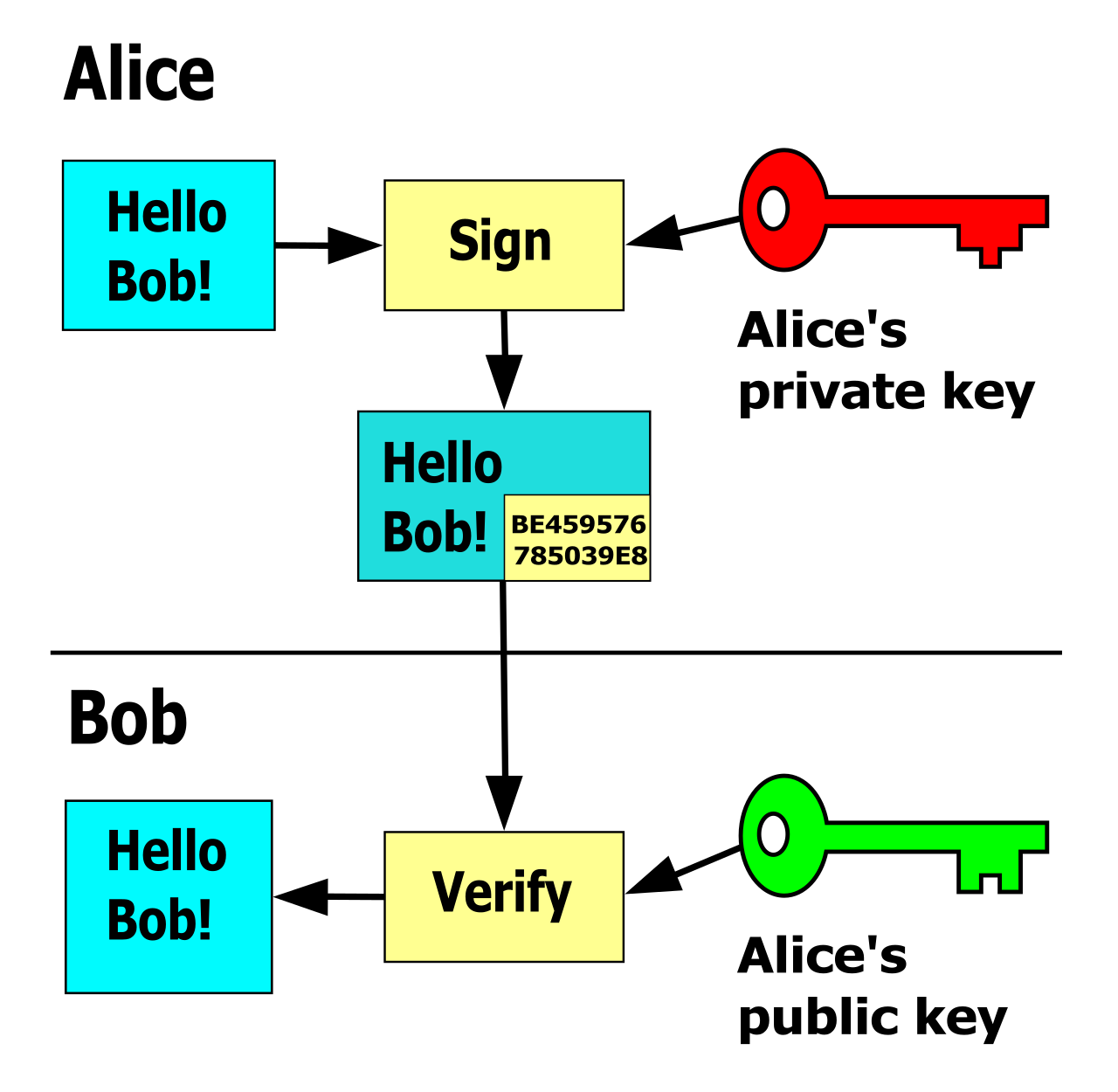
Domain Name System Security Extensions (DNSSEC) uses cryptographic digital signatures to verify the authenticity of DNS responses. By verifying the digital signature on the DNS response against public keys, DNSSEC prevents DNS spoofing attacks by ensuring that DNS records have not been altered in transit. Note that DNSSEC does not encrypt the DNS traffic; anyone can still read the records you are requesting. It simply guarantees they haven't been tampered with.
Encrypting the Query: DoH vs. DoT
To stop network observers—like your ISP, a rogue Wi-Fi hotspot admin, or even your own corporate firewall—from eavesdropping on your DNS queries, the industry has shifted toward encrypting the DNS transport layer using two competing standards.
DNS over TLS (DoT)
- DNS over TLS (DoT) encrypts DNS queries and responses using the Transport Layer Security (TLS) protocol.
- DNS over TLS (DoT) utilizes TCP port 853.
- Because it uses a completely separate port, DNS over TLS (DoT) provides dedicated, encrypted DNS channels that are easily distinguishable from standard web traffic. Network administrators prefer DoT because they can easily block port 853 at the firewall if they want to force users to utilize the corporate, heavily filtered DNS servers.
DNS over HTTPS (DoH)
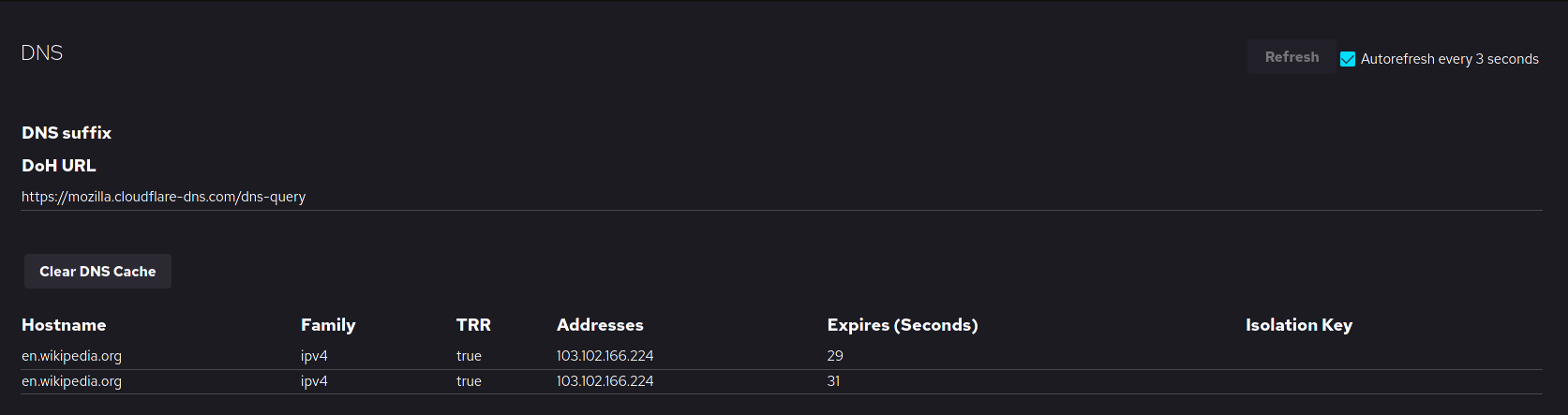
- DNS over HTTPS (DoH) encrypts DNS queries and responses within HTTPS traffic.
- Because it uses standard HTTPS, DNS over HTTPS (DoH) utilizes TCP port 443.
- This makes it a nightmare for corporate network filtering but a triumph for personal privacy. DNS over HTTPS (DoH) hides DNS resolution traffic from network observers by blending the DNS queries with standard encrypted web browsing traffic. To a firewall, a DoH query simply looks like standard HTTPS web surfing.
Understanding the interplay between DHCP providing the foundational addresses, and DNS mapping the human intent, is the bedrock of modern networking. Whether you are assigning static reservations via MAC addresses, troubleshooting an APIPA address because a router dropped a broadcast, or defending against spoofing with DNSSEC, you are manipulating the master control systems of the connected world.