Components and Resources for Security
Not sure you’re ready?
Take the ~3-minute readiness diagnostic and see where you stand.
A modern corporate headquarters does not rely on a single lock on the front door to protect its most valuable assets. Instead, it employs a layered defense: a perimeter fence, a security desk, badge readers at individual office doors, and locked filing cabinets inside those offices. When we design environments in Amazon Web Services (AWS), we apply this exact same philosophy of "defense in depth." Whether you are calculating the financial risk of a data breach, managing the rollout of a new software product, or preparing to validate your foundational cloud literacy, understanding how AWS structures these defensive layers is non-negotiable. We do not just build in the cloud; we secure what we build.
When you place a server—an Amazon Elastic Compute Cloud (EC2) instance—inside a Virtual Private Cloud (VPC), you must dictate exactly who and what is allowed to communicate with it. AWS provides two distinct virtual firewalls to manage this traffic. The distinction between them is one of the most rigorously tested concepts on the Cloud Practitioner exam.
Security Groups: The Office Door Badge Reader
A Security Group acts as a virtual firewall for Amazon EC2 instances to control incoming and outgoing network traffic. Crucially, Security Groups operate at the instance level rather than the subnet level. You can think of a Security Group as the badge reader on a specific employee's office door. Even if someone makes it into the building, they still need authorization to open that specific door.
Security Groups evaluate traffic based on rules that specify allowed protocols (like TCP or UDP), port ranges (like port 443 for HTTPS), and source or destination IP addresses.
Crucial Concept: Stateful Inspection Security Groups are stateful. The stateful nature of Security Groups means return traffic is automatically allowed regardless of any explicit outbound rules.
If you leave your office to grab a coffee (an outbound request), the door remembers you and lets you back in (the inbound response) without requiring you to swipe your badge again.
Because they are designed to be permissive only to trusted entities, Security Groups only support allow rules; they do not support explicit deny rules. You cannot write a rule that says "block this IP address." You simply do not grant it an allow rule.
- By default, a newly created Security Group denies all inbound traffic.
- By default, a newly created Security Group allows all outbound traffic.
Network Access Control Lists (NACLs): The Lobby Security Desk
A Network Access Control List (NACL) acts as a virtual firewall to control traffic entering and exiting an Amazon VPC subnet. Unlike Security Groups, Network Access Control Lists operate at the subnet level. This is the security desk at the lobby of a specific floor. Every piece of traffic entering or leaving that floor must pass through the NACL.
Crucial Concept: Stateless Inspection Network Access Control Lists are stateless. The stateless nature of Network Access Control Lists requires explicit rules for both inbound and outbound traffic because return traffic is not automatically allowed.
If you pass the lobby guard to leave the floor, that guard will still demand to see your ID when you return. Furthermore, Network Access Control Lists support both allow and deny rules. If you want to explicitly block a malicious IP address from ever reaching your subnet, you do it here.
Network Access Control Lists evaluate rules in ascending order based on rule numbers, stopping at the first rule that matches the traffic. If Rule 100 says "Deny IP X" and Rule 110 says "Allow all IPs", the NACL evaluates Rule 100 first, blocks IP X, and stops processing.
- By default, a custom Network Access Control List denies all inbound and outbound traffic until rules are manually added.
- However, the default Network Access Control List created automatically with a new VPC allows all inbound and outbound IPv4 traffic, ensuring your initial network is functional until you lock it down.
Quick Comparison
| Feature | Security Groups (SGs) | Network ACLs (NACLs) |
|---|---|---|
| Scope | Operates at the Instance level | Operates at the Subnet level |
| State | Stateful (Return traffic automatically allowed) | Stateless (Return traffic must be explicitly allowed) |
| Rules | Supports Allow rules only | Supports both Allow and Deny rules |
| Evaluation | Evaluates all rules before deciding | Evaluates rules in ascending number order, stops at first match |
Protecting the network is only the first step. You must also protect the applications running on that network from malicious traffic and overwhelming internet noise.
AWS WAF (Web Application Firewall)
AWS WAF is a web application firewall that helps protect web applications and APIs from common web exploits and malicious bots. Think of it as a highly trained mailroom inspector. Before a package (a web request) reaches the executive (your application), the inspector checks it for known threats.
Specifically, AWS WAF can mitigate common attacks such as SQL injection and cross-site scripting (XSS). It achieves this because AWS WAF allows users to create custom rules that block, allow, or monitor HTTP and HTTPS requests based on specific conditions like IP addresses or query string parameters.
To intercept traffic before it hits your servers, AWS WAF is positioned at the edge of your network. It can be deployed on three specific services:
- Amazon CloudFront distributions (Global content delivery network)
- Application Load Balancers (Regional traffic distribution)
- Amazon API Gateway REST APIs (Entry points for your backend APIs)
AWS Shield
If WAF is the mail inspector looking for a poisoned letter, AWS Shield is the riot police preventing a massive mob from blocking the building's entrance. AWS Shield is a managed Distributed Denial of Service (DDoS) protection service that safeguards applications running on AWS.
- AWS Shield Standard provides automatic DDoS protection for all AWS customers at no additional charge. You benefit from this simply by existing in AWS.
- AWS Shield Advanced provides expanded DDoS protection for applications running on Amazon EC2, Elastic Load Balancing, Amazon CloudFront, AWS Global Accelerator, and Amazon Route 53. It includes access to a specialized 24/7 DDoS response team and financial protection against spikes in your AWS bill caused by a DDoS attack.
A robust security posture requires constant vigilance. AWS provides a suite of intelligent services to monitor, detect, and aggregate security alerts.
- Amazon GuardDuty: This is your surveillance camera operator. Amazon GuardDuty is a threat detection service that continuously monitors an AWS account for malicious activity and unauthorized behavior (such as an EC2 instance suddenly communicating with a known cryptocurrency mining IP).
- Amazon Inspector: This is your internal auditor checking the locks. Amazon Inspector is an automated vulnerability management service that continually scans AWS workloads for software vulnerabilities and unintended network exposure.
- Amazon Macie: This is an intelligent librarian protecting sensitive documents. Amazon Macie is a data security service that uses machine learning and pattern matching to discover and protect sensitive data (like credit card numbers or personal health information) stored in Amazon S3.
- AWS Security Hub: This is the master control room. AWS Security Hub is a cloud security posture management service that performs security best practice checks, aggregates alerts (from GuardDuty, Inspector, Macie, and other tools), and enables automated remediation.
Encrypting data and hiding passwords are fundamental principles of security. In AWS, we rely on two deeply integrated services to handle our cryptographic needs.
AWS Key Management Service (AWS KMS) is a managed service that enables users to create and control the cryptographic keys used to protect customer data. Whether your data is sitting in an S3 bucket or an Elastic Block Store (EBS) volume, AWS KMS provides the lock and the key to ensure that even if someone physically stole the hard drives from an AWS data center, the data would be unreadable.
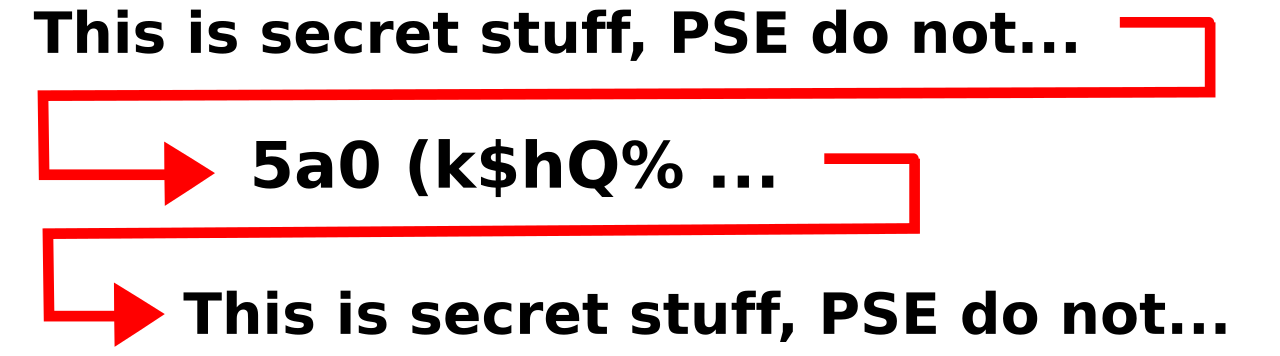
AWS Secrets Manager is a service designed to securely store, rotate, manage, and retrieve database credentials, API keys, and other secrets. Instead of hardcoding a database password into your application's source code (a massive security risk), your application queries Secrets Manager at runtime to get the password. Its greatest feature is its ability to automatically rotate these passwords on a schedule, dramatically reducing the risk of compromised credentials.
AWS provides incredible native security tools, but many organizations already have established relationships with specific security vendors (like Palo Alto, Cisco, or Splunk).
AWS Marketplace is a curated digital catalog used to find, test, buy, and deploy software that runs on Amazon Web Services. For security and finance teams, this is a game-changer. AWS Marketplace provides thousands of third-party security software products and appliances.
Customers can use AWS Marketplace to purchase third-party next-generation firewalls, endpoint protection systems, and compliance reporting solutions. From a business operations perspective, the friction of procurement vanishes because billing for third-party security solutions purchased through AWS Marketplace is consolidated directly into the customer's AWS bill. You do not need to set up new vendor contracts or payment methods; it simply appears alongside your EC2 and S3 charges.
Finally, how do you know if you are actually configuring your environment correctly, and how do you prove it to a government regulator or an auditor?
AWS Trusted Advisor
AWS Trusted Advisor is an online tool that provides real-time guidance to help customers provision resources following AWS best practices. Think of it as a seasoned consultant continually looking over your shoulder.
AWS Trusted Advisor evaluates an AWS account across five pillars: cost optimization, performance, security, fault tolerance, and service limits.
Within the Security pillar, Trusted Advisor acts as a critical safety net. Specifically:
- The Security pillar of AWS Trusted Advisor checks for security vulnerabilities such as unrestricted access to specific ports via Security Groups (e.g., leaving a database port open to the entire internet).
- The Security pillar alerts administrators if Multi-Factor Authentication (MFA) is not enabled on the AWS root account, which is the most dangerous misconfiguration a business can make.
- AWS Trusted Advisor checks for and flags Amazon S3 buckets that have potentially insecure public read or write access, preventing accidental data leaks.
AWS Artifact and Compliance
When your legal or compliance department asks for proof that AWS data centers are secure, you do not invite them to tour an AWS facility. Instead, you send them to AWS Artifact.
AWS Artifact is a central resource for downloading AWS security and compliance documents.
- AWS Artifact provides on-demand access to AWS System and Organization Controls (SOC) reports and Payment Card Industry (PCI) reports.
- Furthermore, AWS Artifact is the portal where customers can review, accept, and manage agreements with AWS, such as Business Associate Addendums (BAA) for HIPAA compliance. If you are building a healthcare application, the BAA must be signed here before you can legally process patient data.
AWS Security Center
To stay informed about the broader security landscape, AWS maintains the AWS Security Center, a centralized web portal providing security bulletins, best practices, and security-related whitepapers. Within this center, AWS Security Bulletins publish official information about security and privacy events that affect AWS services. If a new global software vulnerability is discovered in the wild, the Security Bulletin is where AWS explains how they are addressing it to protect your infrastructure.