Deploying and Operating in the AWS Cloud
Not sure you’re ready?
Take the ~3-minute readiness diagnostic and see where you stand.
Operating a massive, global network of computing resources requires a fundamental shift in how we interact with technology. If you were handed the keys to an infinitely scalable, automated manufacturing plant, you would not expect to walk the factory floor turning screws by hand. Instead, you would need control panels to monitor the systems, automated scripts to repeat complex assembly lines, blueprints to duplicate the factory in another country, and secure supply chains to transport your materials. Deploying and operating in the AWS Cloud relies on this exact same logic. To harness the scale of AWS, an organization must deliberately choose how it provisions resources, where those resources physically reside, and how its internal networks securely connect to the cloud environment.

Before examining the various tools used to manage cloud infrastructure, we must establish a singular, unbreakable rule of the AWS ecosystem: all programmatic and console-based interactions with AWS resources ultimately resolve to Application Programming Interface (API) requests.
When you instruct AWS to launch a server, allocate storage, or create a database, you are not directly manipulating a physical machine. You are sending a digital request to the AWS API, which acts as the universal translator between your intentions and the physical hardware sitting in an Amazon data center. Because every single action goes through this API, AWS provides several distinct pathways—or "control panels"—to send these requests, depending on whether the task requires human intuition or machine automation.
Visual Management: The AWS Management Console
For many professionals—especially those taking their first steps into the cloud, or non-technical staff like project managers and financial analysts reviewing billing dashboards—the primary gateway to AWS is the AWS Management Console.
The AWS Management Console is a web-based graphical user interface for managing AWS resources. Rather than writing code, you point, click, and navigate through visual menus. It is highly intuitive, making it ideal for manual resource provisioning and visual management by human operators.
Security Note: Because it is designed for human users, accessing the AWS Management Console typically requires an identity credential such as a username and password, often backed by Multi-Factor Authentication (MFA).
While the Console is excellent for exploration, learning, and one-off tasks, relying on humans to manually click through menus to build complex infrastructure is slow and prone to error. For scale, we must remove the mouse and keyboard from the equation.
The Power of Automation: Programmatic Access
To achieve the speed and reliability the cloud is famous for, engineers use programmatic access. Programmatic access allows users to interact with AWS services through code or text commands instead of a graphical interface.
Because machines, rather than humans, are making these requests, standard usernames and passwords are too cumbersome and insecure. Therefore, programmatic access to AWS resources requires the use of cryptographic IAM access keys (an access key ID and a secret access key) to cryptographically sign and authenticate every API request.
AWS provides two primary avenues for programmatic access:
-
The AWS Command Line Interface (CLI): The AWS Command Line Interface allows users to control multiple AWS services from a text-based terminal. By typing commands directly into a computer's terminal, a system administrator can launch hundreds of servers in seconds. More importantly, the CLI enables the automation of routine administrative tasks through reusable shell scripts. If you find yourself performing a task three times a week, you can write a CLI script to do it automatically.
Tip: If you want the power of the CLI without configuring it on your local laptop, AWS provides AWS CloudShell. AWS CloudShell is a browser-based shell pre-authenticated with the active AWS Management Console credentials of the user, allowing you to instantly run CLI commands directly from your web browser.
-
AWS Software Development Kits (SDKs): While the CLI is perfect for system administrators running scripts, software developers building applications need something different. AWS Software Development Kits provide language-specific programming interfaces for interacting with AWS services. Whether a developer writes in Python, Java, or C++, SDKs allow developers to integrate AWS services directly into application software code. For example, if you are building a mobile app that needs to save a user's profile picture, the AWS SDK lets your app securely send that image directly to AWS storage from within your application's source code.
Imagine trying to build an exact replica of the Empire State Building by merely describing it to a crew of construction workers from memory. Mistakes would be guaranteed. The same is true for computing infrastructure. Relying on an engineer's memory to manually click through the AWS Management Console to set up a complex network is a liability.
The solution is Infrastructure as Code (IaC). Infrastructure as Code involves managing and provisioning computing infrastructure through machine-readable definition files. Instead of manually clicking buttons to build a network, a database, and a fleet of servers, you write a text file that describes exactly what that environment should look like.
Using Infrastructure as Code reduces the risk of human error associated with manual resource provisioning. Furthermore, it provides a repeatable and version-controllable method for deploying identical cloud environments. If you need a testing environment that perfectly mirrors your production environment, you simply execute your IaC blueprint a second time.
AWS provides two primary services for IaC:
| Tool | How it Works | Best For |
|---|---|---|
| AWS CloudFormation | AWS CloudFormation allows users to define entire cloud environments using JSON or YAML text templates. | Teams who want a declarative blueprint. AWS CloudFormation automatically provisions and configures AWS resources based on predefined declarative templates. You tell AWS what you want, and CloudFormation figures out how to build it. |
| AWS Cloud Development Kit (CDK) | The AWS Cloud Development Kit allows developers to define cloud infrastructure using familiar general-purpose programming languages (like Python, TypeScript, or Java). | Software developers who prefer to use standard programming logic (loops, if-statements) rather than writing rigid JSON/YAML text files. |
Understanding how to deploy resources is only half the equation; you must also decide where those resources physically reside. Organizations are not forced to move entirely into the cloud overnight. AWS categorizes computing architecture into three distinct deployment models:
1. On-Premises Deployment
Before cloud computing, every company had to be an IT company. An on-premises deployment model provisions hardware and software resources in local physical data centers owned by the customer.
While this grants ultimate physical control, it comes with a severe business tradeoff: the on-premises deployment model requires the organization to take full responsibility for physical hardware procurement and maintenance. If a server's hard drive fails at 3:00 AM, it is your IT team driving to the data center with a screwdriver to fix it.
2. Cloud-Native Deployment
At the opposite end of the spectrum is the cloud-native deployment model, which runs all parts of an application architecture fully within the cloud environment. In this model, AWS owns, maintains, and secures the physical hardware, allowing the customer to focus entirely on software innovation, scaling elastically, and paying only for the resources they consume.
3. Hybrid Cloud Deployment
For many large enterprises, abandoning on-premises infrastructure immediately is impossible. They may have millions of dollars invested in existing hardware, or they may operate under strict government regulations regarding data locality.
A hybrid cloud deployment securely connects legacy on-premises infrastructure to AWS cloud computing resources. This model is exceptionally valuable because a hybrid cloud model accommodates the strict local storage requirements of highly sensitive legacy data, keeping it physically on-site. Simultaneously, a hybrid cloud model allows an organization to utilize highly scalable cloud resources without abandoning existing data center investments—perhaps keeping databases on-premises while using the AWS Cloud to run web servers during periods of high traffic.
Blurring the Lines with AWS Outposts: What if you want the benefits of a cloud-native model but absolutely must run it in your own facility? AWS Outposts delivers native AWS hardware, services, and operating models directly to a customer physical on-premises facility. It is literally a rack of AWS servers wheeled into your building, functioning as a seamless extension of the AWS Cloud, managed by AWS, but sitting on your floor.
If you adopt a hybrid cloud model, your corporate data center and the AWS Cloud must communicate securely. Sending sensitive corporate data over the open public internet is like driving an armored truck with the doors wide open. Organizations must construct secure pathways to AWS.
Securing the Internet: AWS VPN
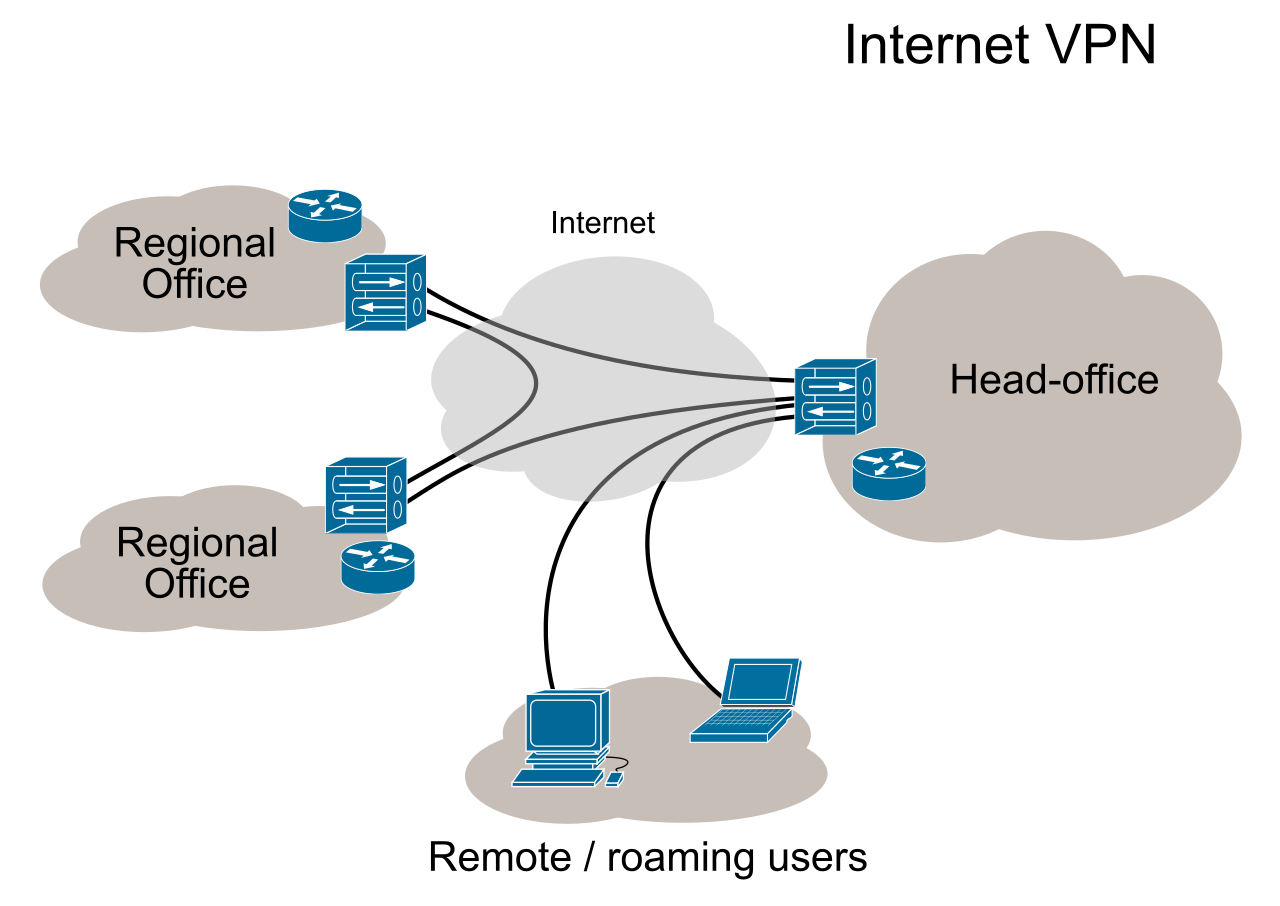
A Virtual Private Network (VPN) creates a secure, encrypted tunnel through the public internet. AWS offers two distinct VPN services depending on who—or what—needs to connect:
- AWS Site-to-Site VPN: This service creates a secure connection between a customer local data center network and an Amazon Virtual Private Cloud (VPC). Imagine this as an encrypted bridge between your corporate office building and AWS. To ensure privacy, AWS Site-to-Site VPN encrypts data in transit over the public internet using the Internet Protocol Security (IPSec) standard.
- AWS Client VPN: This is designed for the individual human worker. AWS Client VPN allows individual remote employees to securely access AWS resources from any remote geographic location, such as a coffee shop or a home office, by installing a simple software client on their laptop.
Bypassing the Internet: AWS Direct Connect
While a VPN is highly secure, it still relies on the public internet, meaning network speeds can fluctuate based on global internet traffic—a phenomenon akin to hitting rush-hour traffic on a highway.
If your organization requires absolute reliability, or transfers massive amounts of data daily, you need a private road. AWS Direct Connect establishes a dedicated physical network fiber connection from an on-premises facility directly to AWS.

Because this is a private, physical cable, data traveling over an AWS Direct Connect connection completely bypasses the public internet. This offers two massive business advantages:
- Consistency: Because you are not sharing the line with global internet traffic, AWS Direct Connect provides a highly consistent network latency experience compared to standard internet-based connections.
- Speed: AWS Direct Connect accelerates the continuous transfer of massive datasets by providing dedicated high-bandwidth physical routing.
For a financial trader where a millisecond of latency costs millions of dollars, or a hospital transmitting thousands of massive MRI scans daily, the investment in a Direct Connect fiber line is not just an IT decision; it is a critical business enabler.