Disaster Recovery (DR) Strategies
Not sure you’re ready?
Take the ~3-minute readiness diagnostic and see where you stand.
Imagine a municipal water system where the main reservoir is suddenly contaminated. You cannot negotiate with the laws of physics to instantly filter it, nor can you magically wish a secondary pipe system into existence if you did not lay the steel years prior. In cloud architecture, a geographic outage—whether from a severed transatlantic fiber cable, a catastrophic power failure, or a malicious ransomware encryption—presents the exact same reality. You are bound by the physics of your preparation. Designing for disaster recovery (DR) is not about trying to build an indestructible system; it is about engineering the exact mathematical limits of how much pain the business is willing to endure when a failure inevitably occurs.
Before we can discuss how to build a recovery mechanism, we must define exactly what we are recovering, and how fast. Every disaster recovery conversation with a business stakeholder ultimately distills down to two non-negotiable variables: data and time.
Recovery Point Objective (RPO) defines the maximum acceptable amount of data loss measured in time.
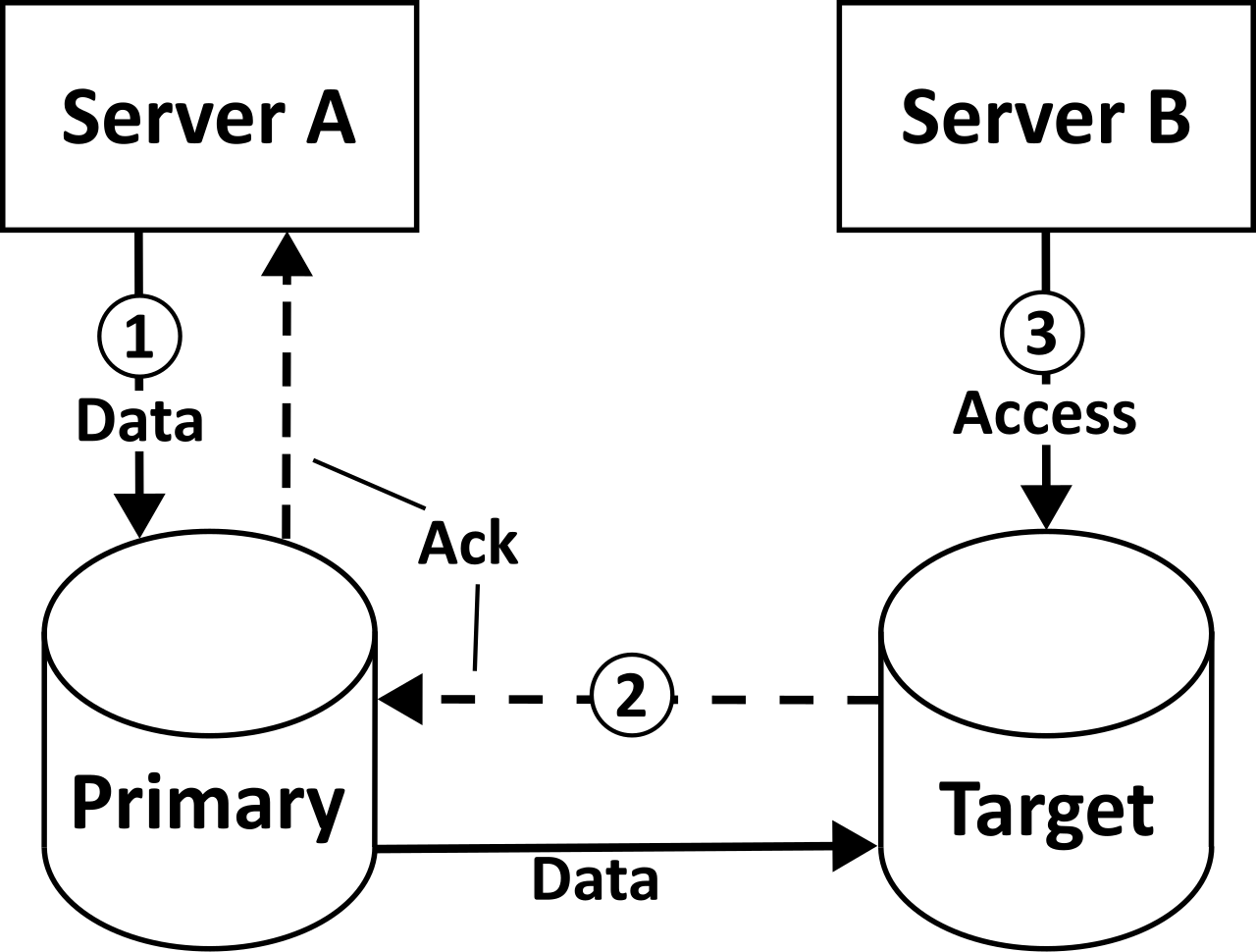
Think of RPO as looking backward in time. If a database goes down at exactly 12:00 PM and your RPO is one hour, your architecture must guarantee that you can restore all data up to 11:00 AM. If you lose the data between 11:00 AM and noon, the business accepts that loss. Consequently, a lower Recovery Point Objective (RPO) requires more frequent data replication or continuous data backups. If your RPO is zero, you must be writing data in multiple geographic locations simultaneously.
Recovery Time Objective (RTO) defines the maximum acceptable delay between the interruption of service and the restoration of service.
Think of RTO as looking forward in time. It is the stopwatch that starts the moment your application fails. If your RTO is 15 minutes, you have exactly 900 seconds to detect the failure, spin up new servers, restore the database, and redirect user traffic. Because provisioning compute and downloading data takes time, a lower Recovery Time Objective (RTO) requires infrastructure to be pre-provisioned and ready to handle traffic quickly.
In the physical world, mitigating risk costs money. You can buy a fireproof safe, or you can buy a fully staffed secondary headquarters in another state. The cloud is no different. AWS defines four primary Disaster Recovery strategies: Backup and Restore, Pilot Light, Warm Standby, and Multi-Site Active/Active.
Let us examine these along the spectrum of cost and speed.
1. Backup and Restore (The Blueprint)
Imagine keeping the blueprints to a factory in a safe, along with a daily snapshot of its inventory. If the factory burns down, you must clear the land, hire contractors, rebuild the walls, and then restock the shelves.
The Backup and Restore Disaster Recovery strategy involves routinely copying data to a secondary region or secondary AWS account. Because you are only paying for storage—not running servers—Backup and Restore is the most cost-effective AWS Disaster Recovery strategy.
However, when a disaster strikes, you must build the environment from scratch. The Backup and Restore Disaster Recovery strategy deploys compute and application infrastructure only after a disaster is declared. Because of this slow, deliberate sequence of events, Backup and Restore has the highest Recovery Time Objective (RTO) and Recovery Point Objective (RPO) among AWS Disaster Recovery strategies.
- Essential Mechanisms: AWS Backup is a fully managed service used to centralize and automate data backup across AWS services for disaster recovery. For object storage, Amazon S3 Cross-Region Replication (CRR) automatically copies objects to a different AWS Region to support disaster recovery objectives. To ensure your servers behave exactly as they did in the primary region, an Amazon Machine Image (AMI) can be copied across AWS Regions to ensure identical compute configurations are available for disaster recovery.
2. Pilot Light (The Idling Flame)
Consider a gas furnace. In the middle of summer, the main burners are off, saving you money. But a tiny, continuous pilot light remains lit. When winter arrives, you flip a switch, the gas flows, the pilot light ignites the main burners, and the house fills with heat.
The Pilot Light Disaster Recovery strategy maintains a minimal version of a production environment always running in the recovery region. The crucial distinction here involves data versus compute. Data has gravity; it takes too long to move during a crisis. Therefore, in a Pilot Light strategy, core data stores and databases are actively running and continuously replicating data.
Compute, however, is stateless and can be summoned on demand. In a Pilot Light strategy, application servers are provisioned from automated templates only after a disaster is declared. Because the database is already warm and synchronized, Pilot Light provides a lower Recovery Time Objective (RTO) than the Backup and Restore strategy.
3. Warm Standby (The Idling Engine)
Now imagine you are in a high-stakes auto race. You have a backup car idling in the pit lane. The engine is running, the driver is in the seat, but it is not currently racing at 200 miles per hour.
The Warm Standby Disaster Recovery strategy maintains a scaled-down, fully functional version of the production environment in the recovery region. Unlike Pilot Light—where application servers do not exist yet—in a Warm Standby architecture, business-critical systems are constantly running at a lower capacity than the primary production environment.
Everything is wired up. The load balancers are routing, the web servers are serving, and the databases are syncing. During a disaster event in a Warm Standby architecture, the scaled-down environment is scaled out to handle full production traffic. Because Auto Scaling groups simply need to add more instances to a running architecture rather than building the architecture from nothing, Warm Standby provides a lower Recovery Time Objective (RTO) than the Pilot Light strategy.

4. Multi-Site Active/Active (The Twin Power Plants)
If you operate two power plants and one explodes, the electrical grid simply relies on the second one without the consumer ever noticing a flicker in their lights.
The Multi-Site Active/Active Disaster Recovery strategy runs workloads simultaneously in multiple AWS Regions to serve live traffic. There is no "failover" process to wait for because the secondary region is already serving a portion of your users. Consequently, Multi-Site Active/Active provides near-zero Recovery Time Objective (RTO) and Recovery Point Objective (RPO). It also has the lowest Recovery Time Objective (RTO) and Recovery Point Objective (RPO) among AWS Disaster Recovery strategies.
The physics of this strategy dictate its economic reality: Multi-Site Active/Active is the most expensive Disaster Recovery strategy due to running infrastructure at full capacity in multiple regions.
Understanding the strategies conceptually is only half the battle. As an architect, you must select the precise AWS services that enforce your RPO and RTO mandates.
Data Layer: The Core of the Strategy
Your compute is disposable; your data is your business.
- Relational Databases: For typical RDS deployments, Amazon RDS Cross-Region Read Replicas can be promoted to a standalone primary database in a secondary region during a disaster. For enterprise workloads requiring incredible scale, Amazon Aurora Global Database spans multiple AWS Regions to enable fast local reads and quick disaster recovery.
- NoSQL Workloads: If you are building a true Multi-Site Active/Active application, you cannot afford latency in writing data. Amazon DynamoDB Global Tables provide fully managed, multi-region, active-active database replication.
Block Storage & Lift-and-Shift DR
What if you are protecting monolithic, legacy applications—like on-premises VMs—that cannot be easily refactored into modern cloud-native architectures?
AWS Elastic Disaster Recovery (AWS DRS) continuously replicates block storage volumes from physical, virtual, or cloud servers to a target AWS Region. To keep costs strictly aligned with the Backup & Restore or Pilot Light philosophies, AWS Elastic Disaster Recovery uses a low-cost staging area subnet to continuously receive replicated data without provisioning production compute resources.
Because it continually streams the underlying byte blocks, AWS Elastic Disaster Recovery provides sub-second Recovery Point Objective (RPO). When a disaster is declared, DRS orchestrates the conversion of these replicated volumes into running EC2 instances, meaning AWS Elastic Disaster Recovery provides a Recovery Time Objective (RTO) measured in minutes.
Orchestrating the Failover (Automation and Routing)
When disaster strikes, humans panic. Human panic introduces latency and typos. A robust DR strategy removes humans from the immediate response loop.
To build out your infrastructure rapidly, AWS CloudFormation automates the provisioning of infrastructure in a recovery region to minimize human error during a disaster.
But how does the system know to switch? It requires automated sensory organs. Amazon Route 53 health checks automatically detect endpoint failures to initiate traffic routing changes. You wire these health checks to your DNS records.
- Under normal conditions, Amazon Route 53 failover routing policy routes traffic to a primary resource when the resource is healthy.
- The millisecond the health check fails, Amazon Route 53 failover routing policy routes traffic to a secondary resource when the primary resource becomes unhealthy.
Behind the scenes, the internal mechanics of your AWS environment must react. Amazon EventBridge can trigger AWS Lambda functions to initiate disaster recovery procedures in response to infrastructure failure events. If the recovery requires a complex sequence of steps—such as promoting a database, updating configuration files, and launching specific auto-scaling groups—AWS Systems Manager Automation runbooks can execute predefined operational tasks to automate disaster recovery failover processes.
Your job as an architect is to map business requirements to the harsh physical realities of distributed systems. If the business asks for zero data loss and instantaneous recovery, they are asking for Multi-Site Active/Active. If they are willing to wait hours and lose a day's worth of data to save thousands of dollars, they are asking for Backup and Restore. Understand the physics, master the AWS services that manipulate them, and you will design architectures that survive the unthinkable.