Elastic Compute Solutions
Not sure you’re ready?
Take the ~3-minute readiness diagnostic and see where you stand.
Designing compute architecture in the cloud is fundamentally an exercise in physics and economics. You are not simply renting servers; you are selecting the exact physical properties of a computational engine to overcome the specific bottlenecks of a given workload. If an application is constrained by how fast it can push bits from disk to RAM, throwing infinite processor cores at it will accomplish nothing except artificially inflating your monthly invoice. The true art of a Solutions Architect lies in mapping the structural demands of an application—whether it requires continuous heavy lifting, sudden bursts of scaling, or massive parallel processing across hundreds of nodes—to the precise AWS service engineered to absorb that strain.

When we examine the fundamental building blocks of cloud compute, Amazon EC2 provides scalable compute capacity in the AWS Cloud. However, a modern data center is not a monolith of identical hardware. To achieve efficiency, AWS organizes EC2 instance types into families optimized for different use cases. Understanding these families requires analyzing the ratios of vCPU, memory, networking, and local storage available to the instance.
General Purpose: The Baseline Balancers
General purpose EC2 instances provide a balance of compute, memory, and networking resources. They are the default starting point when a workload does not exhibit a severe bottleneck in any single dimension.
Within this category, the M instance family is designed for general-purpose workloads such as enterprise applications, internal tooling, and standard web servers.
However, many workloads—like internal administrative tools or low-traffic microservices—spend the vast majority of their time idling, only experiencing brief spikes of activity. For these, AWS provides a fascinating economic abstraction: the T instance family. The T instance family provides a baseline level of CPU performance with the ability to burst above the baseline. The mechanics of this are governed by a "bucket" of CPU credits. T instances accumulate CPU credits when idle. As the instance sits idle, water drips into the bucket. When traffic spikes, T instances consume CPU credits when operating above the baseline performance level. If the bucket empties, the instance is throttled back to its baseline. This mechanism aligns cost directly with statistical usage patterns, allowing architects to run spiky workloads at a fraction of the cost of a dedicated M-class instance.
Specializing Compute, Memory, and Storage
When a workload saturates the balanced ratios of general-purpose instances, we must pivot to specialized families.
Compute-Optimized: Compute-optimized EC2 instances are optimized for compute-bound applications that benefit from high-performance processors. The C instance family is the primary compute-optimized instance category. Because they offer the highest ratio of vCPUs to memory, compute-optimized instances are ideal for high-performance web servers, scientific modeling, and dedicated gaming servers. If your code spends its life crunching algorithms rather than waiting on data retrievals, the C family is your engine.
Memory-Optimized: Conversely, when an application is constrained by the speed at which it can load data into RAM, memory-optimized EC2 instances deliver fast performance for workloads that process large data sets in memory. To meet these demands, the R, X, and High Memory instance families are designed for memory-optimized workloads. Because disk I/O—even solid-state—is orders of magnitude slower than RAM, memory-optimized instances are ideal for high-performance databases, distributed memory caches, and real-time big data analytics.

Storage-Optimized: Sometimes, the bottleneck is purely the sheer volume and velocity of sequential read and write data movement. Storage-optimized EC2 instances are designed for workloads that require high, sequential read and write access to very large data sets on local storage. The I, D, and H instance families belong to the storage-optimized category. By utilizing NVMe architecture closely coupled to the CPU, storage-optimized instances deliver tens of thousands of low-latency, random I/O operations per second to applications. Consequently, storage-optimized instances are ideal for NoSQL databases, in-memory databases, and scale-out transactional databases—systems that must rapidly flush vast amounts of data to physical disks without network latency.

Accelerated Computing: Finally, there are mathematical operations that standard CPUs handle terribly. Standard processors calculate sequentially. When we need to execute thousands of simultaneous calculations, accelerated computing EC2 instances use hardware accelerators like GPUs or FPGAs. Because of their parallel architecture, accelerated computing instances perform functions like floating-point number calculations or graphics processing more efficiently than CPUs. The P, G, F, Trn, and Inf instance families belong to the accelerated computing category. (The "Trn" and "Inf" families specifically leverage AWS Trainium and Inferentia chips). Because of their raw parallel throughput, accelerated computing instances are recommended for machine learning training, autonomous vehicle applications, and speech recognition.

Architect's Summary:
- M, T: General Purpose (Balanced / Burstable)
- C: Compute-Optimized (High vCPU)
- R, X, High Memory: Memory-Optimized (High RAM)
- I, D, H: Storage-Optimized (High Local Disk IOPS)
- P, G, F, Trn, Inf: Accelerated Computing (Hardware parallelization)
While EC2 allows you to carefully select the underlying hardware, serverless computing abstracts the infrastructure entirely. AWS Lambda is a serverless compute service that runs code without provisioning or managing servers. It operates on an event-driven architecture; AWS Lambda automatically scales applications by running code in response to triggers (such as an API Gateway request or an S3 object upload).
Because you do not select instance families in Lambda, architects often wonder how to tune performance. The answer lies in understanding Lambda's fundamental lever of scale.
The Single Dial of Resource Allocation
In EC2, you configure CPU, memory, and networking independently by choosing an instance type. In Lambda, these dimensions are coupled. An AWS Lambda function is configured by allocating a specific amount of memory. Currently, AWS Lambda allows memory allocation between 128 MB and 10,240 MB.
This memory slider is effectively the throttle for your entire execution environment. AWS Lambda allocates CPU power proportionally to the amount of memory configured for the function. Therefore, increasing the memory of an AWS Lambda function automatically increases the available CPU resources. Furthermore, increasing the memory of an AWS Lambda function automatically increases the available network bandwidth.
It is crucial to note that a developer cannot configure the exact number of virtual CPUs for an AWS Lambda function directly. At 1,769 MB, Lambda provides the equivalent of one full vCPU. Beyond that, it allocates multiple vCPUs fractionally up to the 10 GB limit.
The Cost-Optimization Paradox
Because CPU is tethered to memory, optimizing AWS Lambda performance involves adjusting the memory configuration to find the fastest execution time.
This leads to a fascinating economic paradox that catches many junior engineers off guard. AWS bills Lambda based on GB-seconds (the amount of memory allocated multiplied by the milliseconds the function runs). You might assume that keeping memory low keeps costs low. However, if an application is compute-bound, a low memory setting will starve it of CPU, causing it to run for a very long time.
By doubling the memory, you double the CPU speed. If doubling the CPU speed cuts the execution time in half, your cost remains roughly exactly the same—but your user experiences a dramatic performance improvement. In many cases, a higher memory configuration in AWS Lambda can sometimes reduce overall costs by dramatically decreasing execution duration.
Finally, while Lambda scales automatically, sudden spikes can exhaust regional concurrency limits. To protect critical applications, AWS Lambda supports reserving a specific amount of concurrency to guarantee compute availability for a function, acting as an insurance policy that ensures your specific microservice always has immediate execution capacity ready.
Scaling a single application is one challenge; orchestrating the simultaneous processing of terabytes of data or millions of discreet computational jobs is entirely another. When faced with massively parallel workloads, architects typically evaluate two heavyweight services: AWS Batch and Amazon EMR. The decision depends entirely on the shape of the workload.
AWS Batch: The Containerized Dispatcher
Imagine you need to process thousands of distinct, independent jobs—such as encoding video frames or running thousands of distinct financial simulations. AWS Batch is a service used to run batch computing workloads on the AWS Cloud.
Instead of requiring you to build a complex queueing system and worker nodes, AWS Batch dynamically provisions the optimal quantity and type of compute resources based on the volume and specific resource requirements of the submitted batch jobs. You simply submit a containerized job with its requirements (e.g., "I need 4 vCPUs and 8GB RAM for this task"), and Batch handles the rest. AWS Batch eliminates the need to install and manage batch computing software.
The compute resources running these jobs are highly flexible. AWS Batch can provision either Amazon EC2 instances or AWS Fargate compute resources. Because these jobs are highly parallelized and isolated, AWS Batch is ideal for tasks like DNA sequencing, financial risk modeling, and rendering visual effects.
For architects focused on cost optimization, Batch offers a massive financial advantage. Because batch jobs are usually asynchronous and resilient to interruption, AWS Batch uses computing environments consisting of Spot Instances to reduce costs for interruptible batch jobs, seamlessly requesting replacement compute if a Spot instance is reclaimed.
Amazon EMR: The Big Data Ecosystem
While AWS Batch orchestrates distinct containerized tasks, Big Data requires a continuous, interconnected ecosystem where nodes communicate to map and reduce massive datasets. For this, we turn to Amazon Elastic MapReduce (EMR).
Amazon EMR is a cloud big data platform for running large-scale distributed data processing jobs. Instead of bespoke containers, Amazon EMR utilizes open-source frameworks such as Apache Spark, Apache Hadoop, and Presto.
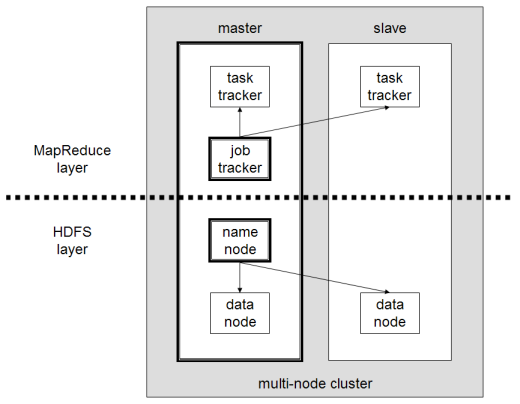
When you boot an EMR cluster, you are creating a vast virtual supercomputer. Amazon EMR processes vast amounts of data by distributing the computational work across a cluster of EC2 instances. The primary master node coordinates the task distribution, while core and task nodes execute the heavy lifting. Amazon EMR is the preferred AWS service for massive parallel processing of large datasets using big data frameworks. When demand surges, Amazon EMR clusters can be scaled out by adding more EC2 instances to the task node group to increase processing power without interrupting the underlying data storage on the core nodes.
Determining the Divide
The architectural heuristic for choosing between these two is elegant in its simplicity. If your data scientists are writing Spark jobs or utilizing Hadoop Distributed File System (HDFS), EMR is mandatory. However, AWS Batch is preferred over Amazon EMR for containerized, queue-based batch workloads that do not require an active Hadoop or Spark ecosystem.
By internalizing these boundaries—from the physical properties of EC2 hardware families to the dimensional tuning of Lambda, up through the orchestration planes of Batch and EMR—you stop guessing at solutions and start engineering highly performant, remarkably efficient cloud environments.