Multi-Account Security & Global Infrastructure
Not sure you’re ready?
Take the ~3-minute readiness diagnostic and see where you stand.
Imagine purchasing a condominium in a massive, state-of-the-art high-rise. The building developer guarantees the structural integrity of the steel, the continuous monitoring of the perimeter fence, and the reliable flow of electricity to your floor. However, if you leave your front door wide open or fail to lock your personal safe, the developer cannot prevent a burglary. This exact dichotomy governs cloud computing. As you design architectures spanning dozens or hundreds of environments, you are not merely deploying servers; you are inheriting a complex baseline of physical security while simultaneously assuming complete liability for the logical access to your resources. Understanding where the concrete foundation ends and your front door begins is the fundamental premise of multi-account cloud security.

To operate safely in the cloud, we must first establish exactly who is responsible for what. The AWS Shared Responsibility Model divides security obligations between AWS and the customer. It is the legal and architectural boundary that dictates your day-to-day engineering tasks.
We can summarize this model into a simple, foundational axiom: Under the AWS Shared Responsibility Model, AWS manages the security of the cloud, while the customer manages security in the cloud.
Security OF the Cloud (AWS's Responsibility)
AWS takes on the heavy lifting of the physical and foundational infrastructure. Specifically, AWS is responsible for protecting the physical hardware and facilities that run AWS cloud services. You do not need to worry about biometric scanners at data centers or HVAC system maintenance. Furthermore, AWS is responsible for securing the global network infrastructure, ensuring that the physical fiber cables connecting Availability Zones and Regions are protected from tampering.

Security IN the Cloud (The Customer's Responsibility)
Once the foundational infrastructure is provided, your responsibility begins. Under the AWS Shared Responsibility Model, the customer manages security in the cloud.
What does this mean for a solutions architect?
- Data Protection: Customers are responsible for managing customer data encryption within AWS services. AWS provides the tools (like AWS KMS), but you must choose to turn encryption on and manage your keys.
- Access Control: Customers are responsible for creating and configuring Identity and Access Management (IAM) users, roles, and policies. If an overly permissive IAM policy causes a data breach, that is an architectural failure, not an AWS failure.
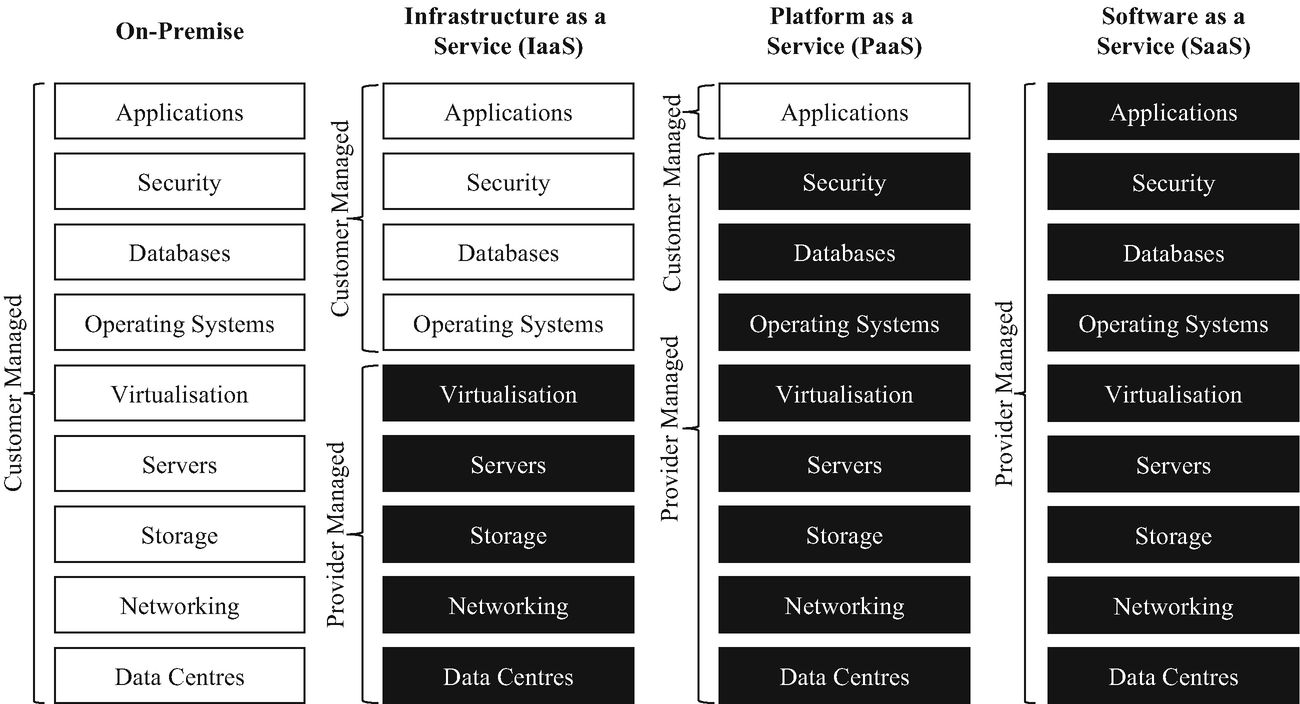
The Shifting Boundary: IaaS vs. PaaS
The exact line between AWS's responsibility and your responsibility shifts depending on the type of service you provision.
- Infrastructure as a Service (IaaS): When you provision raw compute, such as Amazon EC2, you maintain deep control, but you also take on a heavy operational burden. For Infrastructure as a Service (IaaS) offerings like Amazon EC2, the customer is responsible for guest operating system patching and firewall configuration (via Security Groups and Network ACLs).
- Platform as a Service (PaaS): When you abstract away the underlying server, AWS takes on more of the operational load. For Platform as a Service (PaaS) offerings like Amazon RDS, AWS handles the underlying operating system patching. You only focus on your database engine configuration and your data.
In a professional enterprise, you will quickly realize that running all of your workloads in a single AWS account is a recipe for disaster. A single account provides a massive blast radius: if one environment is compromised, the entire infrastructure is at risk.
To solve this, we use AWS Organizations, which is an account management service that enables central consolidation of multiple AWS accounts.
Instead of a sprawling mess of independent accounts, AWS Organizations allows administrators to group member accounts into hierarchical Organizational Units (OUs). You can think of OUs as logical folders. You might have an OU for "Production," an OU for "Development," and an OU for "Shared Services."
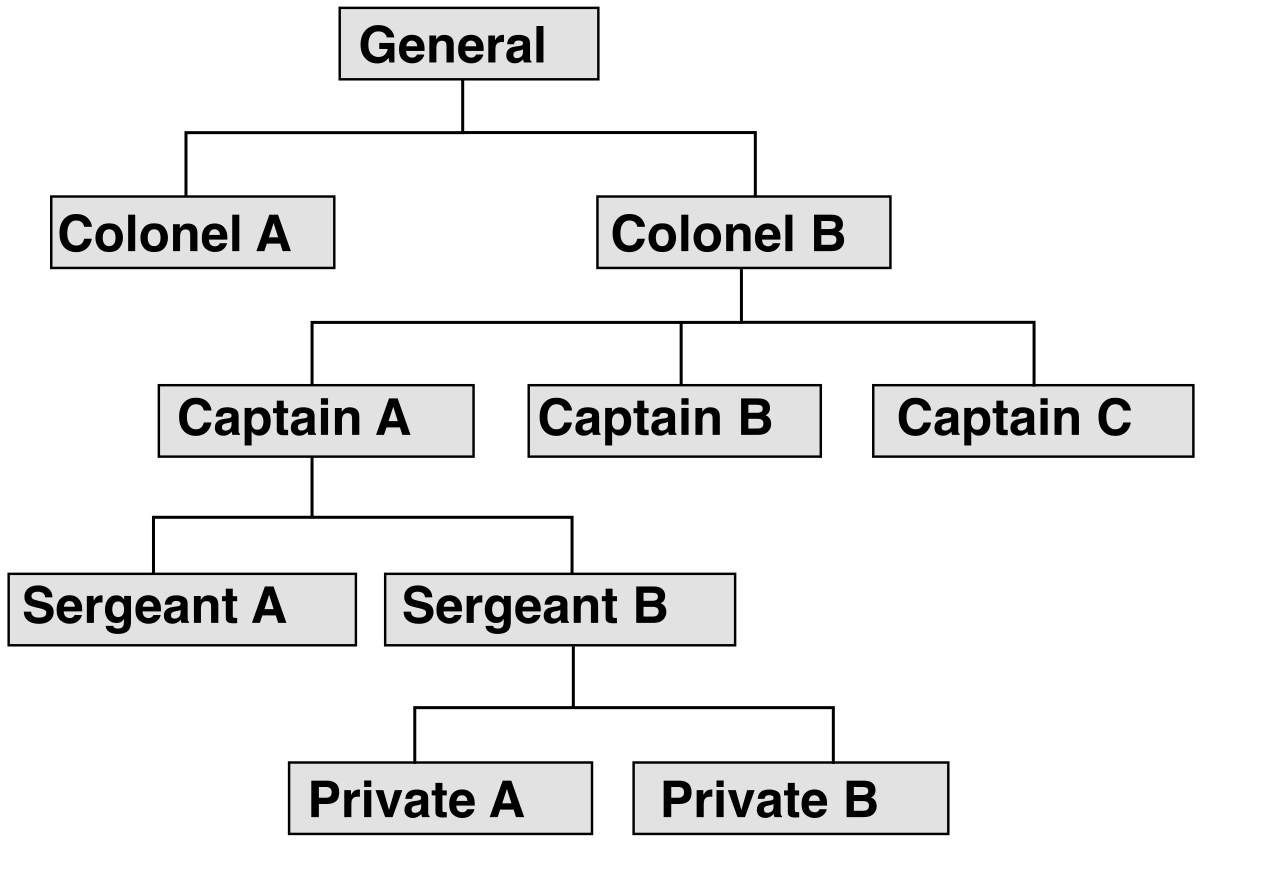
Architectural Constraint: An individual AWS account can only belong to one AWS Organization at a time. You cannot map a single account into two different corporate hierarchies.
The Financial Architecture of Organizations
AWS Organizations is not just for security; it fundamentally changes how you are billed. Within an Organization, there is exactly one management account. The management account in AWS Organizations pays all charges incurred by the member accounts.
Why is this advantageous? Because cloud resources are often priced on a sliding scale—the more you use, the cheaper the per-unit cost. Consolidated billing within AWS Organizations combines usage across member accounts to calculate volume pricing discounts. If your Dev account uses 50 TB of S3 storage and your Prod account uses 50 TB, consolidated billing treats this as 100 TB, pushing you into a cheaper storage tier.
Warning: The AWS Organizations management account cannot be changed after the organization is created. Because this account holds the root billing mechanisms and the ultimate administrative authority, its selection must be treated as a permanent architectural decision.
Once you have distributed your workloads across multiple accounts and OUs, you need a way to enforce organization-wide security rules. This is where Service Control Policies (SCPs) come into play.
SCPs operate as an invisible ceiling over your accounts. Service Control Policies (SCPs) define the maximum available permissions for accounts within an AWS Organization.
To truly understand SCPs, you must internalize their most counterintuitive rule: Service Control Policies (SCPs) never grant permissions to any users or roles. They act strictly as filters. If an SCP allows an action, the user still needs an identity-based IAM policy to actually perform the action.
How SCPs and IAM Interact
Because SCPs act as a filter, a user in an AWS Organizations member account must be granted permission by both a Service Control Policy (SCP) and an IAM policy to successfully perform an action.
Furthermore, an explicit Deny statement in a Service Control Policy (SCP) overrides any Allow statement in an identity-based IAM policy. Even if an engineer gives themselves full administrator privileges ("Action": "*") inside their local dev account, if the organization's SCP denies the creation of an Internet Gateway, that engineer's request will be blocked.
Applying SCPs
Administrators attach Service Control Policies (SCPs) to the organization root, Organizational Units (OUs), or individual member accounts.
- Attached to the Root: Affects every account in the organization.
- Attached to an OU: Affects all accounts within that OU and any nested OUs.
- Attached to an Account: Affects only that specific account.
When an SCP is attached to a member account, a Service Control Policy (SCP) applies to all IAM users and IAM roles within the targeted AWS Organizations member accounts, including the local root user of that member account.
However, there is one monumental exception designed to prevent you from accidentally locking yourself out of your own cloud: Service Control Policies (SCPs) never affect users or roles within the AWS Organizations management account. The management account always retains its full capabilities.
Setting up AWS Organizations, configuring multiple OUs, writing SCPs, and establishing centralized logging manually is tedious and error-prone. To solve this, AWS introduced a high-level orchestration service.
AWS Control Tower automates the setup of a well-architected multi-account AWS environment called a landing zone.
Control Tower is not a replacement for the services we just discussed; rather, it is an orchestrator. AWS Control Tower utilizes AWS Organizations underneath to provision and manage AWS accounts. When you launch Control Tower, it configures your OUs and accounts according to AWS best practices automatically.
Automated Identity and Account Provisioning
When establishing your landing zone, Control Tower takes care of the foundational security plumbing. For identity management, AWS Control Tower configures AWS IAM Identity Center to centrally manage user identities and federated access across accounts. This allows your engineers to log in once (using their corporate credentials) and access their assigned AWS accounts seamlessly.
Control Tower also strictly enforces the separation of duties by isolating security and auditing functions into their own dedicated accounts:
- AWS Control Tower automatically provisions an Audit account to provide cross-account access for security administrators. This gives your security teams a dedicated, secure staging ground to audit the entire organization.
- AWS Control Tower automatically provisions a Log Archive account to store centralized AWS CloudTrail and AWS Config logs. This ensures that even if an attacker compromises a member account, they cannot delete the forensic audit logs, because those logs are shipped to an entirely separate, locked-down Log Archive account.
Guardrails: Enforcing the Rules
To keep your accounts compliant over time, AWS Control Tower deploys predefined governance rules called guardrails across AWS accounts. Guardrails come in two distinct flavors:
| Guardrail Type | Mechanism | Purpose |
|---|---|---|
| Preventive | Preventive guardrails in AWS Control Tower use Service Control Policies (SCPs) to block non-compliant actions from occurring. | Stops bad actions before they happen. Example: Disallowing the creation of resources outside of approved geographic Regions. |
| Detective | Detective guardrails in AWS Control Tower use AWS Config rules to identify and alert on non-compliant resources. | Finds bad actions after they happen. Example: Alerting the security team if an S3 bucket is accidentally made public. |
To manage this massive flow of information, the AWS Control Tower dashboard provides a centralized view of the overall compliance status across the entire AWS Organization. With a single glance, a solutions architect can see exactly which accounts are failing their detective guardrails and track the health of the entire multi-account architecture.