VPC Architecture Security
Not sure you’re ready?
Take the ~3-minute readiness diagnostic and see where you stand.
Architecting a secure network is fundamentally identical to designing a high-security research facility. You do not place your most sensitive laboratories directly on the public street, nor do you rely on a single lock at the front door to protect your intellectual property. Instead, you create strict perimeters, establish specific corridors for authorized traffic, and mandate distinct inspection checkpoints for anyone moving between rooms. In cloud architecture, the physical concrete and steel are replaced by logical boundaries, routing rules, and stateful packet inspection. Understanding how these virtual mechanisms interact is not merely a matter of memorizing exam trivia; it is the absolute prerequisite for ensuring that your databases remain isolated from the open internet while your applications safely scale to meet global demand.
When you provision an Amazon Virtual Private Cloud (VPC), you are claiming an isolated, logical slice of the AWS network. To ensure that resources within this network can communicate out of the box, every Amazon VPC is automatically created with a default main route table.
Think of a route table as the centralized GPS instruction manual for network packets. Without directions, packets go nowhere. By default, a local route is automatically added to every VPC route table to allow communication between all subnets within the VPC. This is the fundamental law of internal physics within your VPC—so fundamental, in fact, that the local route in an Amazon VPC route table cannot be deleted or modified.
However, a VPC is rarely useful as a single monolithic block. We divide it into subnets. Each subnet in an Amazon VPC must be associated with exactly one route table at a time, allowing you to define distinct traffic behaviors for different tiers of your application. Conversely, you can achieve operational efficiency because a single VPC route table can be associated with multiple subnets within the same VPC, grouping identical traffic policies together.
What separates a "public" subnet from a "private" subnet? In AWS, these terms are not arbitrary labels; they are strictly defined by their routing destiny.
- An Amazon VPC subnet is considered a public subnet if the subnet route table directs internet-bound traffic to an Internet Gateway.
- An Amazon VPC subnet is considered a private subnet if the subnet route table lacks a route to an Internet Gateway.
To achieve public internet connectivity, you must attach an Internet Gateway (IGW) to your VPC. Functionally, an Internet Gateway provides a target in a VPC route table for internet-routable traffic. When a packet leaves an EC2 instance, the routing fabric looks at its destination. Route table rules determine traffic direction based on the most specific destination IP address match, routing local traffic internally and sending broader 0.0.0.0/0 traffic toward the IGW.
Defining where traffic can go via routing is only half the battle. We must also define what traffic is permitted to flow. AWS provides two distinct security mechanisms: Security Groups (the bouncer at the door) and Network Access Control Lists (the border patrol at the perimeter).
The Bouncer: AWS Security Groups
Security Groups sit closest to your compute resources. Technically speaking, AWS Security Groups operate at the Elastic Network Interface (ENI) level to control inbound and outbound traffic.
The defining characteristic of a Security Group is its memory. AWS Security Groups are stateful. When you initiate a connection, the Security Group remembers that active session. The stateful nature of Security Groups means that allowed inbound traffic automatically permits the corresponding outbound return traffic, regardless of your outbound rules. Similarly, the stateful nature of Security Groups means that allowed outbound traffic automatically permits the corresponding inbound return traffic.
Because they act as trusted guardians, they operate on a principle of explicit permission. AWS Security Groups only support allow rules. Consequently, AWS Security Groups do not support explicit deny rules. If you do not explicitly allow a packet, it is implicitly dropped.
Let's look at how defaults are handled:
- A default Security Group is automatically created with every new Amazon VPC. To allow cluster-like communication out of the box, the default Security Group allows all inbound traffic from instances assigned to the same default Security Group.
- If you build your own, the posture is strictly defensive: A newly created custom Security Group denies all inbound traffic by default, but to prevent breaking common application behaviors (like downloading patches), a newly created custom Security Group allows all outbound traffic by default.
Architectural Best Practice: IP addresses change, but logical roles do not. Therefore, a Security Group rule can specify another Security Group ID as the traffic source or destination. Instead of whitelisting IPs, you simply state: "My Database Security Group allows traffic from my Web Server Security Group."
The Border Patrol: Network Access Control Lists (NACLs)
While SGs guard the instance, Amazon VPC Network Access Control Lists operate at the subnet level, serving as a firewall for the broader neighborhood. Every subnet in an Amazon VPC must be associated with a Network Access Control List. If you fail to map one yourself, if a subnet is not explicitly associated with a custom Network Access Control List, the subnet is automatically associated with the default Network Access Control List.
Unlike the intuitive memory of Security Groups, Network Access Control Lists are stateless. They do not remember connections. The stateless nature of Network Access Control Lists requires return traffic to be explicitly allowed by separate outbound rules. Because operating systems use random, high-numbered ports to receive return communication, ephemeral ports must be explicitly allowed in Network Access Control List outbound rules to permit return traffic for inbound requests.
NACLs give you blunt-force control over the network. Therefore, Network Access Control Lists support both allow rules and explicit deny rules. This is vital if you need to instantly block a specific malicious IP address from even entering the subnet.
When evaluating traffic, Network Access Control List rules are evaluated in ascending order based on rule number. The logic acts precisely like a compiled script: Network Access Control List evaluation stops as soon as a matching rule number is found. If Rule 100 denies an IP, and Rule 200 allows it, the traffic is denied.
Defaults for NACLs are diametrically opposed to custom configurations:
- The default Network Access Control List created with an Amazon VPC automatically allows all inbound IPv4 traffic and automatically allows all outbound IPv4 traffic.
- Conversely, a newly created custom Network Access Control List denies all inbound and outbound traffic until rules are explicitly added.
| Feature | Security Groups | Network ACLs |
|---|---|---|
| Scope | Operates at the ENI (instance) level | Operates at the Subnet level |
| State | Stateful (return traffic auto-allowed) | Stateless (requires explicit return rules) |
| Rules | Allow only | Allow and Deny |
| Processing | All rules evaluated simultaneously | Evaluated in ascending order, stops on match |
If a database in a private subnet requires a security patch from an external server, it has a fundamental problem: it lacks a route to the Internet Gateway. We bridge this gap using a process called Network Address Translation.
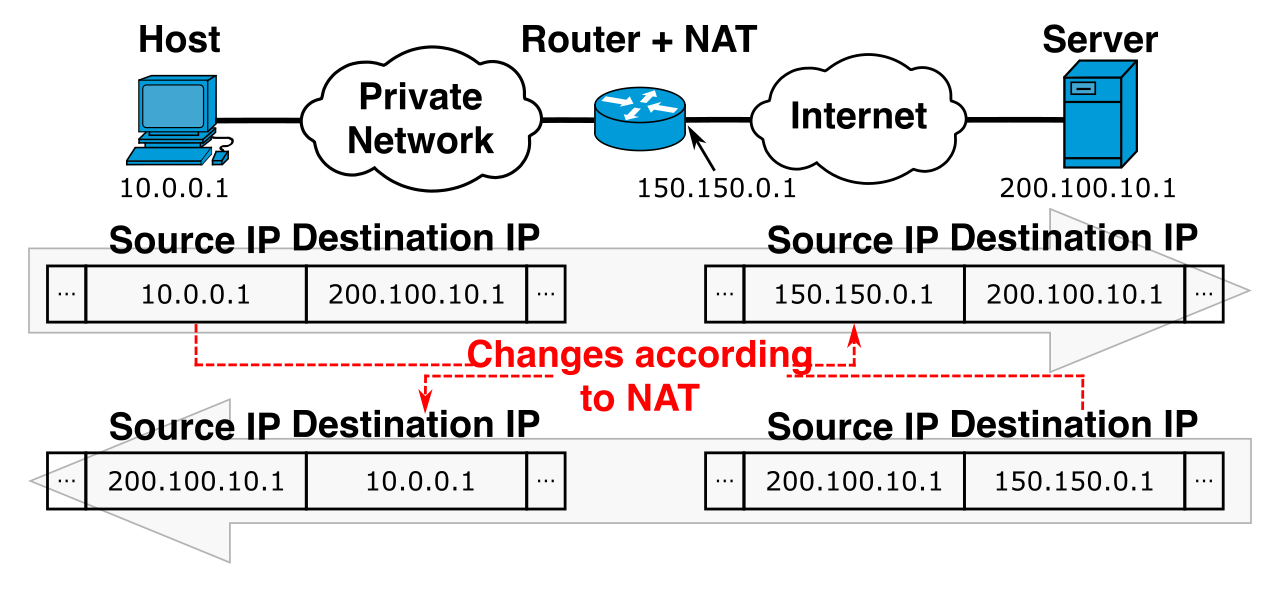
A NAT Gateway allows resources in a private subnet to initiate outbound internet connections. However, security is maintained because a NAT Gateway prevents internet-based resources from initiating inbound connections to instances in a private subnet.
Because the NAT Gateway acts as the public-facing proxy for your private resources, a NAT Gateway must be deployed in a public subnet to route traffic to the internet. Furthermore, to communicate with the public web seamlessly, a NAT Gateway requires an allocated Elastic IP address for IPv4 traffic. To tell your private instances to use it, a route table associated with a private subnet must specify a NAT Gateway as the target for internet-bound traffic.
Historically, architects had to build this themselves. A NAT instance is an Amazon EC2 instance configured to perform network address translation. Because an EC2 instance usually discards traffic not specifically addressed to its own IP, source/destination checks must be disabled on a NAT instance to allow the EC2 instance to route traffic for other instances. Today, the paradigm has shifted. A NAT Gateway is a fully managed AWS service that replaces the need for user-managed NAT EC2 instances, removing the operational burden of scaling and patching.
However, resilience requires planning. An AWS managed NAT Gateway is highly available within a single Availability Zone. If that single Availability Zone experiences an outage, your private subnets in other zones lose outbound internet access. Therefore, for Multi-AZ high availability, a separate NAT Gateway must be deployed in each Availability Zone.
Finally, what about modern IP protocols? IPv6 addresses are globally routable by definition, meaning traditional NAT concepts do not apply. Instead, AWS provides a specific component: an Egress-Only Internet Gateway provides outbound-only internet access for IPv6 traffic originating from private subnets.
What if your private application needs to fetch an object from Amazon S3? By default, S3 is a public AWS service. Routing that traffic through a NAT Gateway to the public internet simply to reach S3 is costly, adds latency, and increases your attack surface.
The elegant solution is a VPC Endpoint. VPC Endpoints enable secure connectivity between an Amazon VPC and supported AWS services without requiring an Internet Gateway or NAT device. They do exactly what their name implies: VPC Endpoints keep traffic between an Amazon VPC and an AWS service entirely within the AWS internal network.
There are two distinct families of VPC Endpoints, utilizing entirely different underlying mechanics:
1. Gateway VPC Endpoints
Gateway endpoints manipulate routing. A Gateway VPC Endpoint requires a route table entry to direct traffic to the specified AWS service. However, their use case is highly specific: Gateway VPC Endpoints only support Amazon S3 and Amazon DynamoDB. They do not cost hourly fees, making them the standard architectural choice for accessing these two massive data stores.
2. Interface VPC Endpoints
For nearly every other AWS service (like SNS, SQS, or KMS), you use an Interface Endpoint. Mechanically, an Interface VPC Endpoint uses an Elastic Network Interface with a private IP address to serve as an entry point for traffic destined to an AWS service.
Under the hood, Interface VPC Endpoints use AWS PrivateLink to securely connect an Amazon VPC to supported AWS services. Because they manifest as physical network interfaces inside your subnet, they obey standard security constructs. This means Interface VPC Endpoints support the attachment of Security Groups to control access to the endpoint network interface, allowing you to enforce strict zero-trust networking internally.
Even the most tightly sealed environment requires administrative access and auditing capabilities. If your instances sit securely in a private subnet, how do you log into them to perform administrative tasks?
You utilize a jump box, natively known in AWS as a Bastion Host. A Bastion Host is an Amazon EC2 instance deployed in a public subnet to act as a secure gateway for administering instances in private subnets. You SSH or RDP into the Bastion, and from there, you hop into the private resources. To securely enforce this, you utilize Security Group chaining: Security Groups on private subnet instances should be configured to only accept administrative access from the specific Security Group attached to the Bastion Host. This guarantees that no internal instance can be accessed unless the session originates from the Bastion.
Finally, you cannot secure what you cannot see. Network auditing requires meticulous logging of packet metadata. VPC Flow Logs capture information about the IP traffic going to and from network interfaces in an Amazon VPC.
This feature acts as the ultimate source of truth for network troubleshooting and security forensics. Depending on the granularity required by your compliance team, VPC Flow Logs can be applied at the VPC level, the subnet level, or the individual Elastic Network Interface level. Once enabled, this data needs a durable home for analysis; therefore, VPC Flow Logs can publish network flow log data directly to Amazon S3 or Amazon CloudWatch Logs, allowing you to run complex queries with Amazon Athena or trigger automated security alarms based on specific traffic patterns.