Serverless and Container Technologies
Not sure you’re ready?
Take the ~3-minute readiness diagnostic and see where you stand.
Imagine buying a massive industrial factory to produce a single gear once a day, paying for the real estate, electricity, and security around the clock. For decades, this was the reality of software engineering: provisioning entire servers to handle sparse, unpredictable, or highly specific workloads. The advent of containerization and serverless computing fundamentally redefined this model, divorcing the execution of code from the underlying physical hardware. Instead of tending to servers, architects now design systems that scale precisely to the millimeter of demand—whether by standardizing the execution environment into portable containers or by distilling business logic into ephemeral, event-driven functions. Mastering these paradigms is not simply about learning new AWS services; it is about shifting the operational burden of scaling, patching, and provisioning entirely onto the cloud provider.

Before evaluating specific AWS services, we must define what we are actually doing when we move away from traditional Amazon Elastic Compute Cloud (Amazon EC2) instances. We are fundamentally trading control over the underlying host for automated scalability and standardized deployments.
When migrating traditional architectures, we often face the challenge of breaking down sprawling, monolithic applications. Migrating a monolithic application to microservices often involves containerizing individual application components using Docker. By isolating these components, containerizing applications standardizes deployment artifacts across development and production environments. Your application runs exactly the same way on a developer's laptop as it does in a highly available cloud cluster.
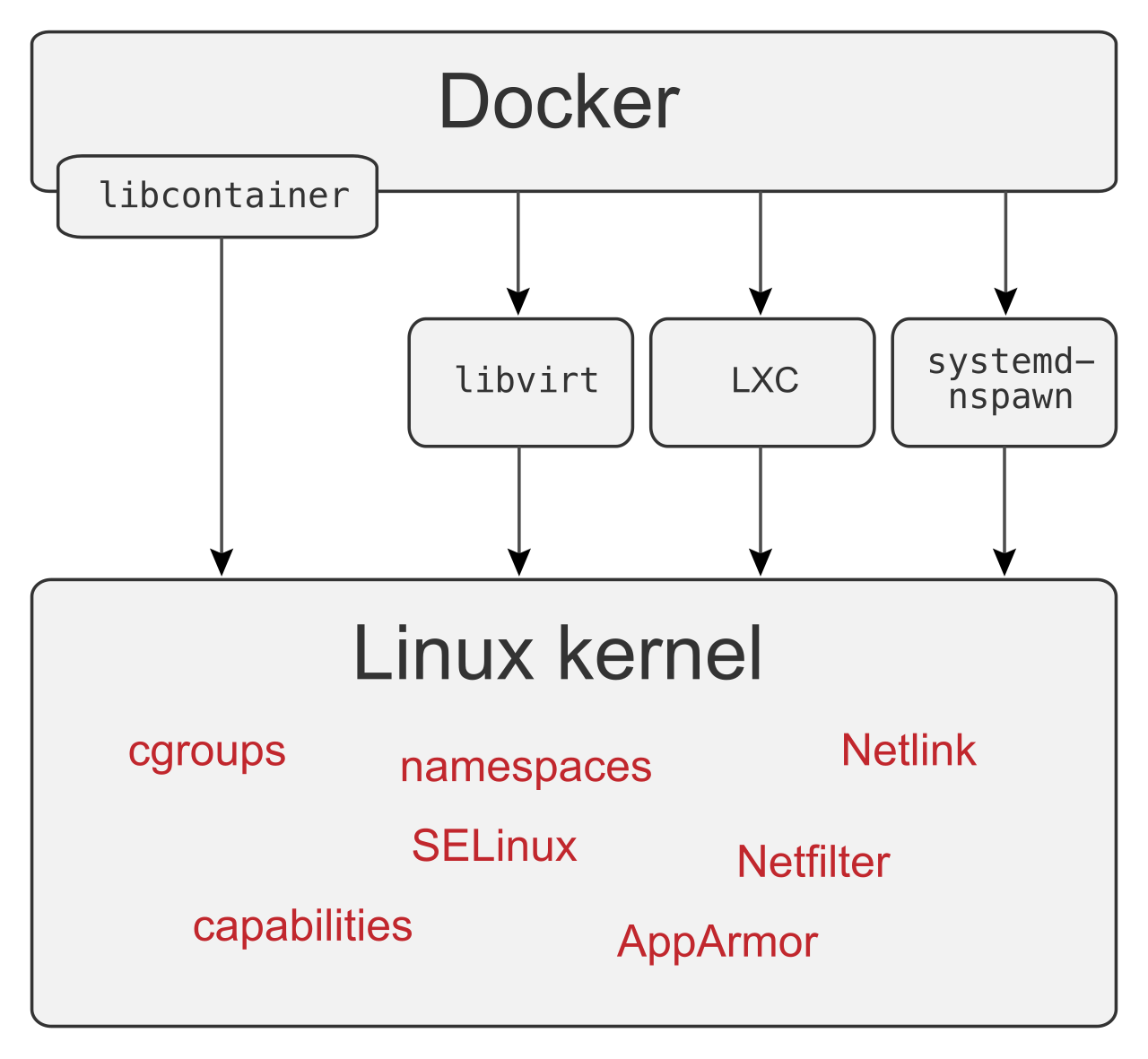
But standardizing the artifact is only half the battle. How do we execute it? In AWS, we classify execution engines along a spectrum of abstraction, culminating in pure serverless functions and fully managed container orchestration.
AWS Lambda represents the pinnacle of the serverless paradigm. It is an event-driven compute service that lets you run code without provisioning or managing servers.
The Execution Model
When we say Lambda is serverless, we do not mean servers do not exist. We mean the abstraction is so absolute that you only care about the invocation. AWS Lambda scales out by executing a separate execution environment for each concurrent request. If one user triggers a function, AWS spins up one environment. If ten thousand users trigger it simultaneously, Lambda spawns ten thousand isolated environments. AWS Lambda scales automatically by running concurrent executions in response to incoming events.
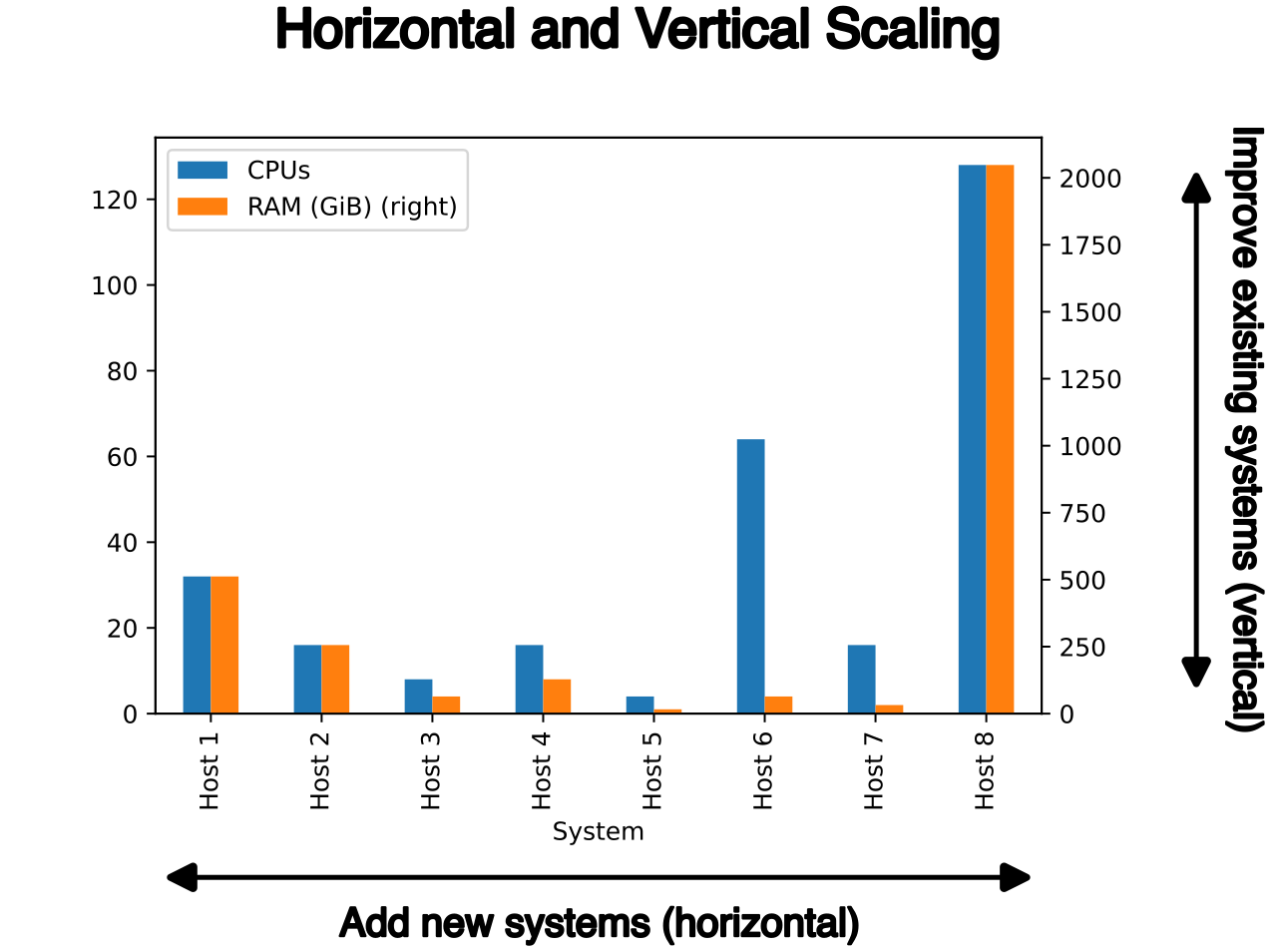
However, this unbounded scaling has guardrails. AWS Lambda limits the total number of concurrent executions per AWS region for a given AWS account (usually starting at 1,000, but adjustable via a quota increase).
Compute and Memory Mechanics
You do not select a CPU instance type in Lambda. Instead, AWS Lambda allows configuring memory allocation from 128 MB up to 10,240 MB. The critical mechanic here is that compute power is strictly tied to memory: increasing the memory allocation for an AWS Lambda function proportionally increases the CPU power allocated to that function. If you have a computationally heavy task that is timing out, you solve it by giving the function more memory, which injects more processing horsepower.
Because Lambda functions scale to zero when not in use, the pricing model is radically granular. AWS Lambda bills compute time in 1-millisecond increments. You pay exactly for the time your code executes, down to the millisecond.
Managing State and Storage
By design, AWS Lambda functions are stateless. The execution environment is ephemeral. When the invocation ends, the environment may be frozen and reused, or it may be destroyed. Because of this, AWS Lambda requires external storage services to persist stateful data between invocations (such as Amazon DynamoDB or Amazon S3).
For transient processing—like downloading a file to manipulate it before uploading it elsewhere—AWS Lambda provides up to 10,240 MB of ephemeral storage in the /tmp directory. This space is strictly temporary and local to that specific execution environment.
Invocations and Orchestration
Lambda functions can be triggered in two primary ways:
- Synchronous Invocations: The client makes a request and waits for a response. AWS Lambda synchronous invocations return the execution response directly to the client. For example, AWS Lambda integrates directly with Amazon API Gateway to serve synchronous HTTP requests.
- Asynchronous Invocations: The client hands off an event and immediately receives an acknowledgment, not the final result. AWS Lambda asynchronous invocations place the event in an internal queue before processing. If the code fails, Lambda will retry. If it repeatedly fails, we need a safety net. AWS Lambda Dead Letter Queues capture asynchronous invocation payloads that fail processing after multiple retries, allowing you to inspect the failed events later.
Limits and Constraints
Lambda is not for everything. It has strict boundaries:
- Time: AWS Lambda has a maximum execution timeout of 15 minutes per invocation. If a process takes longer, it belongs on a container.
- Size: For heavy dependencies, AWS Lambda supports container images up to 10 GB in size as deployment packages.
- Cold Starts: When a function hasn't been invoked recently, spinning up a new execution environment introduces latency (a "cold start"). To eliminate this for latency-sensitive applications, Provisioned Concurrency keeps AWS Lambda functions initialized to prevent cold start delays.
- Workflow: If your logic spans multiple steps—say, processing an order, charging a card, and sending an email—doing this within a single Lambda function risks timing out and tightly couples your code. Instead, AWS Step Functions can orchestrate complex workflows involving multiple AWS Lambda functions, maintaining the state of the workflow externally.
If your application requires running continuously, needs more than 15 minutes of execution time, or requires complex networking, we turn to containers. Running one container on your laptop is easy. Running a thousand containers across multiple availability zones, ensuring they stay healthy, and routing traffic to them requires an orchestrator.
AWS offers two primary orchestrators: Amazon Elastic Container Service (ECS) and Amazon Elastic Kubernetes Service (EKS).
Amazon ECS: The AWS-Native Orchestrator
Amazon Elastic Container Service (Amazon ECS) is a fully managed container orchestration service native to AWS. It is designed to be highly integrated with the AWS ecosystem.
Key Architectural Components of ECS:
- Cluster: An Amazon ECS cluster is a logical grouping of container tasks. It is the boundary within which your applications run.
- Task Definitions: Think of this as the blueprint. Amazon ECS uses Task Definitions to specify the Docker image requirements for running containers. Furthermore, Amazon ECS Task Definitions specify the exact CPU and memory allocations required for running containers.
- Services: While a task is a single running instance of a definition, a Service acts as the manager. Amazon ECS Services ensure that a specified number of task instances are constantly running. If a container crashes, Amazon ECS Services automatically restart failed container tasks to maintain the desired task count.
To expose these running containers to the internet, Amazon ECS integrates with Application Load Balancers to distribute HTTP traffic across multiple container tasks.
ECS Compute Models: EC2 vs. Fargate
An orchestrator just gives orders. Something physical still needs to execute the containers. ECS allows you to choose your underlying compute engine: the EC2 launch type or the Fargate launch type.
The Amazon ECS EC2 Launch Type: When you choose this, you are in the weeds. The Amazon ECS EC2 launch type requires users to provision the underlying Amazon EC2 instances within the ECS cluster. Because you own the instances, the Amazon ECS EC2 launch type requires users to manage operating system updates on the underlying Amazon EC2 instances.
Running containers on EC2 introduces a networking puzzle. If you run three identical web server containers on a single EC2 instance, they cannot all bind to the host's port 80. To solve this, the Amazon ECS EC2 launch type supports dynamic port mapping to run multiple instances of the same container port on a single Amazon EC2 instance. How does traffic find them? An Application Load Balancer automatically assigns ephemeral host ports to Amazon ECS containers when using dynamic port mapping, seamlessly routing external port 80 traffic to the random high ports (e.g., 32768) assigned to your containers.
The Amazon ECS Fargate Launch Type: Fargate is the serverless solution for containers. AWS Fargate is a serverless compute engine for running containers without managing underlying Amazon EC2 instances. By using it, the Amazon ECS Fargate launch type removes the need to provision underlying compute infrastructure.
When you define an ECS Task using Fargate, AWS Fargate scales container applications automatically by provisioning compute resources based on defined container requirements. It looks at the blueprint, finds the hardware, and runs it. AWS Fargate allocates specific CPU and memory combinations based on predefined configurations.
From an operational standpoint, using AWS Fargate instead of Amazon EC2 for containers shifts the responsibility of operating system patching to AWS. You only care about the container itself. However, Fargate trades control for convenience. Because AWS controls the underlying host, AWS Fargate does not support Docker privileged mode, and AWS Fargate does not support running ECS daemon tasks (which are background agents that typically run exactly once per physical EC2 instance).
Amazon EKS: The Kubernetes Standard
Amazon Elastic Kubernetes Service (Amazon EKS) is a managed service that runs Kubernetes on AWS. Kubernetes is the open-source industry standard for container orchestration.
With EKS, AWS takes the heavy lifting out of managing the central brain of the cluster: Amazon EKS manages the availability of the Kubernetes control plane nodes automatically.
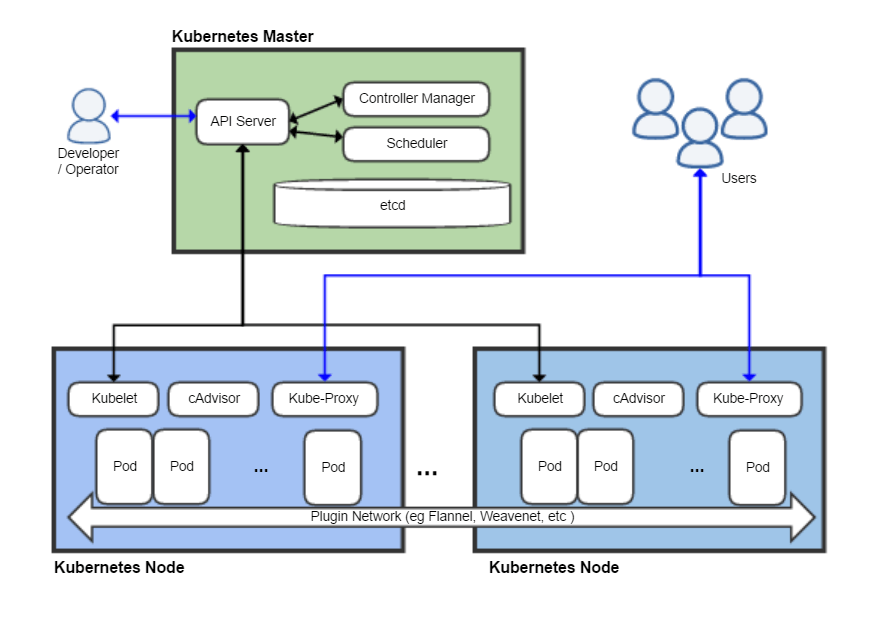
Because it is standard Kubernetes, Amazon EKS allows using standard Kubernetes tooling like kubectl to manage the cluster environment. You aren't locked into proprietary AWS commands.
Networking in EKS is distinctly powerful. Amazon EKS uses the VPC CNI plugin to assign private IPv4 IP addresses from the VPC directly to Kubernetes Pods. This means every pod is a first-class citizen on your AWS network, fully routable without complex overlay networks.
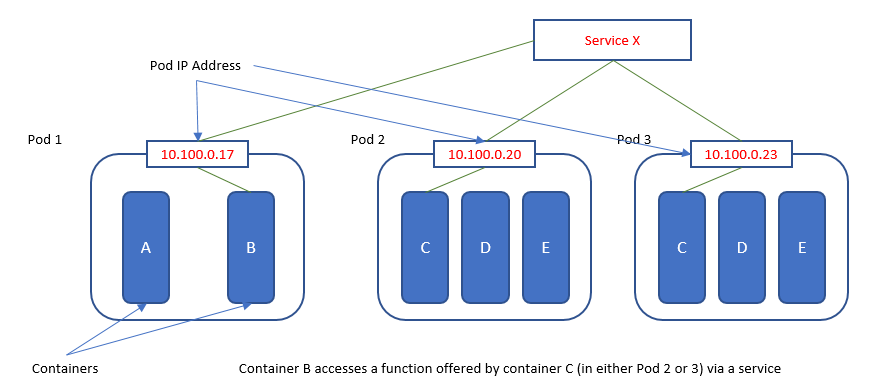
Like ECS, EKS needs a compute layer. Amazon EKS requires managing Kubernetes Worker Nodes if AWS Fargate is not utilized for compute. You can use standard EC2 instances (managing them yourself) or offload the compute completely to Fargate.
Security and Identity in Orchestrators
Both orchestrators require strict adherence to the principle of least privilege. A container processing payments needs access to a DynamoDB table, while a container serving static assets does not. You should never assign an overly broad IAM role to the underlying EC2 host, because every container on that host would inherit those permissions.
Instead, we assign permissions at the granular container level:
- In ECS: Amazon ECS Task Roles provide temporary AWS IAM credentials to the containers running within an ECS task.
- In EKS: IAM Roles for Service Accounts allows assigning specific AWS IAM permissions directly to Kubernetes pods in Amazon EKS.
We have established how to orchestrate containers. But how do we get our code into these clusters?
First, the images must be stored centrally. Amazon Elastic Container Registry (Amazon ECR) is a fully managed container registry for storing Docker images. It is highly secure, encrypted at rest, and Amazon ECR integrates natively with Amazon ECS to deploy container images to AWS compute environments.
Bridging the Legacy Gap
If you are staring down a legacy application running on aging virtual machines, rewriting it to be cloud-native might take years. AWS provides specialized tooling to accelerate this. AWS App2Container is a command-line tool that containerizes existing legacy applications. It inspects your application (like a Java or .NET monolith), packages it into a Docker image, and crucially, AWS App2Container generates deployment artifacts to migrate legacy applications to Amazon ECS, as well as generates deployment artifacts to migrate legacy applications to Amazon EKS.
Developer-Centric Deployment Tools
Building ECS Task Definitions, setting up Load Balancers, and configuring VPC networking manually can be tedious for developers who just want to deploy their code. AWS offers tools that abstract these infrastructure layers away:
- AWS Copilot: This is a developer-focused CLI. AWS Copilot is a command-line interface tool for deploying containerized applications on Amazon ECS and AWS Fargate. You define your application architecture via simple prompts, and Copilot provisions the necessary VPCs, Load Balancers, and ECS configurations behind the scenes.
- AWS App Runner: For applications that simply need to accept HTTP traffic, you can bypass orchestration entirely. AWS App Runner is a fully managed service for deploying containerized web applications and APIs without managing orchestrators. You point App Runner to your ECR image or your source code repository, and it builds and runs it. Crucially, AWS App Runner automatically scales compute resources based on incoming application traffic, scaling up when web requests surge and scaling down when traffic subsides, behaving much like an always-on, HTTP-native container equivalent to Lambda.
As a Solutions Architect, your role is to map business requirements to these technical realities. If you have an intermittent, unpredictable workload that executes quickly and is highly event-driven, AWS Lambda is unparalleled. If you have a long-running, always-on application composed of multiple microservices, Amazon ECS or EKS provide the necessary structure. If your organization demands open-source standardization, you lean toward EKS. And across all containerized workloads, AWS Fargate represents the ultimate shift in shared responsibility, allowing you to stop patching operating systems and focus entirely on the code.