Azure Access Control and Security
Not sure you’re ready?
Take the ~3-minute readiness diagnostic and see where you stand.
Historically, protecting valuable information was a matter of physical geography. Organizations built digital equivalents of the medieval castle: a fortified perimeter, a single drawbridge, and a deep moat. Once inside the walls, a user was inherently trusted and free to roam. The advent of cloud computing dismantled this paradigm entirely. Today, corporate data resides in distributed datacenters, users access critical financial applications from coffee shops, and external vendors integrate directly with internal inventory systems. The network perimeter has evaporated.

In this modern landscape, security cannot rely on where a user is located. Instead, it must dynamically evaluate who they are, what they are trying to access, and the context of their request. Understanding how Microsoft Azure architectures enforce this new reality is critical not just for engineers, but for the project managers ensuring compliance, the finance directors protecting billing data, and the sales teams relying on secure access to customer records from around global globe.
To navigate Azure's security architecture, we must examine the philosophical models that govern cloud security, the multi-layered defense strategies used to protect data, the mechanisms that precisely control access, and the automated platforms that continuously audit our vulnerabilities.
If we abandon the idea of a safe internal network, we must adopt a new governing philosophy. Zero Trust is a security model that assumes every access request originates from an uncontrolled network. It fundamentally rejects the idea that a user or device should be trusted simply because it is connected to a corporate VPN or sitting inside a corporate office.
At its heart, the Zero Trust model operates on the core principle of never trust, always verify.
To implement this philosophy effectively, cloud architects and security professionals build systems upon three guiding principles:
- Verify explicitly: Security systems must require continuous authentication and authorization for all access requests. We do not just check credentials at the front door; we check them at every internal doorway.
- Use least privileged access: We must limit user access with Just-In-Time (JIT) and Just-Enough-Access (JEA) controls. If a database administrator needs elevated permissions to run a script, they receive those permissions only for the hour required, and only for the specific database they are modifying.
- Assume breach: Systems must be designed with the pessimistic expectation that attackers are already inside. We minimize the blast radius of security incidents by isolating networks and resources. If a single web server is compromised, strict segmentation prevents the attacker from moving laterally into the accounting database.
Why this matters to you: For a project manager, understanding Zero Trust explains why team members cannot simply share a generic "admin" password to fix a problem quickly. The friction introduced by Zero Trust is a deliberate mechanism to contain catastrophic financial and reputational damage.
Zero Trust is a philosophy; defense-in-depth is the practical architecture used to achieve it. The defense-in-depth model uses multiple layered security mechanisms to protect information and systems.
Imagine a bank vault. The money is not protected solely by the thick metal door. It is protected by security guards at the entrance, locked lobby doors, security cameras, the vault door, and dye packs inside the cash bundles. The objective of the defense-in-depth model is to prevent unauthorized access to data if one individual security layer fails. By forcing an attacker to bypass multiple distinct barriers, we buy time to detect and respond to the intrusion.
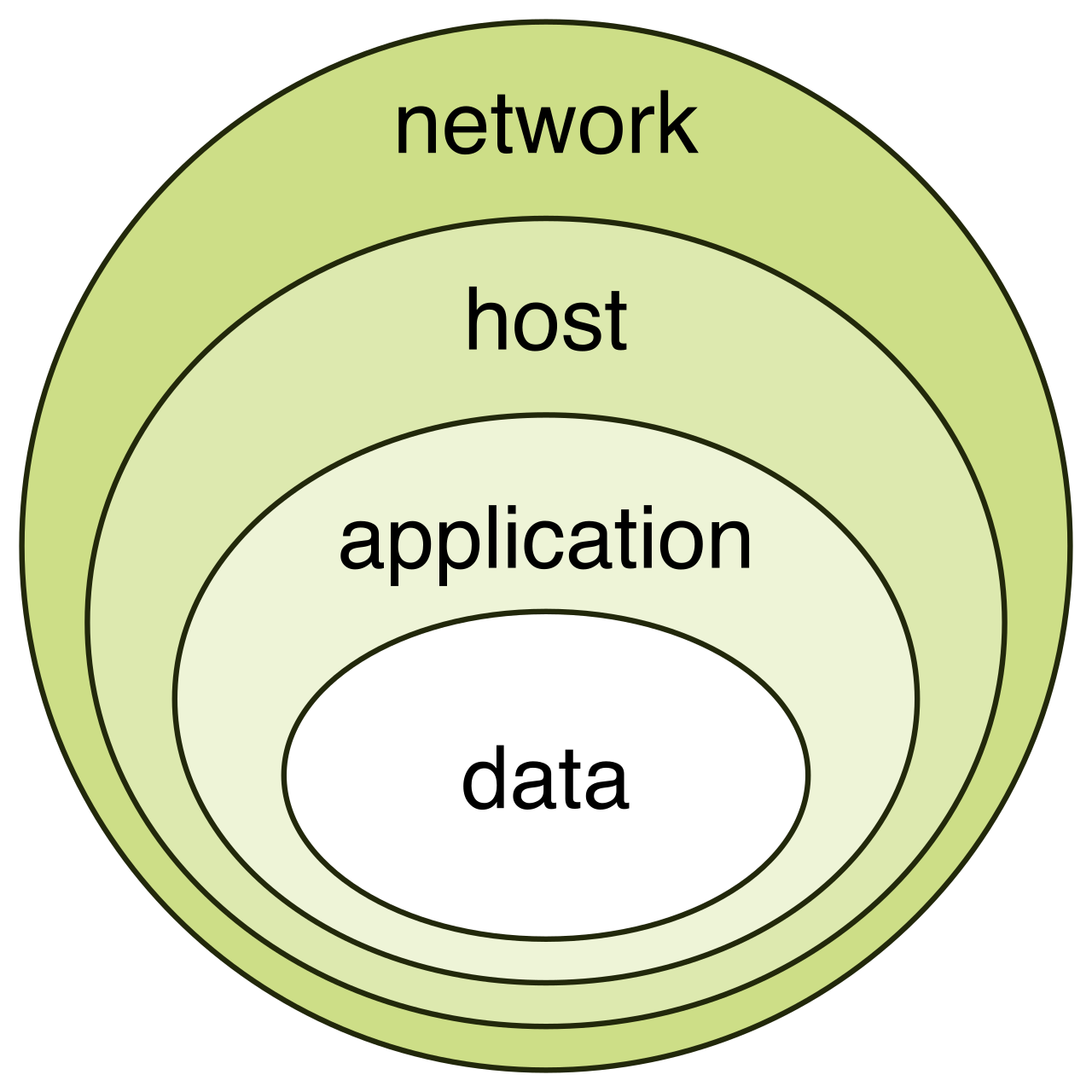
In Azure, the defense-in-depth model includes seven distinct layers, moving from the physical world inward to the data itself:
| Security Layer | Core Function | Example / Implementation |
|---|---|---|
| Physical Security | Protects data center hardware from unauthorized physical access. | Fences, biometric scanners, and strict access controls at Microsoft datacenters. |
| Identity and Access | Controls access to infrastructure and enforces strong authentication. | Single sign-on (SSO), multi-factor authentication, and Zero Trust verification. |
| Perimeter | Uses distributed denial of service (DDoS) protection and firewalls to filter large-scale attacks. | Blocking massive floods of malicious traffic before they reach internal systems. |
| Network | Limits communication between resources using segmentation and access controls. | Ensuring the public-facing web server cannot freely talk to the backend billing server. |
| Compute | Secures virtual machines and endpoints by patching vulnerabilities. | Applying weekly operating system updates and securing endpoint access. |
| Application | Integrates security into the software development lifecycle. | Scanning application code for vulnerabilities before the software is released. |
| Data | Involves encrypting information at rest and in transit. | Scrambling database records so that even if a hard drive is stolen, the data is unreadable. |
Ultimately, physical security, network firewalls, and compute patching all serve one ultimate goal: protecting the Data layer at the center.
In the identity and access layer of the defense-in-depth model, authentication simply answers the question: Are you who you say you are? But in a Zero Trust environment, identity alone is not enough. We must evaluate context.
This is where Microsoft Entra Conditional Access steps in. Conditional Access is a feature provided by Microsoft Entra ID (formerly Azure Active Directory) that acts as the intelligent bouncer of the cloud. Rather than just checking a username and password, Conditional Access evaluates the security risk of a sign-in attempt before granting access to an application.
The Engine of Contextual Security
Conditional Access policies operate on an if-then logic framework. If a certain set of conditions is met, then apply a specific security control.
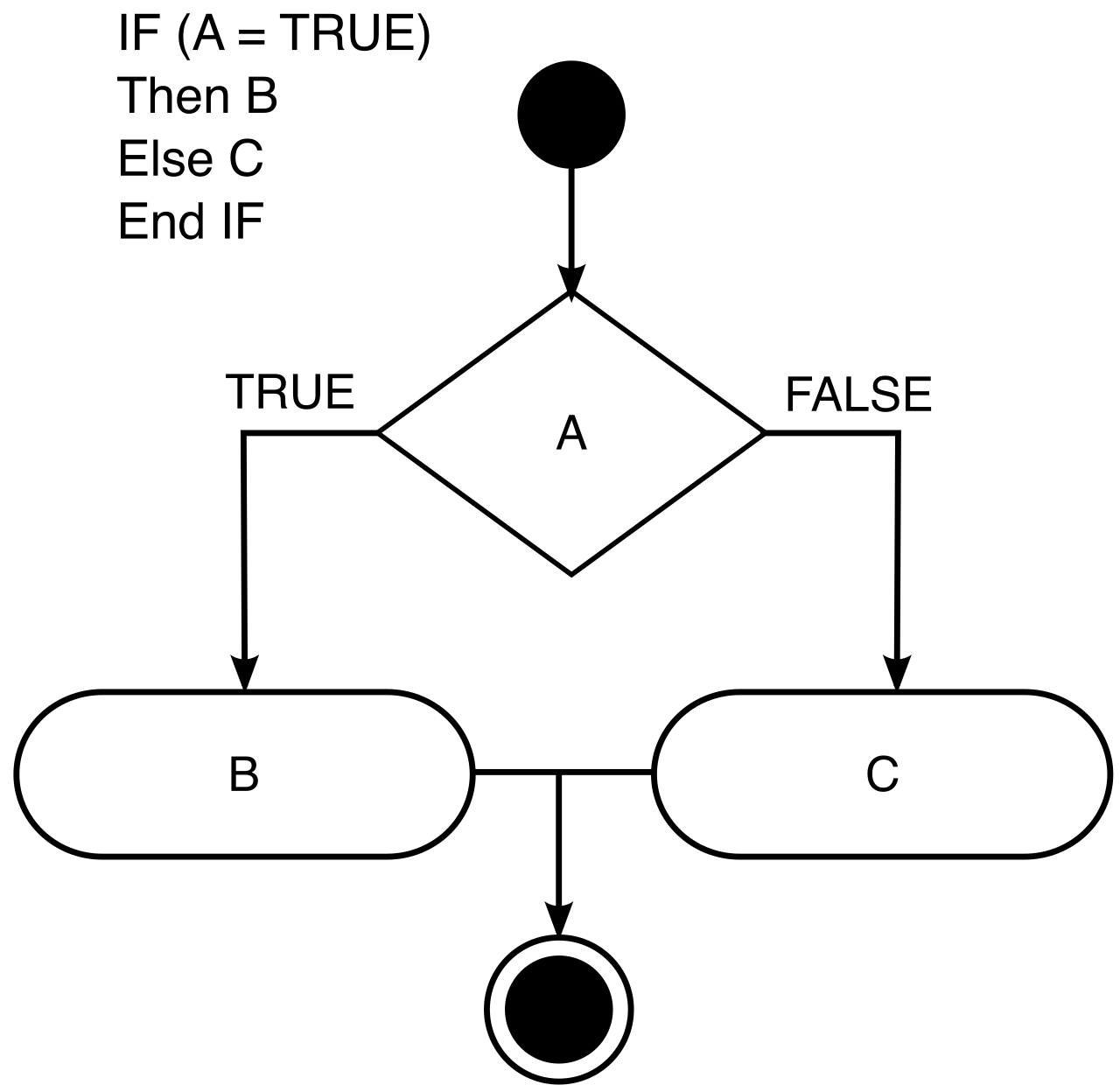
To make these decisions, Microsoft Entra Conditional Access analyzes signals to make automated access decisions. These Conditional Access signals include:
- User identity: Is this a high-level executive or a standard employee?
- User location: Is this login attempt originating from a known corporate office in Chicago, or from an unexpected IP address halfway across the globe?
- Device status: Is the user logging in from a company-issued laptop with all security patches applied, or from a personal tablet running an outdated operating system?
Enforcing the Rules
Based on the analysis of these signals, the system dynamically reacts.
- Allow access: If everything looks normal, the user proceeds without friction.
- Require Multi-Factor Authentication (MFA): A Conditional Access policy can require multi-factor authentication for high-risk access attempts. If our Chicago-based finance director logs in from an airport in London, the system doesn't necessarily block them—but it requires them to verify their identity via an authenticator app.
- Block access: A Conditional Access policy can block access to resources based on suspicious sign-in signals. If the system detects a login attempt from a known malicious IP address, or notes an impossible travel scenario (e.g., logging in from New York and Tokyo five minutes apart), it simply drops the connection.
Once Microsoft Entra ID confirms a user's identity and Conditional Access grants them entry to the environment, a new question arises: What is this user legally allowed to do?
If identity management is the gatekeeper at the front door, Azure role-based access control (RBAC) is the system of locks on the internal filing cabinets. Azure role-based access control (RBAC) is an authorization system built on Azure Resource Manager. It provides fine-grained access management to Azure resources, ensuring that a financial auditor can view billing reports but cannot delete virtual machines.
At its core, Azure RBAC enforces the principle of least privilege by granting only the exact permissions needed for a task.
The Anatomy of an RBAC Assignment
To understand how permissions are granted, we must break down its mechanics. An Azure role-based access control (RBAC) role assignment consists of three highly specific components: a security principal, a role definition, and a scope.
- Security Principal: Who needs access? A security principal in Azure role-based access control (RBAC) can be a user (Alice), a group (the Finance Team), a service principal (an application needing access to a database), or a managed identity (a virtual machine that needs to read from a storage account).
- Role Definition: What can they do? A role definition in Azure role-based access control (RBAC) is a collection of permissions that lists allowed and denied operations. For example, the "Virtual Machine Contributor" role definition allows a user to start, stop, and restart virtual machines, but explicitly denies them the ability to change who else has access to those machines.
- Scope: Where can they do it? The scope in Azure role-based access control (RBAC) determines the set of resources that the access applies to. You do not simply make someone a "Contributor" to the entire cloud. Azure role-based access control (RBAC) scope can be applied at the management group, subscription, resource group, or individual resource level.
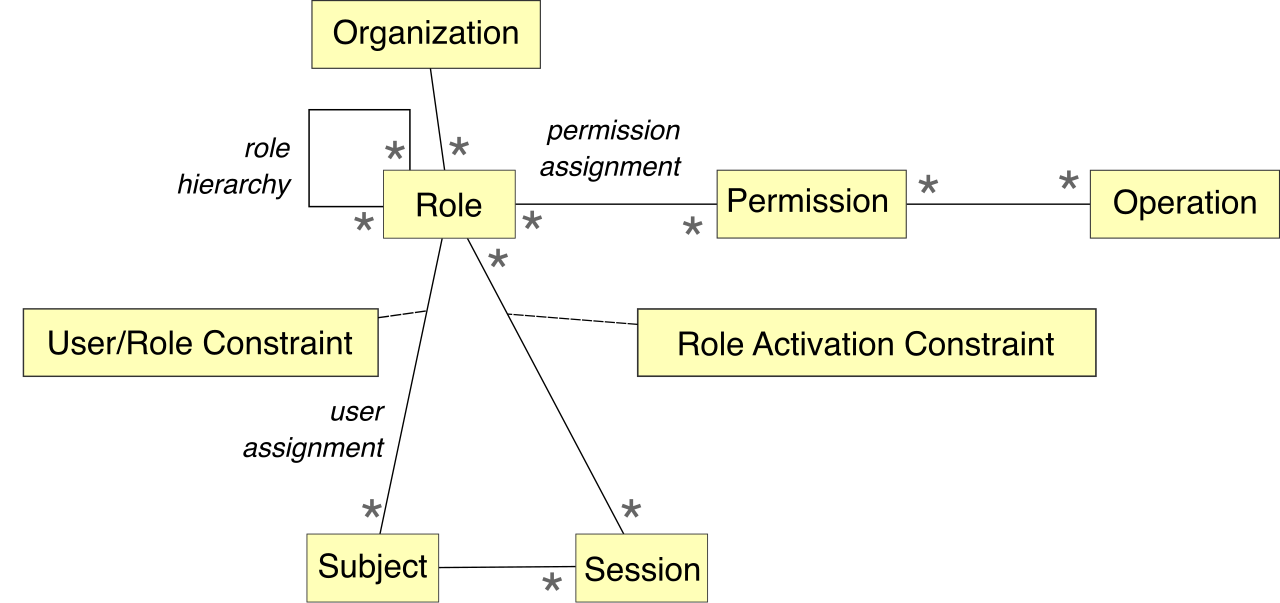
Real-World Application: Imagine a junior developer joins your team. You assign the Security Principal (the developer) to a Role Definition (Virtual Machine Contributor) at a specific Scope (a single Resource Group named 'Dev_Environment'). The developer can freely build and destroy servers within that specific sandbox, but they possess absolutely zero access to the production environment. By restricting scope, you prevent accidental configurations that could cost the business $10,000 in unintended compute charges.
We have verified our users, evaluated their context, and restricted their access. However, modern cloud environments are massive, dynamic, and constantly changing. Someone might accidentally open a network port, or a new zero-day vulnerability might be discovered in a software package. To manage this continuous entropy, organizations rely on a centralized security auditor.
Microsoft Defender for Cloud is a cloud-native application protection platform. Think of it as a combination of an automated health inspector and a 24/7 security guard.
Because modern enterprises rarely keep all their assets in a single location, Microsoft Defender for Cloud can protect resources located in Azure, on-premises datacenters, and other cloud providers like Amazon Web Services (AWS). It provides a unified view of your security posture, regardless of where your servers physically reside.
Defender for Cloud fulfills two primary, highly distinct mandates: Posture Management and Workload Protection.
1. Cloud Security Posture Management (CSPM)
To prevent attacks, you must first ensure your doors are locked and your windows are closed. Microsoft Defender for Cloud provides cloud security posture management (CSPM) capabilities. It assesses resource security and provides recommendations to improve overall security posture.
If a database is created without encryption, or a web server is deployed without a firewall, Defender for Cloud flags it. To help non-technical stakeholders (like IT management and risk officers) quantify this risk, Microsoft Defender for Cloud calculates a secure score based on the implementation of recommended security controls.
The logic is simple: a higher secure score in Microsoft Defender for Cloud indicates a lower identified risk level for the monitored resources. If your organization has a secure score of 20%, you are highly vulnerable. By following the platform's step-by-step recommendations—such as enabling MFA or turning on storage encryption—you actively raise your score and harden your environment.
2. Cloud Workload Protection (CWP)
Posture management prevents attacks by fixing misconfigurations. But what happens when an attacker actively tries to break in? Microsoft Defender for Cloud provides cloud workload protection (CWP) capabilities.
Through CWP, Microsoft Defender for Cloud continuously monitors environments to detect active security threats and generate security alerts. If an attacker attempts to brute-force a remote desktop connection, or if malicious software is executed on a virtual machine, Defender for Cloud immediately detects the anomaly. It provides security teams with actionable intelligence, detailing what resource is under attack, the nature of the threat, and the immediate steps required to neutralize it.
Cloud security is a vast leap forward from the legacy perimeter models of the past. By assuming breach through the Zero Trust architecture, layering defenses so that no single failure is catastrophic, and demanding precise, context-aware authorization through Microsoft Entra and Azure RBAC, organizations can protect their data in a borderless world. When reinforced by the continuous auditing and threat detection of Microsoft Defender for Cloud, these foundational concepts transform cloud security from a roadblock into a robust enabler of modern business agility.