Azure Storage Services, Tiers, and Redundancy
Not sure you’re ready?
Take the ~3-minute readiness diagnostic and see where you stand.
Every modern enterprise is fundamentally an engine that consumes and produces data. To understand cloud storage is to understand the logistics of this enterprise engine: where the raw materials are kept, how fast they can be retrieved, and how they are protected against catastrophic loss. Microsoft Azure manages this through a highly optimized, globally distributed infrastructure. For a business stakeholder—whether in project management, finance, or sales—deciding how to utilize Azure Storage is not merely a technical exercise. It is an exercise in applied economics and risk management. Paying premium rates to hold seven-year-old tax receipts is financial malpractice, just as relying on a single geographic location for mission-critical operations is an existential threat to the business.
To navigate Azure's storage offerings, we must break down the architecture into three foundational questions: What type of data are we storing? How often do we need to look at it? And what happens if the building it lives in catches fire?
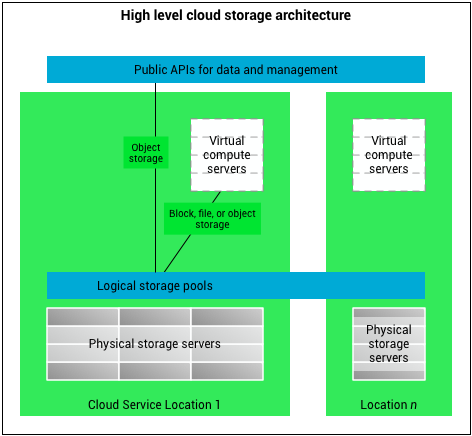
Before you can place a single byte of data into the cloud, you need a designated container and an address. An Azure storage account provides a unique namespace for storing Azure Storage data. Because this namespace is unique across the entire Azure ecosystem, your data is accessible from anywhere in the world over HTTP or HTTPS. If you name your account mycompanydata, it becomes uniquely yours across the global internet.
When provisioning a storage account, you are effectively choosing the physical hardware that will back your data, which dictates both your performance and your bill:
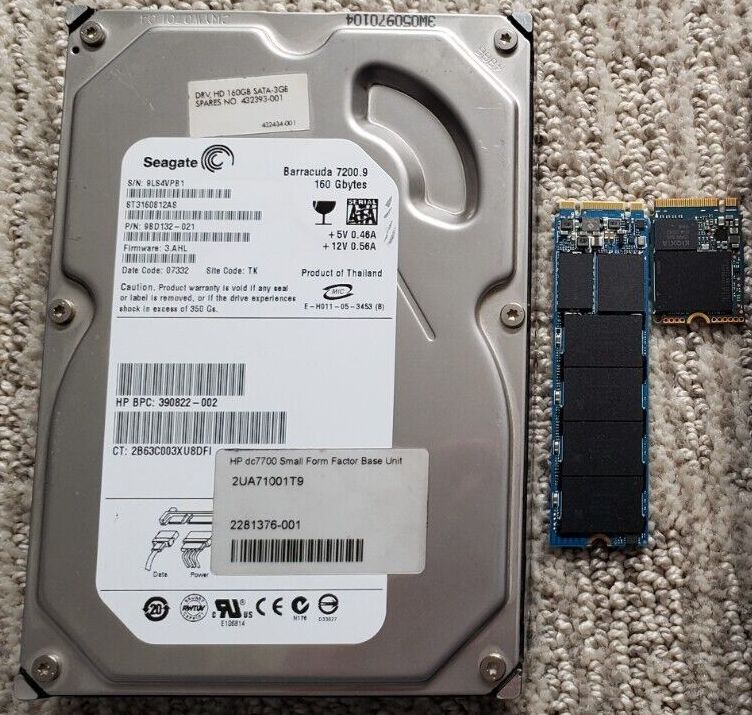
- Standard storage accounts: These are backed by magnetic disk drives (HDDs). They deliver the lowest cost per gigabyte of Azure Storage. If you are a financial controller looking to maximize budget efficiency, this is your baseline.
- Premium storage accounts: These are backed by solid-state drives (SSDs). Because they have no moving physical parts, Premium storage accounts offer consistent low-latency performance for storage operations. If your sales database requires lightning-fast transactional speeds, you pay the premium to use SSDs.
For the vast majority of use cases, Microsoft recommends using Standard general-purpose v2 storage accounts. This account type is the recommended storage account type for most standard Azure workloads because it supports all core Azure Storage services and offers the most flexible pricing tiers.
Once you have a warehouse (the storage account), you need to decide how to organize the goods inside. Azure does not force all data into one rigid format; instead, it offers distinct services tailored to different operational needs.
Azure Blob Storage
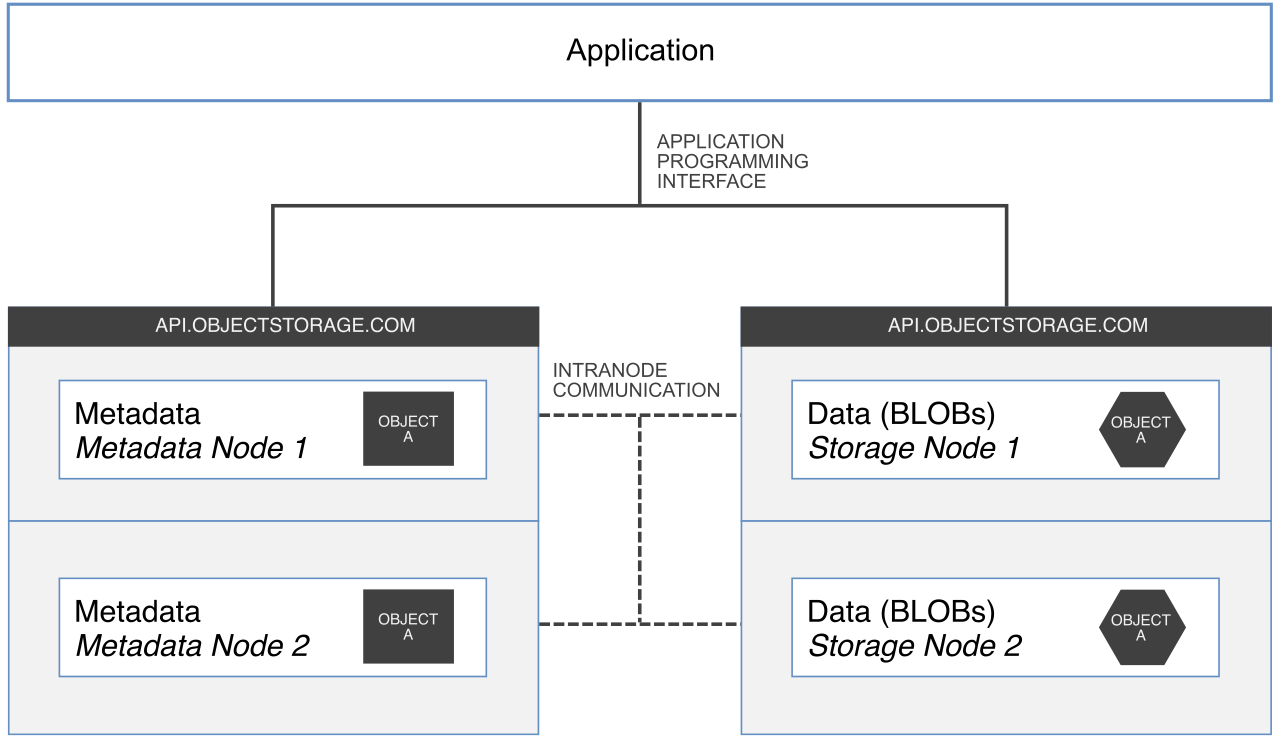
Azure Blob Storage is an object storage solution. In computer science, an "object" is just a payload of data bundled with some metadata describing what it is. Blob Storage is designed to store massive amounts of unstructured data. Think of unstructured data as anything that doesn't fit neatly into a spreadsheet—this includes text data (like massive logs of system events) and binary data (like images, audio files, and video streams).
Azure Files
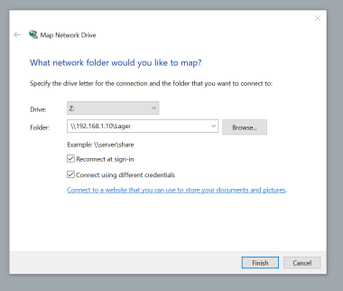
If you have ever worked in an office where everyone saves their documents to an "S: Drive" or "Z: Drive," you understand Azure Files. Azure Files offers fully managed cloud file shares. It speaks the language of traditional corporate networks because Azure Files supports the Server Message Block (SMB) protocol as well as the Network File System (NFS) protocol.
The beauty of Azure Files is its versatility: Azure Files shares can be mounted concurrently by cloud deployments (like virtual machines running in Azure) and can also be mounted concurrently by on-premises deployments (like workstations sitting in your physical office). It bridges the gap between legacy office IT and the cloud.
Azure Disk Storage
When you rent an Azure Virtual Machine, that virtual computer needs a hard drive to run its operating system and applications. Azure Disk Storage provides block-level storage volumes specifically for use with Azure Virtual Machines. It behaves exactly like the physical hard drive inside a laptop, strictly dedicated to the machine it is attached to.
Azure Queue Storage
Imagine a busy restaurant kitchen. The waitstaff punches in orders, and those orders print out on a ticket rail for the chefs. The chefs pull tickets one by one as they have capacity. Azure Queue Storage provides a service for storing large numbers of messages, acting exactly like that ticket rail. Messages in Azure Queue Storage are typically used for asynchronous task processing. If your e-commerce website receives 10,000 orders in one minute, Queue Storage holds those order messages safely until your backend inventory servers have the processing power to fulfill them.
Azure Table Storage
For data that has some structure but doesn't require a complex, expensive relational database (like SQL), there is Azure Table Storage. It is a NoSQL datastore service. Azure Table Storage stores structured, schema-less data. "Schema-less" simply means you can store an employee's name and email in one row, and an employee's name, email, and shoe size in the next row, without breaking the database. It is highly flexible and incredibly fast for simple lookups.
Not all data is equally valuable on a day-to-day basis. A document you are actively editing today is accessed constantly; a compliance report from five years ago might never be opened again unless audited.
To solve this, Azure Blob Storage offers different access tiers to optimize storage costs based on data usage patterns.
The Golden Rule of Cloud Storage Economics: You are always trading storage costs (renting the warehouse space) against access costs (paying the forklift driver to go get the box).
| Tier | Optimization | Storage Cost | Access Cost | Minimum Stay |
|---|---|---|---|---|
| Hot | Frequently accessed data | Highest | Lowest | None |
| Cool | Infrequently accessed data | Lower | Higher | 30 Days |
| Cold | Infrequently accessed data | Even Lower | Even Higher | 90 Days |
| Archive | Rarely accessed data | Lowest | Highest | 180 Days |
Hot, Cool, and Cold Tiers
The Hot access tier in Azure Blob Storage is optimized for storing frequently accessed data. Consequently, the Hot access tier has the highest storage costs among Azure Blob Storage tiers, but it has the lowest access costs. You pay a premium for the shelf space, but reading the data is cheap.
As data ages, you can move it to cooler tiers. The Cool access tier in Azure Blob Storage is optimized for infrequently accessed data. To prevent customers from using this cheaper tier for highly active data, Azure enforces a rule: the Cool access tier requires data to remain in the tier for a minimum of 30 days to avoid early deletion charges.
For data that is accessed even less frequently, the newly introduced Cold access tier in Azure Blob Storage is optimized for infrequently accessed data but comes with stricter rules: the Cold access tier requires data to remain in the tier for a minimum of 90 days to avoid early deletion charges.
The Archive Tier
The Archive access tier in Azure Blob Storage is optimized for rarely accessed data. It is the ultimate deep freeze. Because of this, the Archive access tier has the lowest storage costs among Azure Blob Storage tiers, but the Archive access tier has the highest data retrieval costs.
Why is retrieving data so expensive and slow here? Because data in the Azure Blob Storage Archive tier is stored offline. It is not spinning on a disk waiting for you. Reading data from the Azure Blob Storage Archive tier requires a rehydration process—much like adding hot water to freeze-dried camping food to make it edible again. Be warned: rehydrating data from the Azure Blob Storage Archive tier can take up to 15 hours. Never put data in the Archive tier if a CEO, auditor, or customer might demand it instantly. Furthermore, the Archive access tier requires data to remain in the tier for a minimum of 180 days to avoid early deletion charges.
Hardware fails. Hard drives crash, power grids go offline, and natural disasters strike data centers. Azure's foundational promise is durability: Azure Storage always stores multiple copies of data to protect against hardware failures.
However, where those copies are kept is entirely up to you, and it directly impacts your disaster recovery strategy and your monthly bill.

Primary Region Redundancy
These options keep your data within the primary geographic region you selected (e.g., "East US").
- Locally redundant storage (LRS): This is the baseline. Locally redundant storage copies data synchronously three times within a single physical location. It operates entirely within the primary region. Because all three copies are essentially in the same building, locally redundant storage provides the lowest-cost redundancy option in Azure Storage. However, the risk is absolute: locally redundant storage does not protect data against a full data center disaster. If the building floods, your data is gone.
- Zone-redundant storage (ZRS): For greater resilience without leaving the region, Zone-redundant storage copies data synchronously across three distinct Azure availability zones (three separate physical data centers within the same regional perimeter). Like LRS, Zone-redundant storage operates entirely within the primary region, but unlike LRS, Zone-redundant storage protects Azure Storage data from a localized data center failure. If one building loses power, the other two zones continue operating seamlessly.
Secondary Region Redundancy
For mission-critical applications—where the failure of an entire geographic region (like a massive hurricane taking out power to a whole state) would destroy the business—you must replicate data hundreds of miles away.
- Geo-redundant storage (GRS): GRS takes the LRS approach (copies data synchronously three times within a single physical location in the primary region) but adds a crucial insurance policy: Geo-redundant storage asynchronously copies data to a single physical location in a secondary region (e.g., from "East US" to "West US").
- Geo-zone-redundant storage (GZRS): This is the ultimate hybrid. Geo-zone-redundant storage copies data synchronously across three availability zones in the primary region (the ZRS approach), and then geo-zone-redundant storage asynchronously copies data to a single physical location in a secondary region.
The Catch: Read Access It is vital for project managers and IT architects to understand that simply sending data to a secondary region does not mean you can use it whenever you want. By default, data in the secondary region for Geo-redundant storage is not directly accessible for read operations. Similarly, data in the secondary region for Geo-zone-redundant storage is not directly accessible for read operations by default. Microsoft only flips the switch to let you access that secondary data if they declare a major disaster in the primary region.
If your application requires the ability to read from that secondary backup region at any time—perhaps to serve data faster to users on the other side of the country, or to run analytical reports without burdening the primary servers—you must upgrade your choice:
- Read-access geo-redundant storage (RA-GRS) provides continuous read access to data stored in the secondary region.
- Read-access geo-zone-redundant storage (RA-GZRS) provides continuous read access to data stored in the secondary region.
Summary of Redundancy for Decision Makers
When leading a project, ask yourself: What is the cost of losing this data versus the cost of replicating it?
- If it's temporary cache data? Use LRS.
- If it's a high-availability corporate application? Use ZRS.
- If it's mission-critical data that must survive a regional catastrophe? Use GRS or GZRS.
- If you need to proactively read that cross-country data every day? Upgrade to RA-GRS or RA-GZRS.
Understanding Azure Storage isn't about memorizing technical acronyms; it's about aligning the technical capabilities of the cloud with the financial and operational realities of your business.