Enhancing Security: Firewalls and Filters
Not sure you’re ready?
Take the ~3-minute readiness diagnostic and see where you stand.
Imagine trying to secure a sprawling metropolis that possesses millions of entry gates, where tens of thousands of couriers pass through every second. You cannot afford to halt commerce to strip-search every messenger, yet you absolutely cannot allow saboteurs to slip inside. This is the fundamental challenge of network architecture. Managing this dynamic ecosystem requires highly specialized checkpoints that can instantly distinguish legitimate traffic from malicious payloads. In modern network administration, modifying capabilities to defend against attacks requires a structural understanding of how traffic flows, how it is inspected, and how to rigorously define the rules that govern it. Security is not a singular wall; it is a layered discipline of establishing precise, dynamic control over every packet, connection, and workload traversing the environment.
At the perimeter of any network, the primary mechanism of defense is the firewall. Conceptually, a firewall controls the flow of network traffic based on a predetermined set of security rules. However, not all firewalls inspect traffic with the same level of intelligence. Over the decades, these devices have evolved to look deeper into the data they process.
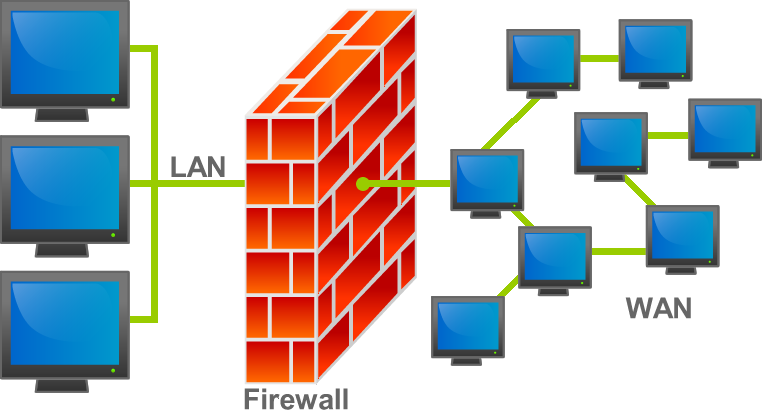
The earliest and simplest iterations are packet filtering firewalls. These devices examine the header information of network packets to allow or deny traffic. They operate much like a mailroom clerk who only checks the "To" and "From" addresses on an envelope. Because they only look at IP addresses and port numbers, packet filtering firewalls operate primarily at Layer 3 and Layer 4 of the Open Systems Interconnection (OSI) model.
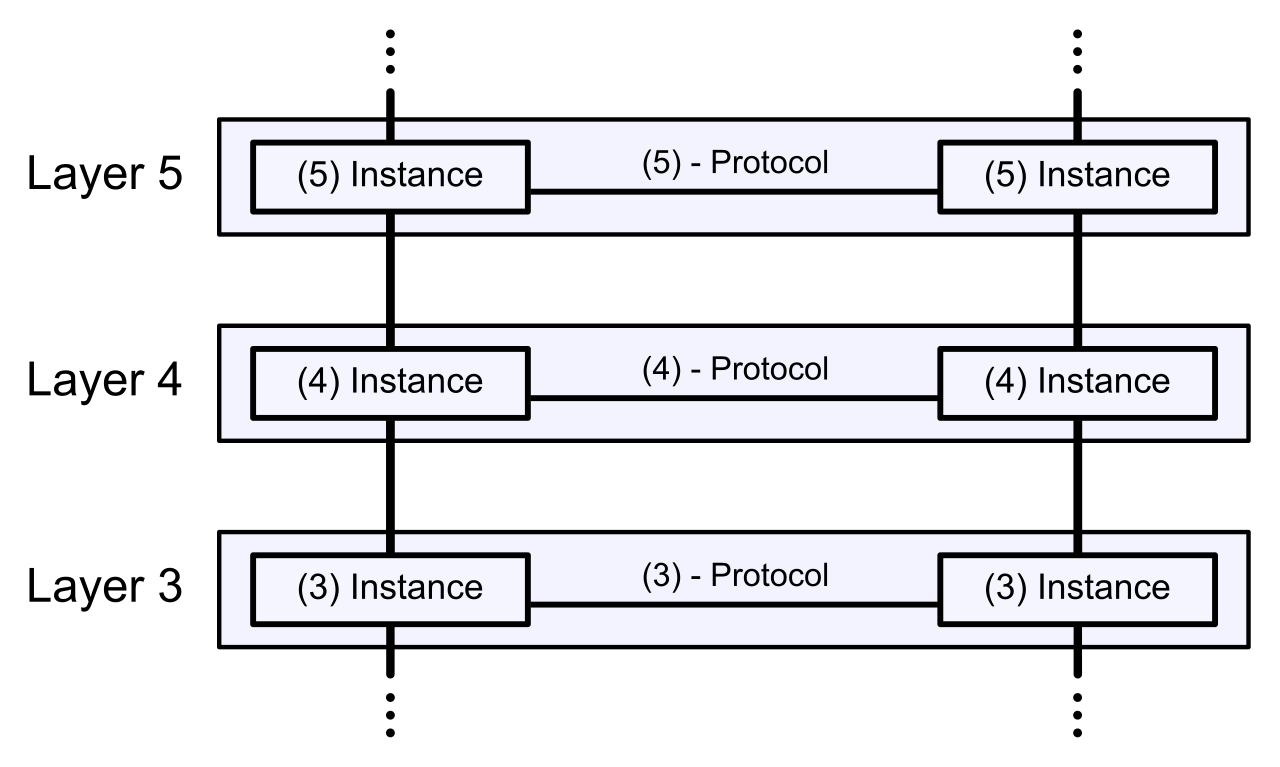
While fast, packet filtering is easily fooled. It has no concept of a conversation. This limitation gave rise to stateful firewalls, which maintain a record of the state of active network connections to make dynamic filtering decisions. If an internal user requests a web page, the stateful firewall records that outgoing request in a state table. When the web server replies, the firewall recognizes the returning packets as part of an established, legitimate conversation and lets them through.
However, modern adversaries hide their attacks inside legitimate-looking web or application traffic. To counter this, organizations deploy Next-Generation Firewalls (NGFW). These are sophisticated platforms equipped with deep packet inspection capabilities to examine the payload of network traffic—opening the metaphorical envelope to read the letter inside. They do not just see "Port 80 traffic"; they see exactly what application is generating it. As a result, Next-Generation Firewalls provide Layer 7 application visibility and control. Furthermore, because inspecting payloads allows for the detection of exploits, Next-Generation Firewalls integrate intrusion prevention systems directly into the firewall appliance, marrying access control with active threat hunting.
Specialized Network Appliances
Not all firewalls guard the perimeter. Some are purpose-built for specific types of traffic or specific operational environments:
| Appliance Type | Primary Function | Operational Scope |
|---|---|---|
| Web Application Firewall (WAF) | Protects web applications by filtering HTTP and HTTPS traffic between a web application and the internet. | A Web Application Firewall operates at Layer 7 of the Open Systems Interconnection model, natively understanding web traffic syntax to block attacks like SQL injection. |
| Unified Threat Management (UTM) | Combines firewall capabilities, intrusion prevention, antivirus, and web filtering into a single hardware device. | Designed for ease of administration, typically used in branch offices or smaller enterprises to avoid managing multiple disparate security appliances. |
Whether you are configuring a basic packet filter or a stateful firewall, the actual engine dictating what passes and what drops is the Access Control List. An Access Control List is a sequential list of rules applied to a network interface to permit or deny traffic.
Understanding how a router or firewall reads these rules is critical for any network administrator, as a single misconfigured line can accidentally expose a sensitive server or knock an entire company offline.
Network devices process Access Control List rules sequentially from the top down. The order of operations is absolute. Furthermore, an Access Control List stops evaluating incoming traffic against its rules as soon as a match is found. If rule number two explicitly permits an IP address, the device will forward the packet immediately, completely ignoring rule number five which might have been intended to drop it.
The Implicit Deny What happens if a packet arrives and matches absolutely none of your carefully crafted rules? It is dropped. This is because the implicit deny rule is placed at the very bottom of an Access Control List. The implicit deny rule automatically blocks any network traffic that does not match a previous rule in an Access Control List. This ensures a "default-deny" security posture—if traffic is not explicitly allowed, it is inherently forbidden.
Security is heavily dictated by physical and logical placement. We classify traffic in a data center by its directionality. North-south traffic refers to network communication between an internal network and an external network, such as users connecting to the internet. Conversely, East-west traffic refers to network communication between devices within the same internal network, such as a database synchronizing with a backup server.
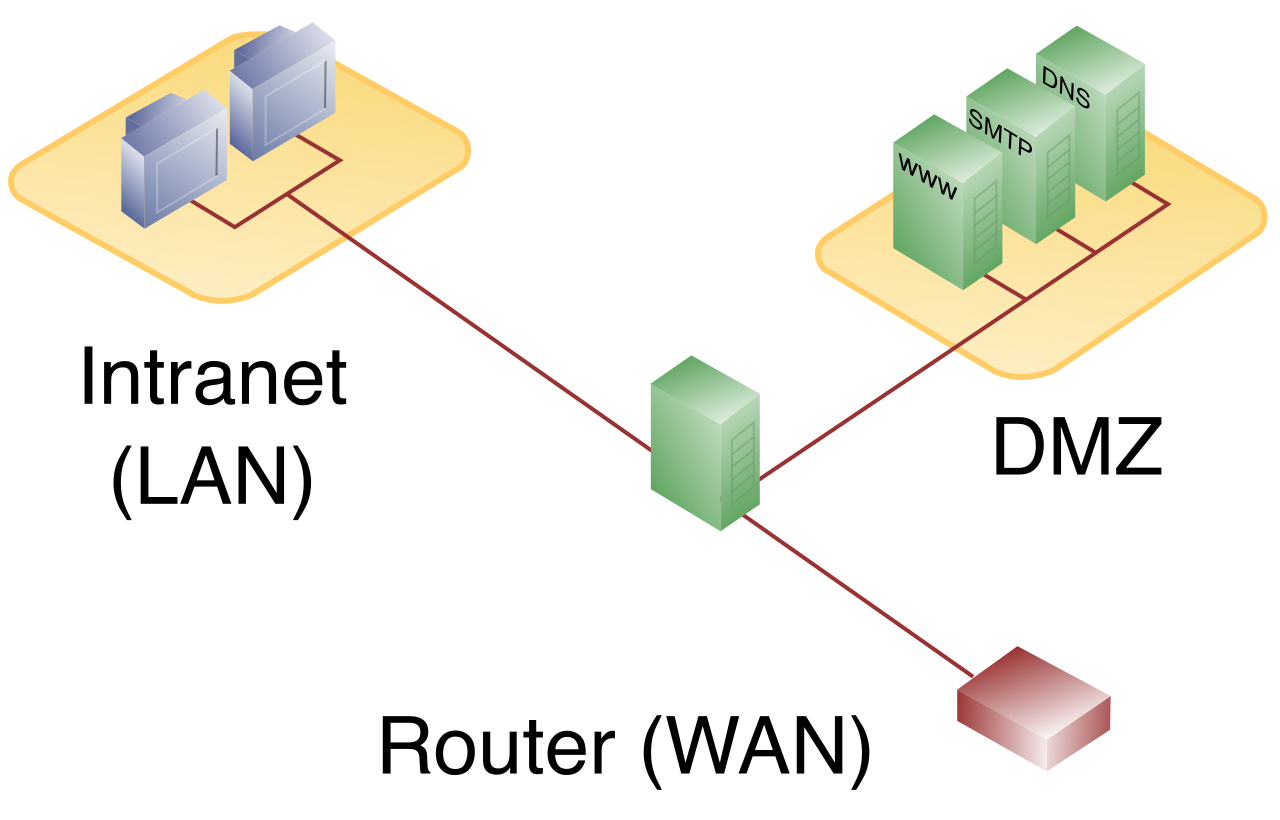
When building a network, we must safely accommodate inbound North-south traffic to public services without exposing our private data. We achieve this using a screened subnet, which is a specialized network segment designed to host public-facing servers.
A screened subnet separates a trusted internal network from an untrusted external network. By architectural design, public-facing web servers are placed in a screened subnet to prevent external users from directly accessing the internal network. If an attacker manages to compromise the web server, they find themselves trapped in an isolated zone, unable to pivot to the internal accounting or HR databases. (Note for the exam: The term screened subnet is the modern vendor-neutral terminology for what was traditionally called a Demilitarized Zone, or DMZ).
However, securing the perimeter and the screened subnet is no longer enough. If an attacker bypasses the perimeter, they will attempt to move laterally using East-west traffic. To stop this, administrators deploy microsegmentation, which applies firewall policies at the individual workload level within a data center. By wrapping security rules around individual virtual machines or containers, microsegmentation prevents the lateral movement of network threats within an internal network environment. It treats every single server as its own secured perimeter.
Firewalls are primarily access control devices. To actively hunt for malicious activity hidden within allowed traffic, we rely on intrusion detection and prevention systems.
An Intrusion Detection System (IDS) is the equivalent of a security camera. An Intrusion Detection System monitors network traffic for malicious activity and generates security alerts. Because it is designed not to interrupt the flow of traffic, an Intrusion Detection System operates out-of-band—meaning it receives a copy of the network traffic via a mirrored port. The critical limitation of this design is that an Intrusion Detection System cannot actively block malicious network traffic; it can only notify administrators that an attack is occurring.
An Intrusion Prevention System (IPS) acts as an armed guard. An Intrusion Prevention System sits in-line with network traffic and actively drops malicious packets before they reach their destination. Because every packet must pass through it, an Intrusion Prevention System operates in-band.
Detection Engines
How do these systems actually recognize an attack? They rely on two distinct methodologies:
- Signature-based detection: This method compares network traffic against a database of known malicious threat signatures. A threat signature is a specific set of rules or byte sequences used to identify a known network threat. While highly accurate for known threats, signature-based detection cannot identify newly emerging zero-day attacks because there is no existing signature for an attack that has never been seen. Therefore, Intrusion Prevention System signature databases must be continuously updated to protect against newly discovered threats. Additionally, network administrators can create custom Intrusion Prevention System signatures to block specific threats unique to their organizational environment, such as exploiting an in-house proprietary application.
- Heuristic detection: Rather than looking for a specific fingerprint, heuristic detection establishes a baseline of normal network behavior to identify anomalous activity. If a workstation that normally downloads 50MB of data a day suddenly begins exporting 500GB of encrypted data to an unknown overseas IP, the system flags it. Because it does not rely on a predefined list of bad code, heuristic detection can identify previously unknown attacks or zero-day vulnerabilities.
The Tuning Challenge
Neither engine is perfect, and security administrators spend significant time tuning these systems to mitigate errors in judgment.
- A false positive occurs when a security system incorrectly flags benign network traffic as malicious. This causes business disruption, such as dropping a vital VoIP call because the traffic pattern looked vaguely suspicious.
- A false negative occurs when a security system fails to detect actual malicious network traffic. This is a critical security failure, allowing malware to slip through the defenses unnoticed.
Securing a network also means controlling what internal users do when they browse the internet. Web filtering restricts user access to specific external websites based on organizational security policies, mitigating the risk of users inadvertently downloading malware or violating corporate compliance.
Web filtering generally utilizes two distinct methods:
- Uniform Resource Locator (URL) filtering blocks or allows access to websites by comparing the requested web address against a database of categorized links. If a user requests a site categorized as "Gambling" or "Malware," the request is denied.
- Content filtering goes deeper; it examines the actual payload of web traffic to block specific keywords or restricted file types, such as stopping the download of executable .exe files or documents containing the phrase "Confidential."
Administrators enforce these filters using two primary security configurations:
- A blocklist (formerly blacklist) is a security configuration that explicitly denies access to specifically listed websites or domains. All other traffic is assumed safe and is permitted.
- An allowlist (formerly whitelist) is a highly restrictive security configuration that permits access only to specifically approved websites or domains. Everything else is implicitly blocked.
To technically implement this filtering, organizations deploy proxy servers. A forward proxy server sits between client devices and the internet to intercept and filter outbound web requests. The client sends its request to the proxy, and the proxy fetches the website on the client's behalf—assuming the site passes all filtering rules.
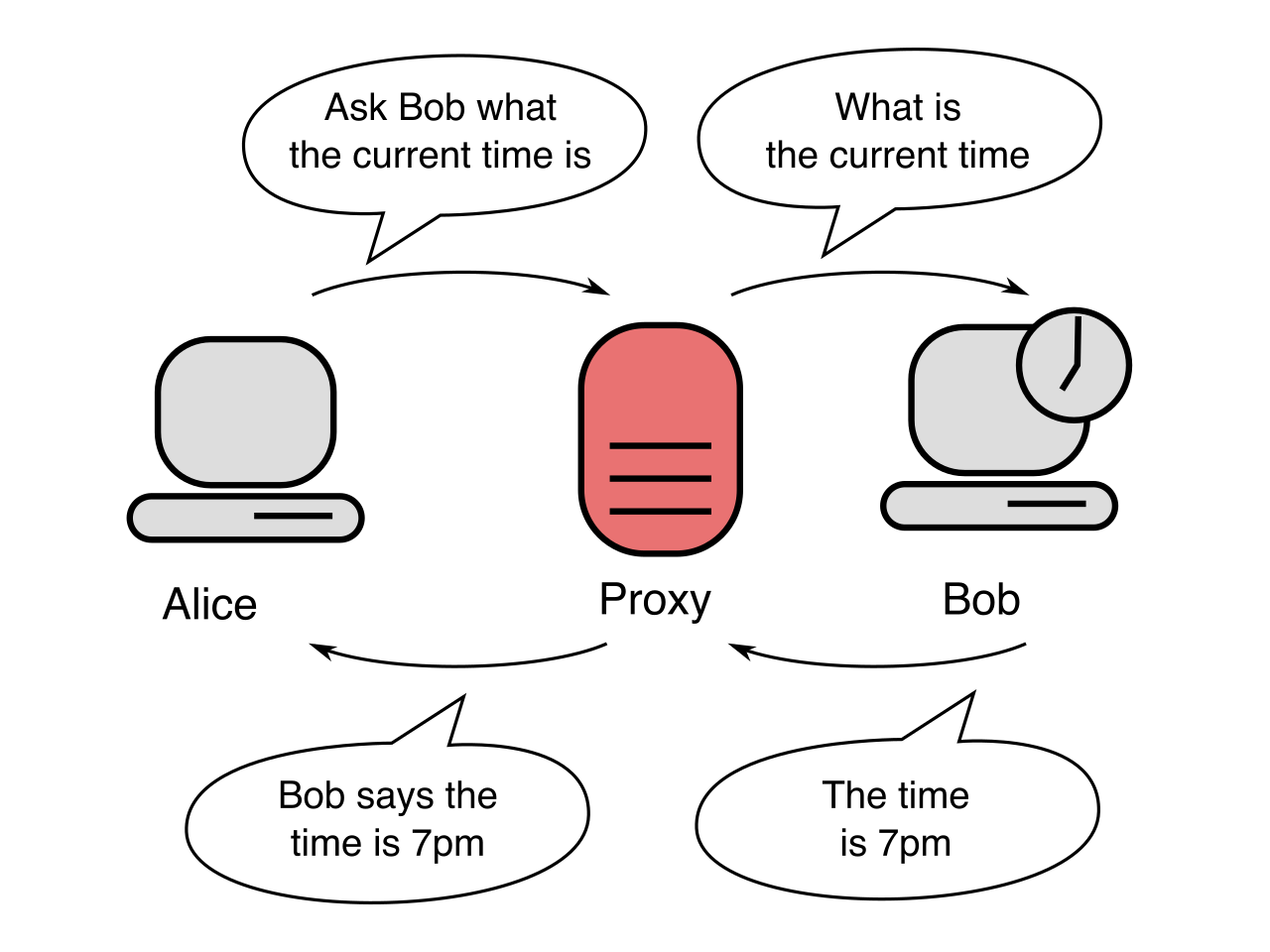
Historically, utilizing a proxy meant individually configuring the web browser on every single client machine. Today, administrators often deploy a transparent proxy, which intercepts client web traffic without requiring any specific proxy configuration on the client device. The network infrastructure simply redirects outbound web traffic to the proxy seamlessly, ensuring all users are protected and monitored without any complex endpoint setup.