IPv4 Addressing and Subnetting
Not sure you’re ready?
Take the ~3-minute readiness diagnostic and see where you stand.
Imagine trying to deliver a parcel in a sprawling, infinite metropolis that has no street names, no postal codes, and no logical districts. Every time a package arrives, the courier must ask every single resident if the parcel belongs to them. Chaos would consume the system in seconds. The foundation of all modern digital communication avoids this chaos through an elegant, mathematical coordinate system known as the IPv4 protocol. Every time you triage an unreachable server, deploy a new branch office, or provision a cloud environment, you are manipulating this exact system. To master network support, we must deconstruct the architecture of an IPv4 address, pulling apart the bits that orchestrate global routing to understand exactly how we carve up network space with mathematical certainty.
At its core, an IPv4 address consists of 32 bits divided into four 8-bit octets. When you look at an address like 192.168.1.50, you are looking at a human-readable translation of 32 binary ones and zeros.
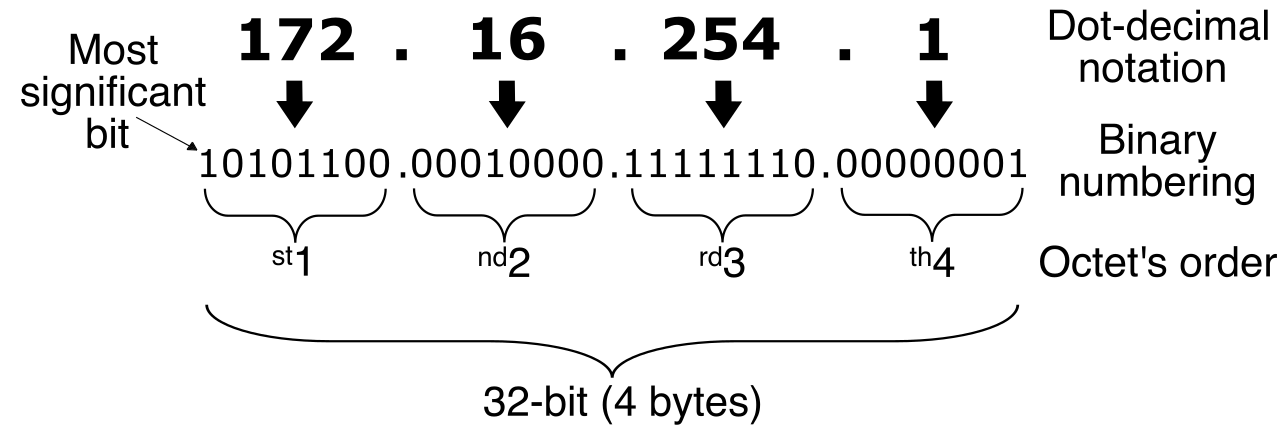
But an IP address alone is meaningless to a router without its corresponding filter: the subnet mask. A subnet mask acts as a cryptographic stencil laid over the IP address. A subnet mask uses contiguous 1 bits to identify the network portion of an IP address, and it uses contiguous 0 bits to identify the host portion of an IP address.
When a packet hits a router interface, the router doesn't analyze the address the way humans do. Instead, a router uses the bitwise AND operation between an IP address and a subnet mask to determine the network ID. In binary logic, comparing a 1 with a 1 yields a 1; anything else yields a 0. The router mathematically slices off the unique host identity, leaving only the pure network address, and immediately knows which pathway to forward the traffic down.
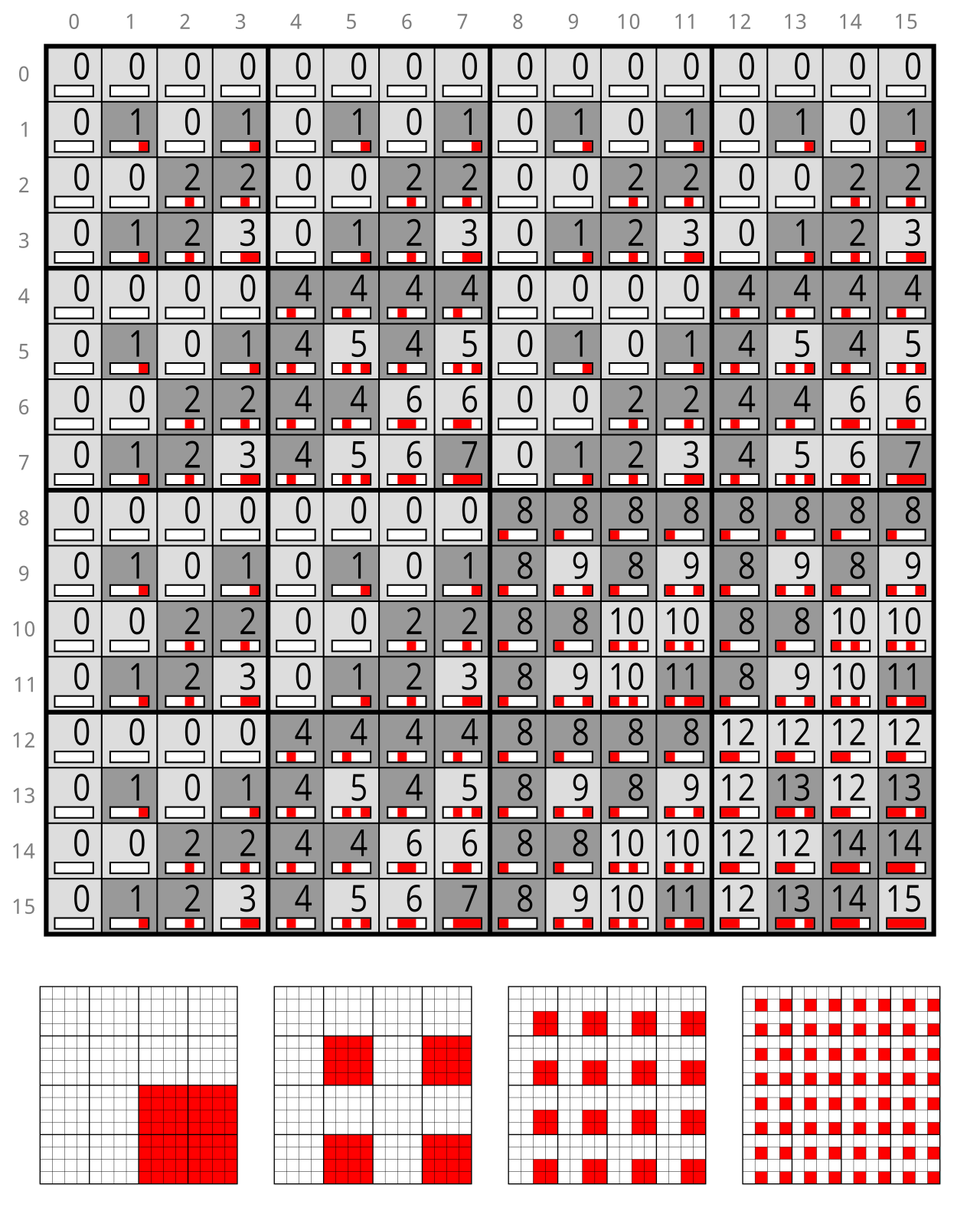
In the early days of the internet, engineers believed network sizes would fall into predictable, standardized buckets. They developed a system where the value of the first octet mathematically determines the class of a traditional IPv4 address.
In this era, classful networking rigidly binds the subnet mask to the IP address class. You didn't configure a subnet mask; the device simply assumed it based on the first number of the IP address.
The Five Address Classes
| Class | First Octet Range | Default Subnet Mask | Purpose |
|---|---|---|---|
| Class A | 1 to 126 | 255.0.0.0 | Massive networks (millions of hosts). |
| Class B | 128 to 191 | 255.255.0.0 | Medium-to-large enterprises. |
| Class C | 192 to 223 | 255.255.255.0 | Small networks (up to 254 hosts). |
| Class D | 224 to 239 | (None) | Multicast. |
| Class E | 240 to 255 | (None) | Experimental. |
Note: You may notice that 127 is missing from the Class A range above. We will cover this critical reservation shortly.
To fully understand the table above, you must memorize the exact boundaries and facts defining these historical ranges:
- The Class A address space spans from 1.0.0.0 to 126.255.255.255, and the default subnet mask for a Class A network is 255.0.0.0.
- The Class B address space spans from 128.0.0.0 to 191.255.255.255, and the default subnet mask for a Class B network is 255.255.0.0.
- The Class C address space spans from 192.0.0.0 to 223.255.255.255, and the default subnet mask for a Class C network is 255.255.255.0.
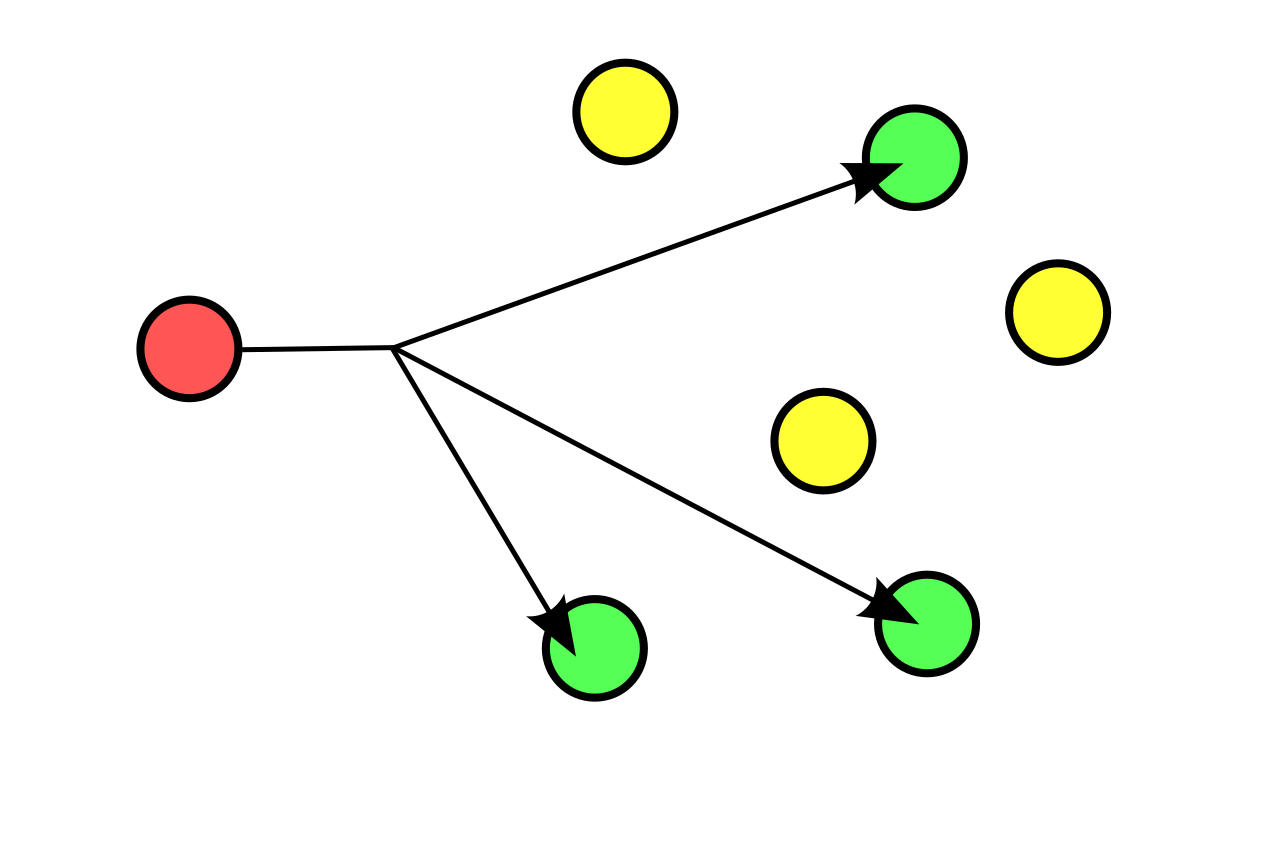
- The Class D address space spans from 224.0.0.0 to 239.255.255.255. Class D IP addresses are reserved exclusively for multicast traffic, meaning data is streamed to a subscribing group of endpoints simultaneously, rather than a single destination.
- The Class E address space spans from 240.0.0.0 to 255.255.255.255, and Class E IP addresses are reserved exclusively for experimental purposes and future use.
As the internet exploded in popularity, a mathematical crisis emerged: 32 bits only provides roughly 4.3 billion unique addresses. Because public IP addresses must be globally unique across the entire internet, and public IP address blocks are globally assigned by the Internet Assigned Numbers Authority (IANA), the world was rapidly running out of assignable IP real estate.
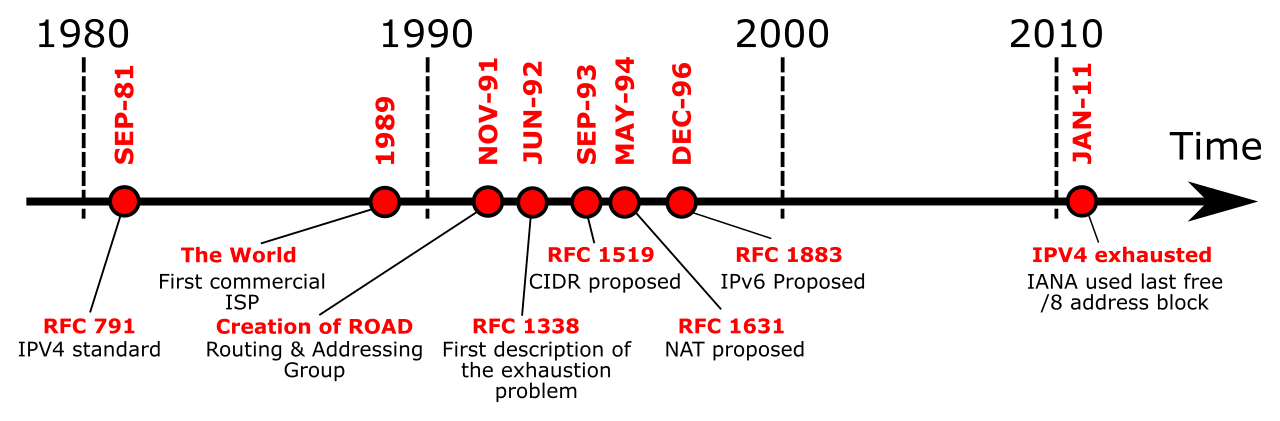
The solution was brilliantly simple. Instead of giving every single device a globally unique address, engineers carved out specific "internal only" addresses. RFC 1918 defines the specific ranges of private IP address space for IPv4 networks.
These ranges are free for anyone to use inside their corporate walls or home networks, but they come with a strict rule: Private IP addresses are not routable on the public internet. When an internet backbone router sees a private IP, it instantly drops the packet.
The RFC 1918 Private Ranges:
- The Class A private IP address range spans from 10.0.0.0 to 10.255.255.255.
- The Class B private IP address range spans from 172.16.0.0 to 172.31.255.255.
- The Class C private IP address range spans from 192.168.0.0 to 192.168.255.255.
If private addresses cannot access the web, how are you reading this right now from your 192.168.x.x laptop? The answer is translation. Network Address Translation (NAT) must be used to route traffic from a private IP address to the public internet. Your router acts as a concierge, taking your private internal request, stamping it with the router's single public IP address, sending it out to the internet, and then handing the returning traffic back to your private internal machine.
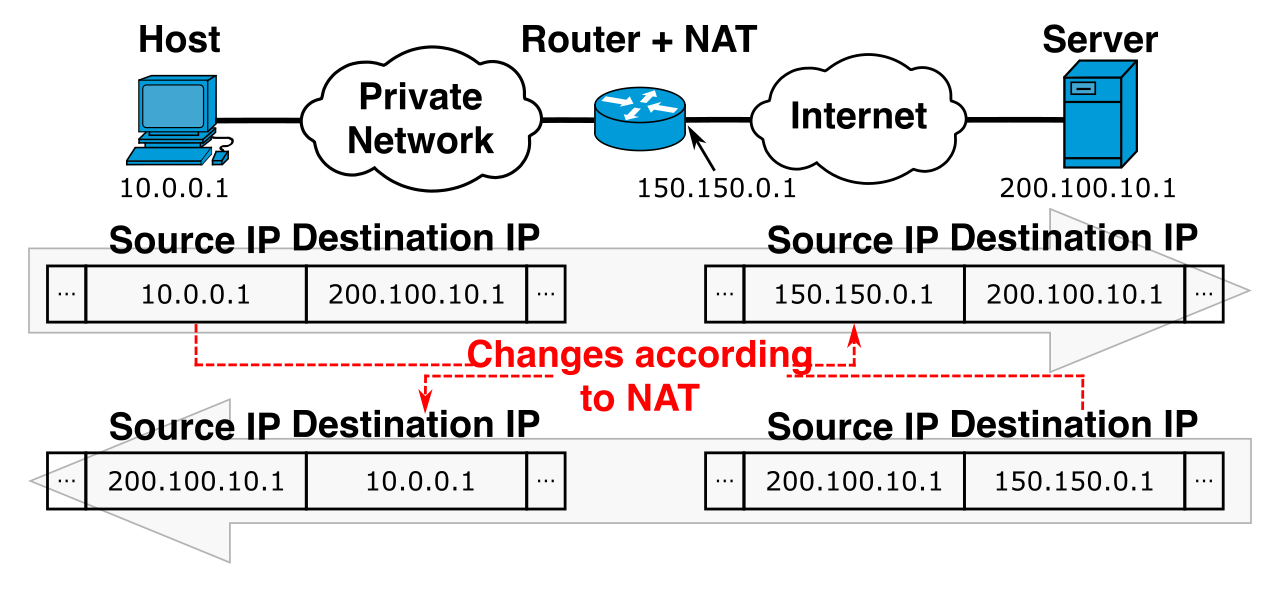
As a NOC analyst or network technician, much of your day involves diagnosing what goes wrong when hosts cannot communicate. IPv4 reserves several specific blocks exclusively for system diagnostics and fallbacks.
The Loopback: Checking the Core Stack
If you suspect a device's network interface has completely failed, you ping the loopback. The entire 127.0.0.0/8 network is reserved for IPv4 loopback testing.
Within this block, the most commonly used IPv4 loopback address is 127.0.0.1.
Why do we do this? Loopback addresses are used to verify the operational status of the local TCP/IP stack. When you ping 127.0.0.1, you are asking the operating system, "Is our fundamental networking software actually running?" Crucially, traffic sent to a loopback address never leaves the network interface card of the local host. It routes downward through the software stack and bounces right back up.
APIPA: The DHCP Safety Net
Imagine a workstation booting up, sending a desperate shout onto the network asking for a DHCP server to hand it an IP address, but the server is down. Rather than failing entirely, modern operating systems deploy a fallback mechanism.
Automatic Private IP Addressing (APIPA) assigns IP addresses in the 169.254.0.0 to 169.254.255.255 range.
- APIPA automatically assigns an IP address when a device cannot reach a configured DHCP server.
- Because it operates locally, APIPA allows multiple devices on the same local network segment to communicate without a DHCP server.
However, there is a catch. APIPA addresses are completely non-routable outside the local network segment. If you see a user with an IP of 169.254.x.x, you immediately know the root cause of their internet outage: they lost contact with DHCP.
Special System Routes
In your routing tables, you will frequently encounter two major cornerstones of IPv4 traffic direction:
- The IP address 0.0.0.0 represents a default route in routing tables. It essentially means "If you don't know where to send this packet, send it here."
- The IP address 255.255.255.255 acts as the universal broadcast address for the local network segment. When a packet targets this IP, every single switch and device on the local VLAN processes it.
The old classful system (Classes A, B, and C) was devastatingly wasteful. If a company needed 300 IP addresses, a Class C (/24, which only holds 254 hosts) was too small. They were forced to apply for a Class B (/16), giving them 65,534 addresses and instantly wasting over 65,000 of them.
To fix this, engineers developed a more granular approach. Classless Inter-Domain Routing (CIDR) eliminates the rigid network boundaries of traditional IP address classes.
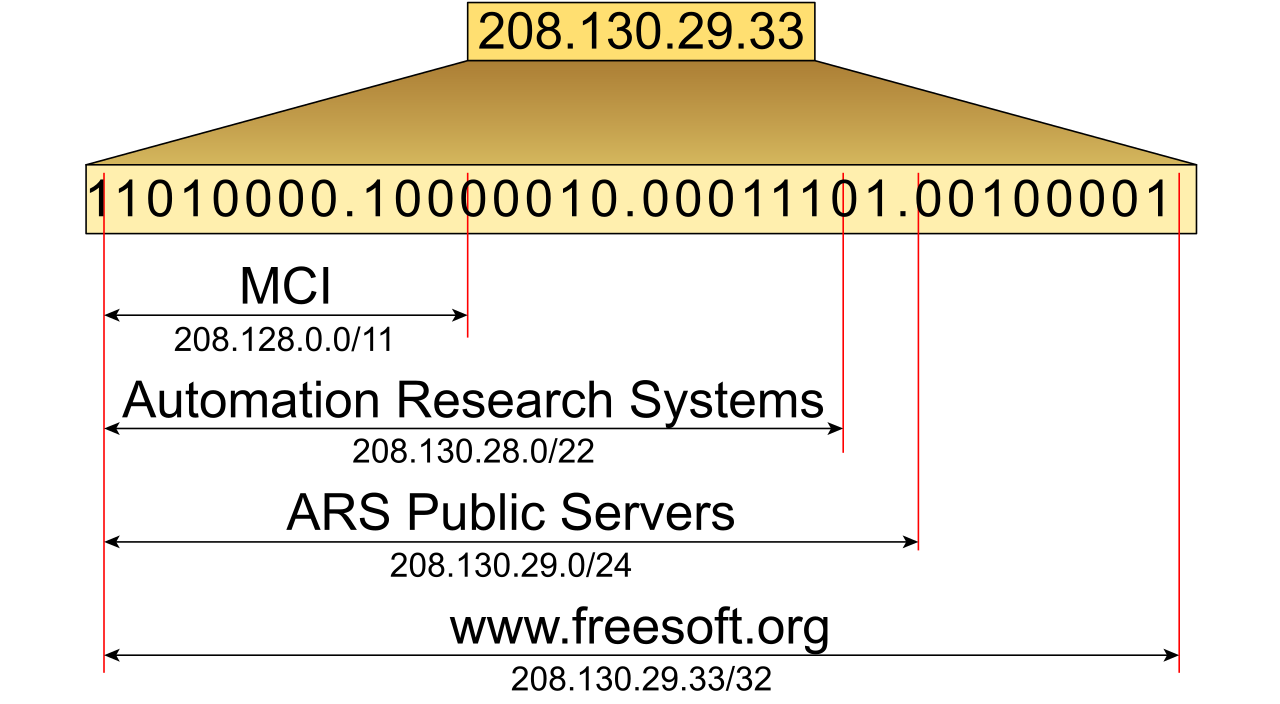
CIDR allows network administrators to allocate IP addresses based on exact network size requirements. Rather than relying on the first octet to guess the subnet mask, CIDR notation appends a forward slash followed by a number to an IP address (e.g., 10.5.5.0/24).
What does that number mean? The number in CIDR notation represents the exact number of contiguous 1 bits in the subnet mask. A /24 simply means twenty-four 1s followed by eight 0s (which translates to 255.255.255.0 in decimal).
The Mechanics of Subnetting
When we build enterprise networks, we do not want 500 computers screaming at each other in a single broadcast domain. We need to split them up. Subnetting creates new network segments by stealing bits from the host portion of an IP address.
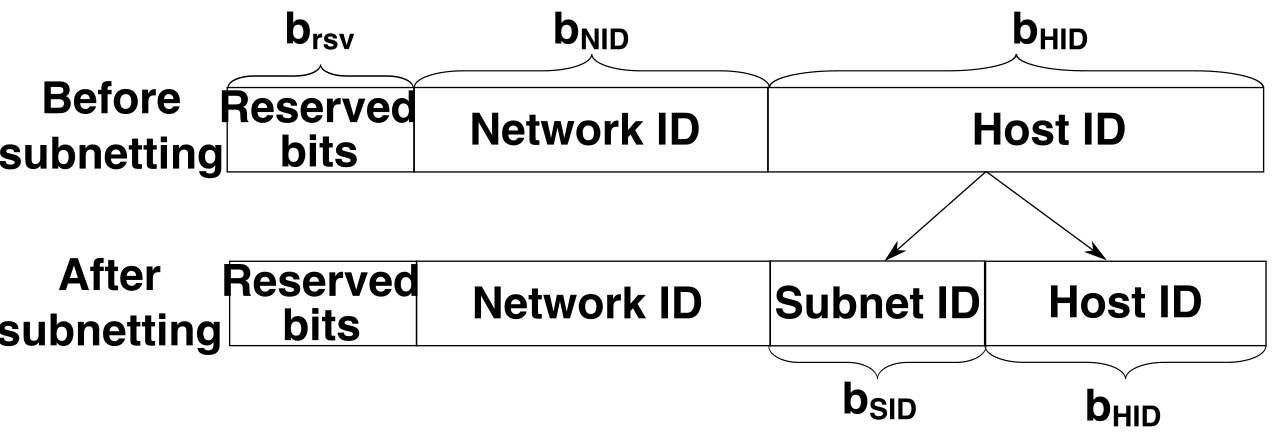
By moving the boundary line between the network 1s and the host 0s further to the right, we create smaller, tightly controlled networks. To execute this mathematically, we use two vital formulas.
Subnet Formula: 2^n The formula 2^n calculates the number of available subnets. In the subnetting formula 2^n, the variable n represents the number of borrowed network bits. If you steal 3 bits from the host portion, you create 23=8 new subnets.
Host Formula: (2^h) - 2 The formula (2^h) - 2 calculates the exact number of usable host addresses per subnet. In the host formula (2^h) - 2, the variable h represents the number of available host bits. If you leave 5 bits for the host, you have (25)−2=30 usable hosts per subnet.
Why do we subtract 2 in the host formula? Because within any mathematical subnet, the lowest and highest values serve architectural purposes:
- The all-zeros host address in a subnet designates the network ID. (The name of the subnet itself).
- The all-ones host address in a subnet designates the broadcast address. (The destination used to talk to everyone on that specific subnet).
Therefore, network IDs and broadcast addresses cannot be assigned to individual hosts on a network.
The Peak of Efficiency: VLSM
Even with basic CIDR, standard subnetting splits networks into equal-sized chunks. But what if you have a massive call center requiring 100 IPs, and a point-to-point router link that requires exactly 2 IPs? Cutting equal chunks wastes space on the router link.
This is solved by VLSM. Variable Length Subnet Mask (VLSM) allows a single classful network space to be divided into subnets of varying sizes.
Think of VLSM like slicing a pie. First, you cut a massive slice for your largest department. Then, you take the remaining slice and cut it into smaller and smaller pieces for your IT closets and router links. VLSM maximizes IP address efficiency by tailoring subnet sizes to the specific number of required hosts.
Understanding these mechanics—how an IP address is masked, how private ranges are translated, and how host bits are systematically "stolen" to shape traffic flow—separates the tier-one reset technician from the elite network engineer. Mastering IPv4 allows you to look at a CIDR block not as abstract numbers, but as the tangible architecture of the internet itself.