A 9-Week CompTIA A+ Core 2 (220-1202) Study Plan That Fits a Real Schedule
In short
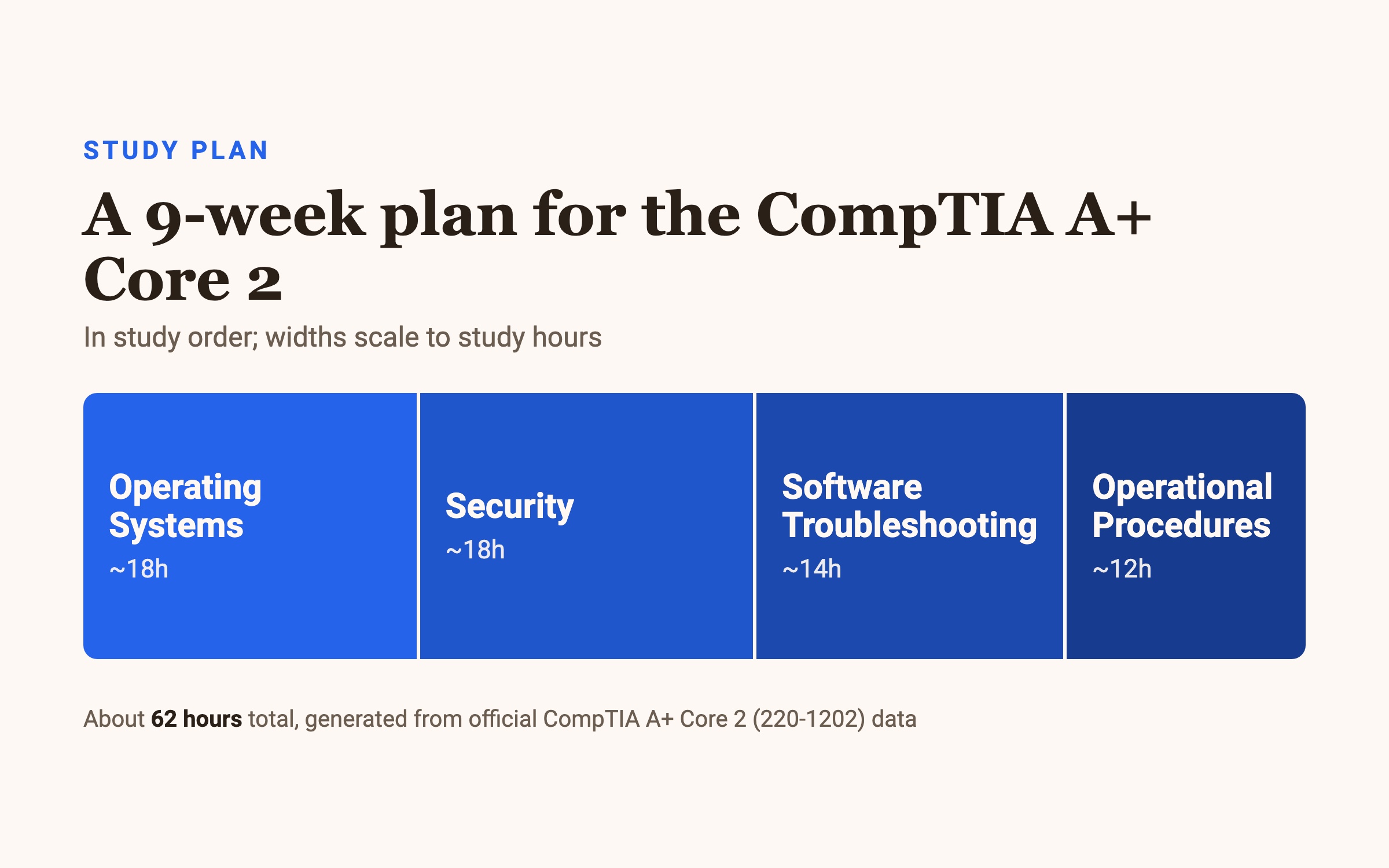
Plan on about 62 hours to pass the CompTIA A+ Core 2 (220-1202) exam. Over 9 weeks that's roughly 7 hours a week — a denser schedule than Core 1, because there's less total material. The two biggest domains, Operating Systems and Security, are each worth 28%, so they lead the plan.
How long you actually need
The 220-1202 exam is a maximum of 90 questions in 90 minutes, and you pass at 700 on a 100–900 scale — a fixed cutoff CompTIA applies to every candidate. About 62 hours of study is realistic, though it shifts with your prior IT experience. Core 2 is the software-and-security half of the A+; you still need Core 1 (220-1201) to complete the certification.
The four domains cluster close in weight, but the two 28% domains carry the most questions:
- Operating Systems — 28% · ~18 hours. The largest by objective count: OS types, installation and boot, Windows editions, and command-line tools.
- Security — 28% · ~18 hours. Malware, social engineering, and workstation hardening.
- Software Troubleshooting — 23% · ~14 hours. Diagnosing OS, application, and security issues.
- Operational Procedures — 21% · ~12 hours. Safety, documentation, and professionalism.
Week by week
Nine weeks, ordered from the heaviest domains to the lighter ones, with troubleshooting after the OS and security foundations it depends on.
Weeks 1–3 — Operating Systems (18 hours).
Thirteen objectives, so give it three weeks and get hands-on with a virtual machine. Cover OS and filesystem types →
installation, boot methods, and partitioning →
Windows editions, features, and command-line tools. The curriculum covers up to Windows 11, so practice on a current build.
Weeks 4–5 — Security (18 hours). Two focused weeks on the other 28% domain. Learn malware types and their indicators, social engineering tactics, and how to harden a workstation. Flashcards work well here — much of it is recognizing a threat from its description.
Weeks 6–7 — Software Troubleshooting (14 hours). Only four objectives, but 23% of the exam, so the questions go deep. Learn a repeatable approach to diagnosing OS, application, and security problems:
Reproduce the symptom →
check recent changes →
isolate the cause →
apply and verify the fix.
Then practice against real scenarios rather than reading about them — performance-based questions expect you to actually solve the problem.
Week 8 — Operational Procedures (12 hours). The professionalism domain: safety, environmental controls, documentation, change management, and communication. It's the least technical, but at 21% it's worth a full week.
Week 9 — Full review and timed practice. No new material. Sit full-length timed practice tests, review every miss back to its objective, and re-drill your weakest domain until 90 questions fit comfortably in 90 minutes.
If you have less time (or more)
Compressing to ~5 weeks: raise your weekly hours to 12–14 and lead with the two 28% domains. Operating Systems and Security together are 56% of the exam — protect those first, then Software Troubleshooting, and move quickly through Operational Procedures. Don't drop a domain; each one appears.
Stretching to 12+ weeks: if Windows internals are new to you, add time up front on OS installation and command-line tools, and keep a virtual machine running so you can try each command yourself. Hands-on practice is the single best predictor of passing the software domains.
Whatever the timeline, keep the last week for review only and let your per-domain hours follow the exam's weights.
Common questions
What is the passing score for Core 2? 700 on a 100–900 scale — a fixed cutoff set by CompTIA, the same for every candidate.
How much time do I get? 90 minutes to complete a maximum of 90 questions.
Do I need to pass both Core 1 and Core 2? Yes. The full CompTIA A+ requires passing both Core 1 (220-1201) and Core 2 (220-1202).
What types of questions are on the exam? Multiple-choice (single and multiple response) plus performance-based questions that test problem-solving in a simulated environment.
Which Windows versions does Core 2 cover? Up to and including Windows 11. Where an objective doesn't name a version, it can cover both Windows 10 and Windows 11.
How much should I study? Around 62 hours, depending on your IT background. Only Ever splits every domain into 15-minute topics, so you can build the hours in short, consistent sessions.
Want to check your readiness first? Try the free practice questions for A+ Core 2 — every answer explained, no paywall.